You must be based in Ontario to enjoy all this online casino features
- Yukon Gold Login:
Ontario Players
Yukon Gold Ontario Login: Sign In, Reset and Fix Problems
Yukon Gold Ontario Login: Sign In, Reset and Fix Problems
🕑 Updated: 5 November 2026
 Content Writer
 Content Manager
Visit
Support
- Software Providers


To log in to Yukon Gold Casino Ontario, go to ontario.yukongold.casino from inside Ontario, choose Login and enter the username the casino sent you when you registered, with your password. The Ontario app from Apollo Entertainment Ltd uses the same details.
Pros
 24/7 live chat for log-in help
Biometric log-in in the app
Login-time limits you can set
Limits shared across seven casinos
Cons
 Username is a code, not email
Keep me logged in comes pre-ticked
Account dormant after 60 days
How to Log In to Yukon Gold Casino Ontario
The log-in takes four steps, and the only unusual one is a box you tick to confirm you are fit to play.
- Open ontario.yukongold.casino, or the Yukon Gold Casino Ontario app, while you are physically in Ontario. The provincial site is a subdomain: the older yukongoldcasino.com address belongs to the international site, and a page that mentions the Kahnawake Gaming Commission is not the Ontario one.
- Choose Login at the top of the page, then Click Here To log in. This opens the casino lobby; if it shows the registration form instead, use Already have an account? Login here.
- Enter your username and password. The password is case-sensitive.
- Tick I am fit to play and choose Log In. Keep me logged in comes already ticked: untick it on a shared computer or phone.
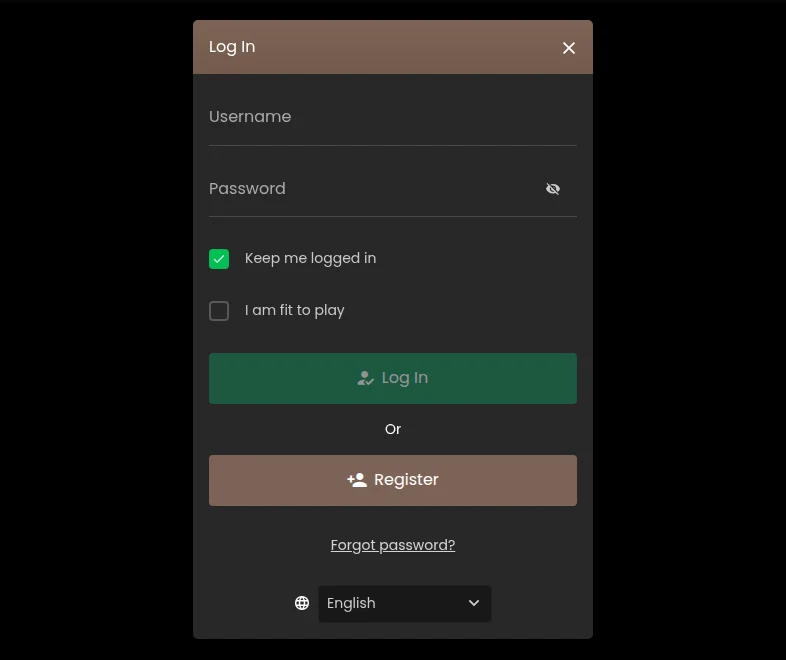
The log-in window in the Ontario lobby, read from Toronto: the I am fit to play box sits under the password, with Forgot password? below the buttons.
Your Username Is a Code, Not Your Email
The log-in window asks for a username, not an email address. When you register you give your name and email and choose a password, and the casino then sends a unique username that usually starts with four or five letters followed by a series of numbers. If it has not arrived within five minutes, the FAQ suggests resending the registration form or contacting the help desk. Keep that message: the username is what both the lobby and the app ask for.
Logging In on the Yukon Gold App
The Ontario iPhone app is listed as Yukon Gold Casino Ontario, published by Apollo Entertainment Ltd, and needs iOS 16 or later; there is an Android app as well. Once you are signed in, the lobby offers biometrics with a simple prompt: “Would you like to set up your biometrics for quicker log in?” The terms say your biometrics are stored on your device only, and that you must register only your own.
Check the publisher before you install. Other listings with similar names come from other companies, such as Yukon Gold Casino Rewards from LabelCare B.V.; the Ontario casino app is the one from Apollo Entertainment Ltd. Our Yukon Gold app guide lists the copies on both stores.
Can’t Log In? The Usual Causes and Fixes
Most failed log-ins come down to one of six things. Here is each one, and what to do about it.
A Forgotten Password or Username
There are two ways back in. On the Ontario website, Forgot your account/password? at the top of every page opens the 24/7 live chat; inside the casino lobby, the log-in window has its own Forgot password? link. You can also email support from the contact page, choosing Login/Password as the topic; the casino aims to answer emails within 48 hours.
Do not send your password to anyone while you sort it out. The FAQ says the help desk does not need it, and that no one at the casino knows it.
You Are Not in Ontario
The Ontario site is for play from inside the province. By registering, you confirm you are wagering from within Ontario, and the terms prohibit using a VPN or any other IP-changing software to wager while you are outside it. If you are travelling, wait until you are back in Ontario rather than trying to get round the check.
Your Account Is Waiting for Verification
Yukon Gold can suspend an account whose registration details are incomplete or unconfirmed until verification is complete. It may ask for identification documents and a document confirming your address, such as a bank statement or utility bill no older than three months, and in some cases for copies certified by a notary. Clear, complete copies are the quickest way back.
The Account Has Gone Dormant
An account with no wager, deposit or withdrawal for 60 days is treated as dormant. The balance is then removed from the account and returned only on request, after identity checks, so contact support rather than assuming the money has gone.
A Limit or Break You Set Yourself
Yukon Gold lets you set daily, weekly and monthly limits on how long you stay logged in, through support or in the casino software, alongside breaks and self-exclusion. If one of these is the reason you cannot log in, it is working as intended. A self-exclusion through BetGuard, iGaming Ontario’s central register, applies to every licensed site in the province. If staying away is hard, ConnexOntario answers around the clock on 1-866-531-2600.
The Account Has Been Suspended
The terms allow Yukon Gold to suspend or close an account, with notice and reasons, for unauthorised use, for sharing your log-in details with someone else, or when a payment method is not in your name. A deposit that is charged back or disputed can lock every account you hold on the Casino Rewards network. In these cases, only support can restore access.
Keeping Your Yukon Gold Login Secure
Your username and password are the only key to the account, and the terms make you responsible for everything done with them.
Choose a Password You Use Nowhere Else
The FAQ asks you to treat it like any other password that deals with real money. It is case-sensitive, so a password that suddenly fails may simply have Caps Lock on.
Be Careful With Keep Me Logged In
The box comes ticked in the log-in window. If anyone else uses the same computer or phone, untick it: the FAQ advises against any setting that remembers your password on a shared device.
Use Biometrics Only for Yourself
Biometric log-in is quicker and stays on your device, but the terms treat any action taken with correct log-in details, biometrics included, as yours. Register only your own fingerprint or face.
Report Anything Unusual at Once
If you see activity you did not make, or think your details have been stolen, tell support immediately. The terms require it, and they leave losses caused by poorly stored log-in details with the player.
Log In Only on the Ontario Site
Bookmark ontario.yukongold.casino and use the app published by Apollo Entertainment Ltd. The Ontario footer names Apollo Entertainment Ltd, the AGCO and iGaming Ontario; a page without them is not the provincial casino.
One Global Account Across Seven Casinos
Yukon Gold is one of seven Ontario casinos run by Apollo Entertainment Ltd, and the terms link them. The first account you open at any of them creates a Global Account, and each account you then open at another Apollo casino becomes a sub-account linked to it. Responsible gaming settings, deposit and loss limits and wagering are monitored across the Global Account, so a limit set here follows you to Zodiac Casino, Luxury Casino, Grand Mondial and the others.
Each casino still keeps its own account, so the log-in you use here is your Yukon Gold one. Zodiac works the same way, and our Zodiac Casino login guide covers its version.
New to Yukon Gold? Opening an Account
If you do not have an account yet, the same lobby takes you through registration.
- Enter your first name, last name and email address, as they appear on your ID.
- Choose a password, then complete the rest of the registration.
- Wait for the username the casino sends you, and keep it with your password.
- Have identification and a recent proof of address ready: Yukon Gold can ask for them before a withdrawal.
The account requires you to be 19 or over and inside Ontario. Before you register, it helps to know how the cashier works: deposits start at $10, withdrawals at $50 ($300 by bank wire), and each request waits 48 hours in a reversible pending period. Our Yukon Gold Casino Ontario review covers the games, the payments and the support in full.
FAQ’s – Frequently Asked Questions
- What is my Yukon Gold username?
It is the code Yukon Gold sends after you register, usually four or five letters followed by numbers. The log-in window asks for it rather than your email. If it has not arrived within five minutes, resend the registration form or contact the help desk.
- How do I reset my Yukon Gold password?
Use Forgot your account/password? on the Ontario website, which opens the 24/7 live chat, or Forgot password? in the casino lobby. You can also email support with Login/Password as the topic; emails are answered within 48 hours.
- Can I log in to Yukon Gold Ontario from outside Ontario?
The Ontario site is for play from inside the province: registering confirms you are wagering from within Ontario, and the terms prohibit using a VPN to wager from outside it. Wait until you are back in Ontario to play.
- Does my Yukon Gold login work at Zodiac Casino?
Each Apollo casino has its own account, but all of them link to one Global Account. That is how your deposit and loss limits and responsible gaming settings follow you across the seven Ontario sites, Zodiac Casino included.
- Why can’t I log in to my Yukon Gold account?
The usual reasons are a mistyped username or case-sensitive password, a location outside Ontario, an account waiting for verification, 60 days of inactivity, or a limit or break you set yourself. Live chat, open 24/7, can tell you which applies.
Yukon Gold Ontario Login: The Short Version
Log in at ontario.yukongold.casino or in the Apollo app, from inside Ontario, with the username the casino sent you and a case-sensitive password, and tick I am fit to play. If that fails, live chat is open around the clock, and Forgot your account/password? takes you straight to it.
Keep the log-in to yourself, use biometrics only with your own face or fingerprint, and remember that the limits you set here follow you to the other six Apollo casinos.