You must be based in Ontario to enjoy all this online casino features
- PlayFallsview Login:
Ontario Players
PlayFallsview Ontario Login: Email, Password and Momentum
PlayFallsview Ontario Login: Email, Password and Momentum
🕑 Updated: 11 November 2026
 Content Writer
 Content Manager
Visit
Support
- Software Providers




To log in to PlayFallsview in Ontario, go to play.playfallsview.com, press LOG IN and use your email and password. The Momentum account number and PIN are for the Fallsview Casino Resort website, a separate sign-in.
Pros
 Online play earns Momentum status
Saved game state on reconnect
Geolocation dashboard shows problems
Well-rated iPhone app
Cons
 Two log-ins easily confused
Momentum Dollars not usable online
Chromebooks cannot play for money
Account closure is permanent
Two Fallsview Log-Ins, Two Sets of Details
Fallsview has two separate sign-ins, and they are easy to mix up:
- PlayFallsview, the online casino at play.playfallsview.com, uses your email and password.
- My Momentum, the rewards account of Fallsview Casino Resort, signs in at fallsviewcasinoresort.com with your Momentum account number and PIN.
A Canadian search for “fallsview casino login” leads with the resort’s Momentum pages, while “playfallsview login” puts the online casino first. If you want to play online, the email-and-password box is the one you need.
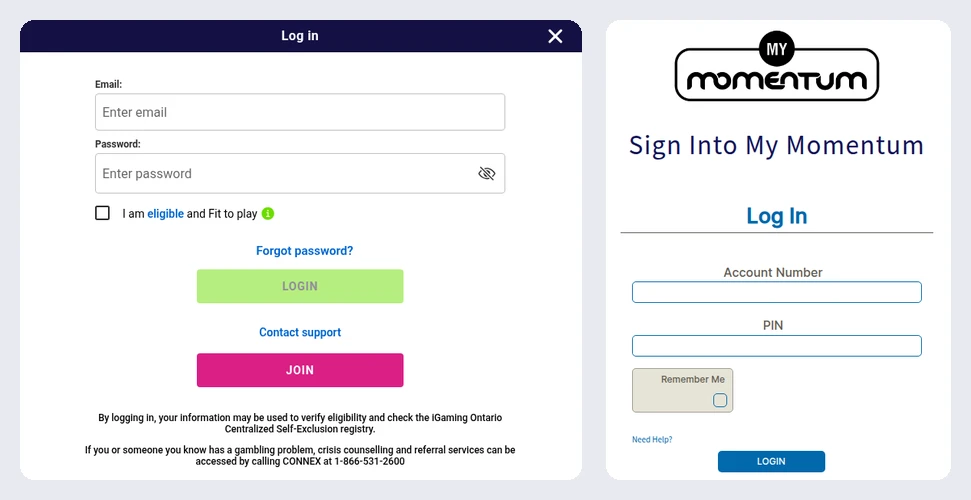
PlayFallsview’s Log in window (left) and the separate Sign Into My Momentum page at the resort’s website (right), opened from Toronto.
Logging In at play.playfallsview.com
- Go to play.playfallsview.com and use the green LOG IN button in the corner of the header.
- Fill in Email and Password, using the eye to check what you typed.
- Confirm the eligibility box and select LOGIN.
A note in the window explains that a log-in can be compared with the province-wide self-exclusion list kept by iGaming Ontario, so a BetGuard enrolment can block it. A Contact support link sits under the LOGIN button.
Linking Momentum to Your Online Account
PlayFallsview can pass your online play to Momentum, but only once the two accounts are linked, and only from inside PlayFallsview:
- Log in to PlayFallsview and open the menu (the three-bar icon).
- Choose Momentum, then Link Momentum Account.
- Enter the account number printed on the front of your Momentum card and submit it; an authentication check runs, and the accounts link if it passes.
- Only your own card: the authentication will not link someone else’s Momentum number.
- Status points: once linked, online play earns them and they are applied to your land-based account as if earned on the property.
- Momentum Dollars: they transfer daily but can take up to three business days to appear, and they are spent at Fallsview Casino Resort and Casino Niagara, not online.
- One wallet: online and land-based Momentum Dollars land together, with no breakdown of which came from where.
- Problems or unlinking: write to support@playfallsview.com.
Passwords: Resetting and Changing
- Forgotten: the Forgot password? link under the password box asks only for your registered email, then mails a reset link.
- Changing a known password: while logged in, open the menu, go to account details and pick Change Password. You give the current password, the new one and the answers to a few security questions.
PlayFallsview runs on the same Pala platform as Stardust, so the advice in our Stardust login guide on security questions and email changes applies here too.
Location: a Plugin, IP Address and Wi-Fi
A software plugin launches at every log-in and reads your IP address and the Wi-Fi networks around you; its geolocation dashboard shows exactly what is blocking you. On a computer, keep Wi-Fi on, and the help centre warns that a machine without Wi-Fi, or a Chromebook, will most likely be unable to reach real-money games. On a phone, allow the app to use your location. Leaving Ontario stops real-money play until you are back and located again, and an internet provider handing you an out-of-province IP address may have to change it.
Disconnections, Cool-Offs and Closing
- Cut off mid-game: most games save their state, so logging back in on the same device resumes the round. Where they do not, the server finishes it for you, standing on blackjack and holding all cards in video poker.
- Cool-off: from the menu, Responsible Gaming, then Cool-off; at least one day (24 hours), during which deposits and wagers are blocked.
- Closing is permanent: Close Account under Responsible Gaming, or a request to Player Services, ends the account for good, which is why the help centre points anyone wanting a pause to cool-off or self-exclusion instead.
The PlayFallsview Apps
On iPhone the app is PlayFallsview Online Casino from MGE Digital Canada Inc, rated 4.36 from 999 ratings, version 1.2.34, an 89.1 MB download for iOS 14 or later. The Google Play version is PlayFallsview Casino by MGE, listed under the developer name Play Fallsview, rated 3.8 from 360 reviews with more than 50,000 downloads. Both use your online email and password, not the Momentum number. Our comparison of Ontario casino apps covers the rest. Our PlayFallsview Ontario review covers lobby size, the sportsbook and the cashier.
FAQ’s – Frequently Asked Questions
- Is the PlayFallsview login the same as My Momentum?
No. PlayFallsview uses your email and password at play.playfallsview.com; My Momentum, at the resort’s website, uses your Momentum account number and PIN. You can link the two from inside PlayFallsview.
- How do I link my Momentum card to PlayFallsview?
Log in, open the menu, choose Momentum and Link Momentum Account, then enter the number on the front of your card. An authentication check confirms the card is yours.
- Can I spend Momentum Dollars on PlayFallsview?
No. Momentum rewards earned online can only be used at Fallsview Casino Resort and Casino Niagara. Status points from online play count towards your land-based tier.
- How do I reset my PlayFallsview password?
Use the Forgot password? link and give the email on your account; PlayFallsview mails a reset link. To change a password you know, use Change Password while logged in.
- Can I reopen a closed PlayFallsview account?
No: closing is permanent, so use a cool-off of at least 24 hours for a break instead. Canada treats a hobby player’s gambling wins as untaxed windfalls.
PlayFallsview Login, Briefly
Play online at play.playfallsview.com with your email and password; the account number and PIN belong to My Momentum at the resort.
Link the two from the PlayFallsview menu if you visit Niagara, keep Wi-Fi on for the location plugin, and remember that closing the online account cannot be undone.