


 You must be based in Ontario to enjoy all this online casino features
- Stardust Login:
Ontario Players
Stardust Ontario Login: Resets, Security Team and Location
Stardust Ontario Login: Resets, Security Team and Location
🕑 Updated: 11 November 2026
 Content Writer
 Content Manager
Visit
Support
- Software Providers




To log in to Stardust in Ontario, go to on.stardustcasino.com or the Stardust Ontario app, choose LOGIN, enter your email and password and tick the fit-to-play box. Each log-in is checked against Ontario’s BetGuard self-exclusion registry before you can play.
Pros
 Email-only password reset
Security team replies within 24 hours
Forfeited balances can be reclaimed
Chats answered within 60 seconds
Cons
 Email changes only by request
Chromebooks are not supported
Three similar Stardust apps
Logging In at on.stardustcasino.com
Stardust signs you in with the email address on your account and your password. The Ontario casino lives at on.stardustcasino.com; the plain stardustcasino.com is Boyd Gaming’s location picker, where you choose Ontario from a list that also includes New Jersey, Pennsylvania, West Virginia and Alberta.
- Go to on.stardustcasino.com, or open the Stardust Ontario Casino Games app.
- Choose LOGIN at the top right.
- Type your email and password; tap the eye to check them.
- Tick I am eligible and fit to play and choose Log in.
- Let the location check run: a plugin on a computer, the GeoGuard app in a phone browser, or location services in the Stardust app.
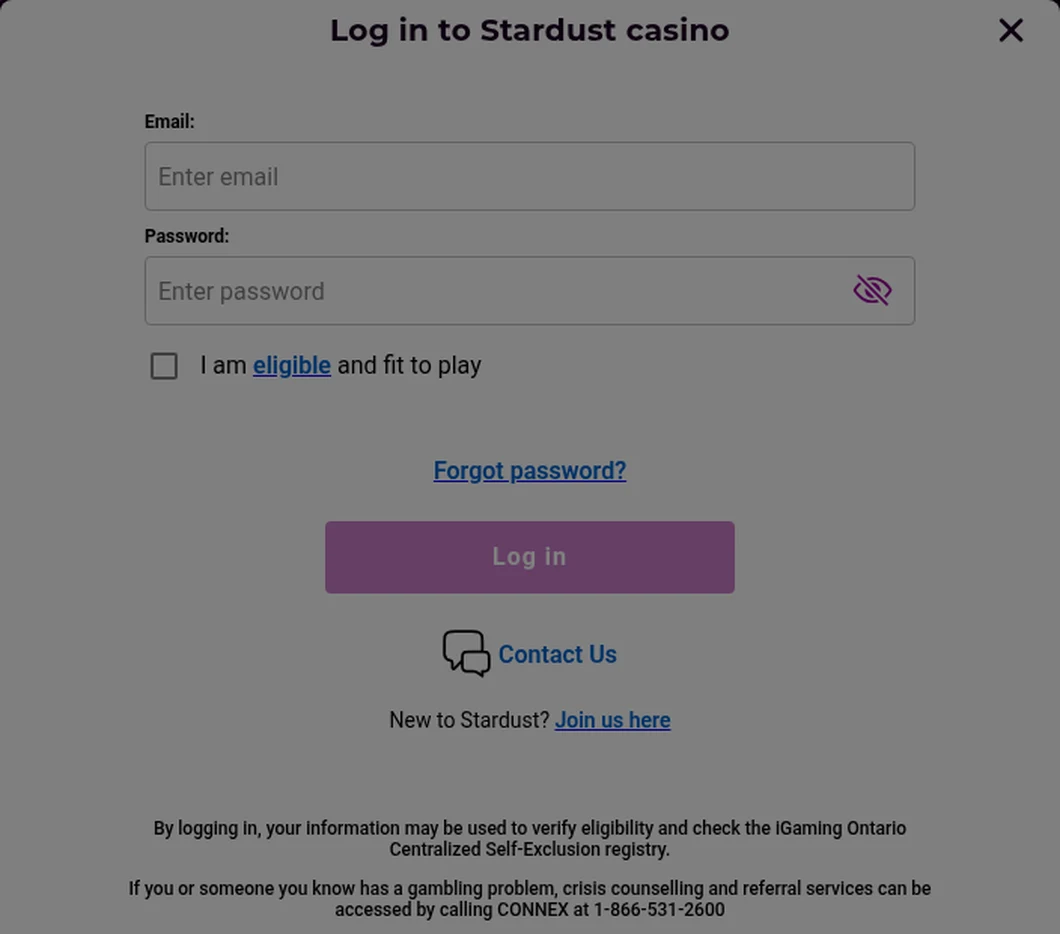
The Stardust log-in window, opened from Toronto. The note at the bottom says the log-in is checked against iGaming Ontario’s centralized self-exclusion registry.
Every Log-In Checks BetGuard
The log-in window states it plainly: signing in lets Stardust verify your eligibility and check the iGaming Ontario Centralized Self-Exclusion registry, BetGuard. If you have enrolled there, the log-in is refused. Stardust’s own self-exclusion is separate from BetGuard, which covers every regulated Ontario site at once and is handled at BetGuard.ca or on 1-833-776-7171.
Other Stardust Sites
Boyd Gaming runs separate Stardust casinos for other markets, and they appear in the same search results: pa.stardustcasino.com, for instance, is the Pennsylvania site. Your Ontario account exists only at on.stardustcasino.com and in the Stardust Ontario apps, so check for the “on.” before you type your password.
Forgotten Password and Security Questions
A forgotten password needs only your email. Choose Forgot password? in the log-in window, enter the email you used to create the account and choose Send password reset email. The email links to a reset form that opens in a new window; fill it in, choose Submit, and log in with the new password.
Security Questions
The account also has two security questions, used when you need to prove it is you. Change them under your profile picture > Information & security > Security questions: pick two questions, enter the answers and choose Update profile. The answers are case-sensitive, so a capital letter now means a capital letter later.
When the Reset Does Not Work
If you cannot reset the password yourself, email the Security team at security@on.stardustcasino.com with your request and a photo ID; Stardust says you will receive a new password within 24 hours. Send documents only to that address, never to Customer Support or through live chat.
Changing Your Email or Address
Neither can be edited in the account; both go to the Security team at security@on.stardustcasino.com, which replies within 24 hours.
- Email: write from the new address and include the email currently on the account. This is also the route if you mistyped the email at registration or lost access to it.
- Address: send the request and upload a document from the last three months, such as a bank statement, utility bill or address change confirmation, or a current rental agreement or insurance card. The change is made within 48 hours.
- A deposit you did not make: tell the Security team straight away, and contact the bank or card issuer as well.
Location Checks
Stardust confirms you are in Ontario at every log-in, using your IP address and nearby Wi-Fi networks, and it shows a geolocation dashboard explaining anything that blocks you.
- Computer: download and install the geolocation plugin when Stardust prompts you, allowing it to make changes, then return to the site. Windows PCs and Macs are supported; Chromebooks are not.
- Phone browser: install the GeoGuard app when prompted, give it location permission, then go back to the browser.
- Stardust app: the location check is built in. On iPhone, turn on Location Services for Stardust with Precise Location; on Android, allow location and use High Accuracy mode.
- Weak signal: Stardust needs about three Wi-Fi networks in range to place you; in a remote spot, switch to mobile data.
- Blocked software: VPNs and remote desktop programs such as TeamViewer or AnyDesk make the check fail.
Cool-Offs, Dormant Accounts and Closing
Some log-in refusals are rules you set, or time.
- Cool-off: 3 to 30 days, from the menu > Responsible Gaming. You cannot log in until it ends, and it cannot be reversed early.
- Self-exclusion: 6 months, 1 year or 5 years; Stardust may not reopen the account in some cases.
- Dormant account: after 24 months without a log-in, the account becomes dormant. Stardust emails you 30 days beforehand if the balance is $1 or more; log in within that time or the balance is forfeited. Forfeited money can still be claimed back: log in, then contact support, which will verify your identity.
- Closing: use Close Account in the Responsible Gaming menu, or email support@on.stardustcasino.com.
- Reopening: email support with answers to two of these: your last deposit amount or method, your current balance, your date of birth, or your last withdrawal. If you cannot answer two, send the request with a photo ID to the Security team. Either way, expect a reply within 24 hours.
The Stardust Apps
Three Stardust apps from Boyd Gaming sit on Google Play, and only one opens an Ontario account: Stardust Online Casino Ontario, rated 4.3 from 364 reviews. Stardust Social Casino is a free-play social game with no real money, and Stardust Casino: Alberta serves the other province. On the App Store the Ontario app is Stardust Ontario Casino Games, rated 4.60 from 1,070 ratings and needing iOS 15.0 or later. Both use the same email and password as the website. Compare them in our Ontario casino apps compared guide.
Contacting Stardust Support
Support runs 24 hours a day. Live chat starts from the support page and shows whether an agent is free: Stardust says chats are answered within 60 seconds, and when every agent is busy your message becomes an email ticket. Email support@on.stardustcasino.com, or submit a ticket from the help portal, and expect a reply within 4 hours on average. The log-in window also carries a Contact Us link, for problems before you sign in. The Stardust Ontario review covers the games, payments and limits in full.
FAQ’s – Frequently Asked Questions
- Is stardustcasino.com the Ontario Stardust site?
Not directly. stardustcasino.com is Boyd Gaming’s location picker, listing New Jersey, Pennsylvania, West Virginia, Ontario and Alberta. Choosing Ontario takes you to on.stardustcasino.com, where your Ontario account logs in.
- How do I reset my Stardust password?
Choose Forgot password? in the log-in window, enter the email you registered with and choose Send password reset email. If that fails, email security@on.stardustcasino.com with a photo ID for a new password within 24 hours.
- How do I change the email on my Stardust account?
Email the Security team at security@on.stardustcasino.com from your new address, including the email currently on the account. The email cannot be changed in the account itself, and Stardust replies within 24 hours.
- What happens if I do not log in to Stardust for two years?
After 24 months without a log-in the account becomes dormant and the balance can be forfeited, after an email warning 30 days earlier. Forfeited money can still be recovered through support.
- Which Stardust app works in Ontario?
Stardust Online Casino Ontario on Google Play and Stardust Ontario Casino Games on the App Store, both from Boyd Gaming. Stardust Social Casino and Stardust Casino: Alberta do not open an Ontario account.
Stardust Ontario Login: Key Points
Log in at on.stardustcasino.com, or in the Stardust Ontario app, with your email and password and the fit-to-play box ticked; every log-in also checks BetGuard. A forgotten password is reset by email, and anything the reset cannot fix, from a new email to a new address, goes to the Security team with a reply within 24 hours.
Keep the location plugin or GeoGuard ready, avoid Chromebooks, VPNs and remote desktop tools, and log in at least once every two years so the account does not go dormant.









