You must be based in Ontario to enjoy all this online casino features
- bet365 Login:
Ontario Players
bet365 Ontario Login: Recovery and Strong Authentication
bet365 Ontario Login: Recovery and Strong Authentication
🕑 Updated: 1 November 2026
 Content Writer
 Content Manager
Visit
Support
- Software Providers



To log in to bet365 in Ontario, go to on.bet365.ca or casino.on.bet365.ca, or open a bet365 app, choose Log In and enter your username or email address and your password. Add the SMS code if Strong Authentication is on, and allow the location check.
Pros
 Username or email both work
Optional SMS code at log-in
Face and fingerprint in the app
Adjustable automatic log-out
Cons
 Browser play may need Authenticator
Locks after three wrong attempts
Phone must be verified first
How to Log In to bet365 in Ontario
bet365 accepts either your username or your email address, together with your password. The same log-in opens the sportsbook and the casino.
- Go to on.bet365.ca, or casino.on.bet365.ca for the games, or open a bet365 app.
- Choose Log In at the top right.
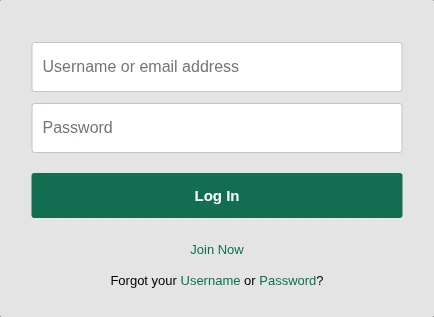
- Enter your username or email address and your password, which is case sensitive.
- If you have switched on Strong Authentication, type in the six-digit code bet365 texts you.
- Allow location access. In a web browser, bet365 may also ask you to confirm your location with its Authenticator app.
Check You Are on the Ontario Site
The on in on.bet365.ca stands for Ontario: bet365 runs a separate provincial platform, operated by Hillside (International Sports) ENC. The iGaming Ontario seal and a BetGuard link sit in the top bar, next to the Log In button. If they are missing, you are not on the regulated Ontario site.
Face or Fingerprint in the App
Biometric Login lets you sign in to the app with your face or fingerprint. If it stops working, close the app and clear its settings: on iPhone, find the bet365 app in Settings and switch on Clear Settings; on Android, open the app’s Storage, choose Clear Cache and, if that fails, Clear Data. If the problem persists, delete and reinstall the app.
Why bet365 Logged You Out
For security, bet365 logs you out after three hours of inactivity, with a pop-up reminder first. You can change that under My Account > Preferences > Maximum Inactivity Period: 20 minutes, or one, two, three, six or 12 hours. On a shared computer, the shortest setting is the safer choice.
Forgotten Username or Password
Under the log-in fields, the line Forgot your Username or Password? has a separate link for each.
Recovering Your Username
Choose Username, enter your date of birth and the email address registered to your account, pick email or SMS, and select Get Username. The email can take up to 20 minutes to arrive; check your junk folder, or select Resend.
Resetting Your Password
Choose Password, enter your username, which may be your email address, and select Next. In the reset-code form, choose to receive the code by SMS or email, select Get a reset code, then enter it and create a new password. It must be 6 to 32 characters long, use only letters, numbers and accepted symbols with no spaces, and cannot contain your username, name, email address or year of birth.
Locked After Three Attempts
A “Details not recognized” message means the username or password is wrong, and three failed attempts in a row lock the account. Clearing your browser cache and cookies can help with other log-in errors. If you see error LL01, cannot reach your registered email or phone, or the account stays locked, contact bet365 support.
Strong Authentication and the Authenticator App
bet365 has two security tools with similar names. One protects your password; the other confirms where you are.
Strong Authentication: A Code at Every Log-In
Strong Authentication is optional. Once it is on, bet365 texts you a six-digit code every time you log in, so a stolen password alone is not enough. Switch it on under My Account > Strong Authentication > Send Code; the same section can send codes by email if SMS gives trouble. If a text has not arrived after five minutes, check your email, including the spam folder. Three wrong codes lock the account until support unlocks it.
The bet365 Authenticator: A Location Check for Browsers
bet365 – Authenticator is a separate app that confirms your location when you play in a mobile or desktop browser. In a phone browser, a pop-up asks you to verify, you choose I have the app, and the Authenticator confirms it. On a computer, a QR code appears: open the Authenticator on your phone, choose Tap To Authenticate and scan it, with camera and location permissions on. If you play in the bet365 app, you do not need it, because the check is built in. With the Authenticator rated 1.3 from 364 ratings in the App Store, playing in the app is the simpler route.
Location: When bet365 Will Not Let You Play
bet365 has to confirm that you are in Ontario before you play. A VPN, a managed connection or a web server can place you somewhere gambling is not allowed, and bet365 reserves the right to refuse those connections, so switch the VPN off or use another connection.
Elsewhere in Canada or Abroad
In the rest of Canada, an Ontario account can still log in, deposit and withdraw, but not play. Outside Canada, a pop-up blocks the log-in; on a holiday or business trip, you can log back in once you return. If you move permanently to a place where bet365 operates, you need a new account registered there, and the old one is closed; where it does not operate, the account is closed.
Supported Browsers and Devices
On a computer, bet365 supports Windows 10 or later with Chrome or Edge, and macOS 15 Sequoia or later with Safari, Chrome or Firefox, on a connection of at least 5 Mbit/s. On phones, it supports the last three major releases of iOS and Android.
The bet365 Apps
Casino players use bet365 Casino Games & Slots, published in the Canadian App Store by Hillside Technology Limited and needing iOS 15.0 or later. bet365 Sports Betting comes from the same publisher, and one bet365 account works in both. Each app has the location check built in, which spares you the Authenticator. Our Ontario casino apps compared guide sets the casino app against the others.
Keeping Your bet365 Account Secure
- Switch on Strong Authentication, so every log-in needs a code from your phone.
- Keep your cell number and email current under My Account, because codes and recovery messages go there.
- Never share your log-in: bet365 can restrict an account it finds being shared.
- Keep to one account; bet365 restricts extra accounts while it checks them.
- Use the account at least once a year: one left inactive for a year is closed under bet365’s dormancy procedure.
Contact details, address, preferences and password can be changed under My Account. A new name needs a document showing the change, such as a marriage certificate. Support runs through 24-hour live chat, a webform and email at support-eng@customerservices365.com; there is no published phone line for Ontario.
New to bet365? Opening an Account
- Choose Join and fill in the registration form with your full name exactly as on your ID, your date of birth, address and contact details.
- Verify your cell phone: select Get Code and enter the six-digit SMS code within 20 minutes. You cannot log in until this is done.
- You have three tries at the code, then a 10-minute wait, and you can request up to five new codes an hour. A number already registered with bet365 cannot be used again.
- Set your deposit limits before you fund the account.
Verification documents go in under My Account > Verification: in-date ID and proof of address from the last six months. Withdrawals open once verification is complete. You must be 19 or older and in Ontario, and the minimum deposit is C$10. The bet365 Ontario review covers the games, payments and support in full.
FAQ’s – Frequently Asked Questions
- How do I log in to bet365 in Ontario?
Go to on.bet365.ca or casino.on.bet365.ca, or open a bet365 app, and choose Log In. Enter your username or email address and your password, then the SMS code if Strong Authentication is on, and allow location access.
- I forgot my bet365 username. How do I get it back?
Choose Username under Forgot your Username or Password?, enter your date of birth and registered email, and pick email or SMS. The email can take up to 20 minutes, so check your junk folder before selecting Resend.
- What is the bet365 Authenticator app for?
It confirms your location when you play in a mobile or desktop browser, by a pop-up on a phone or a QR code on a computer. You do not need it in the bet365 apps, which have the check built in.
- Why does bet365 keep logging me out?
By default bet365 logs you out after three hours of inactivity. Change the Maximum Inactivity Period under My Account > Preferences, choosing between 20 minutes and 12 hours.
- Can I log in to bet365 outside Ontario?
In the rest of Canada you can log in, deposit and withdraw, but not play. Outside Canada a pop-up blocks the log-in until you return, and a permanent move means a new account or closure.
bet365 Ontario Login: Key Points
Log in at on.bet365.ca or casino.on.bet365.ca, or in a bet365 app, with your username or email and your password. Switch on Strong Authentication for a code at every log-in, and use the app rather than a browser if you want to skip the Authenticator.
Username and password have separate recovery links, each working by SMS or email. Three wrong attempts lock the account, and the location check, not the password, is behind most refusals while travelling.