


 You must be based in Ontario to enjoy all this online casino features
- SpinAway Login:
Ontario Players
SpinAway Ontario Login: spinaway.ca/on and Email Sign-In
SpinAway Ontario Login: spinaway.ca/on and Email Sign-In
🕑 Updated: 11 November 2026
 Content Writer
 Content Manager
Visit
Support
- Software Providers




To log in to SpinAway in Ontario, open spinaway.ca/on, press Log In and fill in your email and password in the Welcome back window. The footer should name Jungle Media Limited and the AGCO; from other provinces the same address opens a different casino.
Pros
 Detailed location troubleshooting steps
Session limits sign you out
Other SpinAway addresses redirect here
Password change inside Settings
Cons
 No iPhone app
Lookalike apps on Google Play
Different casino outside Ontario
Inactivity fee after 12 months
Signing In at spinaway.ca/on
SpinAway’s Ontario casino is at spinaway.ca/on, where the Log In button opens a “Welcome back” window asking for an email address and a password.
- Type spinaway.ca/on. From a Toronto connection, the plain spinaway.ca and even spinaway.com went straight there.
- Glance at the footer: it should name Jungle Media Limited and AGCO licence OPIG1551604.
- Choose Log In in the top right corner.
- In the “Welcome back” window, type your Email and Password; the eye symbol makes the password visible.
- Choose Sign in, then let the browser or app share your location.
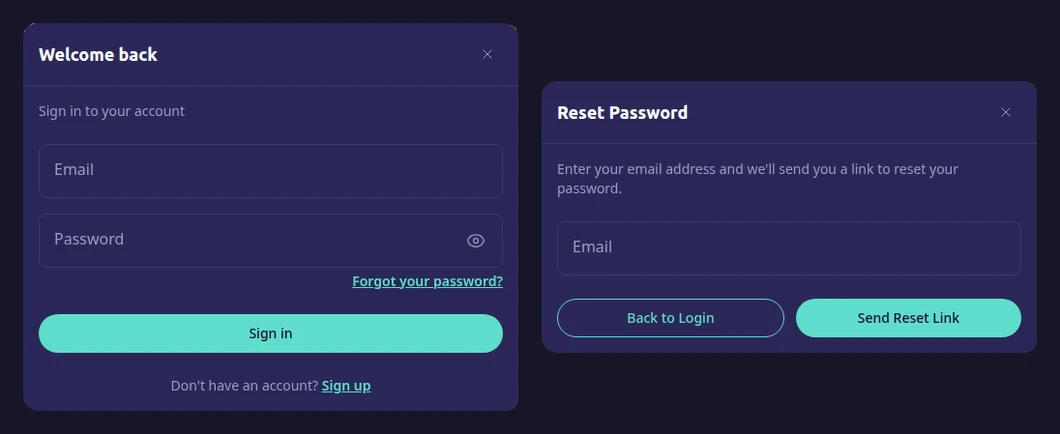
SpinAway’s Ontario sign-in window (left) and the Reset Password window behind “Forgot your password?” (right), opened from Toronto at spinaway.ca/on.
SpinAway, Spin Casino and spinaway.com
Google Canada’s top three for “spinaway login” are spinaway.ca, a login page on the international spinaway.com, and spincasino.com, which belongs to Spin Casino, an unrelated brand with its own accounts (see our Spin Casino login guide). The address itself changes with your location. From Toronto, spinaway.ca and spinaway.com both ended on the Ontario site; from Montreal, spinaway.ca stayed on a casino run by Monkey 9 Limited under a Kahnawake licence. If the footer names Monkey 9, you are not on the AGCO casino where your Ontario account lives.
Passwords, Lockouts and Account Details
Everything except a forgotten password goes through SpinAway’s support team, and the password itself takes about a minute to reset.
- Forgotten password: the Forgot your password? link sits just under the password box. Type your email in the Reset Password window and choose Send Reset Link; “Back to Login” takes you back.
- Locked after failed attempts: the help centre names this as the most common reason a log-in stops working, and the cure is the same password reset.
- New password while signed in: change it under Settings.
- New name, address or contact details: ask Support; a change of name or address can require documents.
- Slow emails: look in the junk folder and check that you typed the address on the account.
SpinAway’s Location Check, Step by Step
SpinAway cannot skip the location check, because the AGCO requires every player to be inside Ontario. When you are in the province and still get a location error, its help centre lists these fixes.
- Switch mobile data off and on again to refresh the connection.
- Move from Wi-Fi to mobile data, or from mobile data to a stable Wi-Fi network.
- Power the Wi-Fi router off for 30 seconds, then on again.
- Turn off any VPN, proxy or security software that can mask your location.
- Close remote desktop programs, such as TeamViewer or Remote Desktop.
- Try another browser, for example Chrome, Safari or Firefox, and check that location access is on for it.
If none of that works, contact Customer Support with what you have tried.
Session Limits That Sign You Out
SpinAway’s session limit does more than warn you: under its Ontario terms, once a play session reaches the time you set, you are logged out automatically and cannot carry on.
- Setting it: the Responsible Gaming page places session limits, by day, week or month, under Settings > Responsible gaming > Player Limits. The terms also let you ask Support, and a limit requested by email can take up to 48 hours.
- Changing it: a lower limit applies at once, while raising or removing one waits at least 24 hours.
- A break: 24 hours, one week or one to three months, set under Account closure. You cannot open the account until it ends, and it reopens automatically afterwards.
- Self-exclusion: six months, one year or five years, with no log-in or reopening before the period ends. BetGuard, set up separately, excludes you from every regulated Ontario site.
Inactive and Closed SpinAway Accounts
SpinAway measures activity by log-ins on its website, so a sign-in is all it takes to keep an account active.
- Twelve months with no log-in: SpinAway sends a reminder to the email on the account. If you do not sign in within 30 days, CA$5 comes off the balance, and the fee then repeats monthly.
- During a fixed self-exclusion: the fee stops, and starts again 30 days after the exclusion ends.
- Thirty months with no log-in: the account is closed, and SpinAway holds any remaining funds for five years.
- Closing it yourself: write to support@spinaway.ca. Withdraw first, because a deposit balance below CA$3 is not paid out on closure.
- Reopening: ask Customer Support while SpinAway still holds your data.
The SpinAway App and Four “Spin Away Casino” Lookalikes
SpinAway’s app exists for Android only. On Google Play it is SpinAway Canada Slots Casino, from the developer SpinAway with support at support@spinaway.ca; at the time of this review it has 2.7 stars from 7 ratings and 500+ downloads. SpinAway’s Ontario app page links to it and says existing Ontario accounts sign in with the same details. The Canadian App Store has no SpinAway app, so on an iPhone use Safari.
Searching “spinaway app” on Google Play from Ontario also brings up four apps called Spin Away Casino, from four developers: EUROTECH ENGINEERING SOLUTIONS, RehmanDeveloper, Fasadon and Private Pool. Their listings describe a plant-care journal, a utility kit, a memory game and an offline casino-style game, each with 1+ downloads. None is SpinAway, so keep your SpinAway email and password out of them. Our Ontario casino apps compared page puts the real app in context.
Getting Help with a SpinAway Log-In
Live chat is the quickest route: the “Chat with us” button on the help centre at spinaway.ca/on/help, which says the team works 24/7. Email goes to support@spinaway.ca. There is no customer service phone line; the 1-866-531-2600 on SpinAway’s pages is ConnexOntario’s gambling helpline. SpinAway shares its platform with Lucky Days, whose sign-in works the same way, as our Lucky Days login guide shows. The SpinAway Ontario review covers games, payments and the change of operator.
FAQ’s – Frequently Asked Questions
- Is spinaway.ca the same casino everywhere in Canada?
No. From Ontario the address opens spinaway.ca/on, run by Jungle Media Limited under the AGCO. From other provinces it is Monkey 9 Limited’s casino, licensed in Kahnawake. Check the footer before signing in.
- Is SpinAway the same as Spin Casino?
No. Spin Casino is a separate brand from a different operator, with its own accounts and sign-in. Google often lists spincasino.com among SpinAway results, so check the name before typing your password.
- How do I reset my SpinAway password?
Open the Log In window and pick Forgot your password? below the password field. Enter your email and choose Send Reset Link. The same reset also unlocks an account blocked after too many failed attempts.
- Is there a SpinAway app for iPhone?
Not in the Canadian App Store. SpinAway’s app is Android only: SpinAway Canada Slots Casino, from the developer SpinAway. On an iPhone, sign in through Safari at spinaway.ca/on.
- Does SpinAway charge for an inactive account?
Only after 12 months without a log-in and a reminder email. If you still do not sign in within 30 days, CA$5 a month comes off the balance, and after 30 months the account closes. Winnings from casual play are tax-free in Canada.
SpinAway Ontario Login in Short
Use spinaway.ca/on, your email and your password, and make sure the footer names Jungle Media Limited, not Monkey 9. A forgotten password or a lockout is fixed from the same reset link.
On Android, install only SpinAway Canada Slots Casino; on iPhone, use Safari. Log in every few months so the inactivity fee never starts.









