


 You must be based in Ontario to enjoy all this online casino features
- Lucky Days Login:
Ontario Players
Lucky Days Ontario Login: The /on Address and Region Checks
Lucky Days Ontario Login: The /on Address and Region Checks
🕑 Updated: 11 November 2026
 Content Writer
 Content Manager
Visit
Support
- Software Providers


To log in to Lucky Days in Ontario, go to luckydays.ca/on, choose Log In and enter your email and password. Check the footer names L7 Entertainment Ltd: outside Ontario the same domain serves a different casino, and your Ontario account does not work there.
Pros
 Reset link unblocks the account
Region selector in the header
Live chat without logging in
Self-service account closure
Cons
 Same domain serves non-Ontario casinos
CA$5 monthly fee after a year
Two similar apps in the store
Logging In at luckydays.ca/on
Lucky Days signs you in with your email address and password. The address matters, because the same domain serves three different sites depending on where you are.
- Go to luckydays.ca/on. From inside Ontario, typing luckydays.ca takes you there.
- Check the footer names L7 Entertainment Ltd and licence OPIG1242643, and that the region box at the top reads Ontario.
- Use the Log In button in the top right corner of the page.
- Enter your email and password; the eye icon shows the password as you type.
- Choose Sign in, and let the site confirm you are in Ontario before you play.
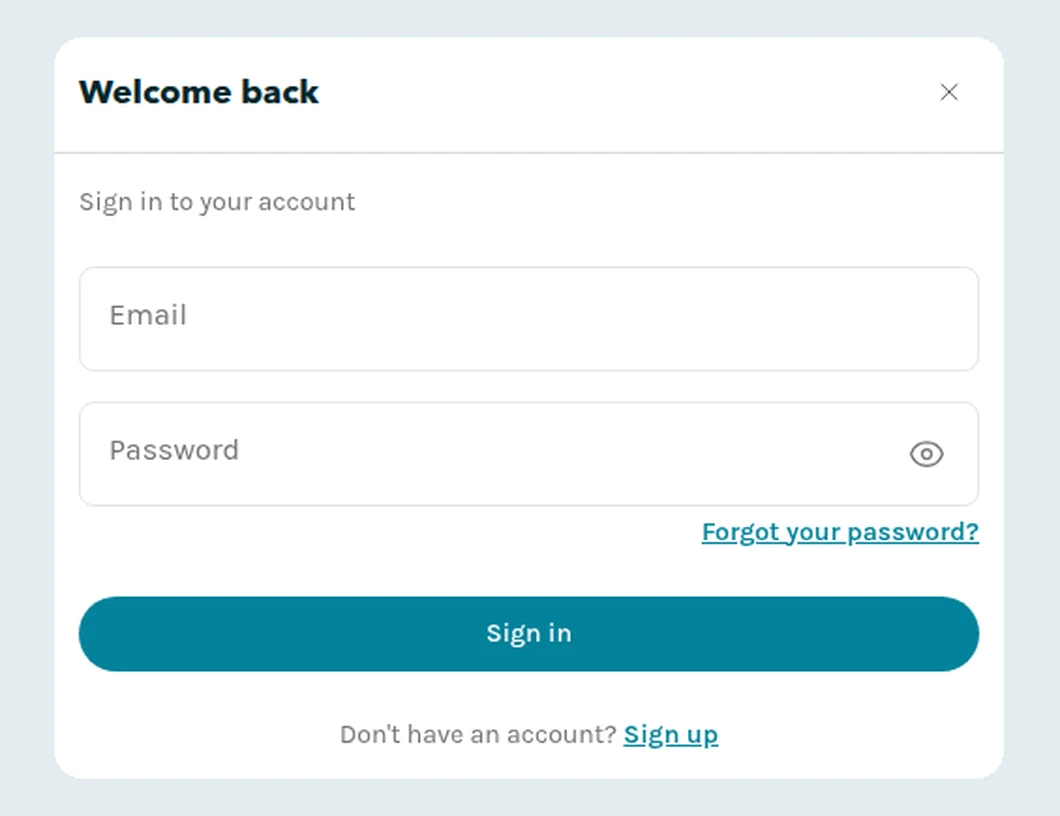
The Lucky Days sign-in window at luckydays.ca/on, opened from Toronto.
Three Sites at One Address
Lucky Days sends you to a regional site based on your approximate location: /on for Ontario, /ab for Alberta, and the plain luckydays.ca for the rest of Canada. Outside Ontario that plain address is a different business, Monkey 9 Limited, licensed by the Kahnawake Gaming Commission rather than the AGCO. Your Ontario account belongs to the /on site, and the region selector in the header, or the regional links in the footer, take you back to it if you land on the wrong one.
When Lucky Days Asks You to Confirm Your Region
Lucky Days may ask you to choose your region when its location checks disagree. Its help centre names the usual causes: a VPN, a mobile network, a corporate network, or a connection near a provincial border.
- Choose Ontario if that is where you are. Picking a site does not make you eligible to play; eligibility is checked separately against where you actually are.
- Your account does not change when the address does. Keep using the account you opened for Ontario.
- Old bookmarks may redirect; update them once you reach luckydays.ca/on.
- Still on the wrong site? Tell Customer Support the page you were trying to reach, your province, and whether you were on a VPN or mobile network.
Forgotten Password and Blocked Accounts
Both are fixed from the same link. Lucky Days blocks an account after too many failed log-in attempts, and its help centre says the way out is simply to request a new password.
- In the sign-in window choose Forgot your password?, just above the Sign in button.
- Enter the email address you used when you created the account.
- Choose Send Reset Link and follow the link in the email.
If the email does not arrive, check you typed the address you registered with, then look in the spam folder. If the account stays blocked after a reset, check your email for a message from Lucky Days, or contact support.
Verification, Closing and Reopening
The account tools sit under Settings once you are logged in.
- Verify your identity in Settings > Verify. Lucky Days aims to finish within 24 hours, and the same tab shows the status.
- Take a break for 24 hours, a week, or one, two or three months, under Settings > Responsible Gaming > Account closure; you cannot log in or play until it ends.
- Self-exclude for 6 months, 1 year or 5 years from the same place, or use BetGuard to exclude yourself from every regulated Ontario site at once.
- Close the account under Settings > Responsible Gaming, with immediate effect, or by writing to help@luckydays.ca. The terms say deposit funds of less than CA$3 left in a closed account are kept.
- Reopen it through Customer Support if you closed it yourself or a self-exclusion has ended. A permanent self-exclusion, or a closure by Lucky Days, cannot be reversed.
A Year Without Logging In
At Lucky Days, a log-in is what counts as activity. After 12 months without one, Lucky Days emails a reminder to the address on the account, and you then have 30 days to log in and withdraw if you want to. If you do not, a CA$5 account maintenance fee is taken from the balance each month from the 13th month, and an account inactive for 30 months in total is closed.
The fee is paused during a fixed-term self-exclusion and resumes 30 days after it ends. Logging in once a year is enough to avoid all of it.
The Lucky Days Apps
Two Lucky Days apps sit side by side in the Canadian App Store, both from L7 Entertainment Limited, and only one links to luckydays.ca:
- Lucky Days Casino Canada links to luckydays.ca and serves Ontario. It holds 3.63 from 274 ratings at the time of writing and needs iOS 16.0 or later.
- LuckyDays: Play Slots & Live links to luckydays.com instead; it is not the Ontario casino.
- On Google Play the app is Lucky Days Canada Casino, published as Lucky7 Entertainment, with 3.4 from 572 reviews and 100,000+ downloads; its listing names the AGCO.
Log in with the same email and password as on the website. Installing the right one is covered step by step in our Lucky Days app guide; compare it with the others in our Ontario casino apps compared guide.
Support and Opening an Account
Live chat runs 24/7 from “Chat with us” on the help page at luckydays.ca/on/help, which you can open without logging in. The Ontario terms give help@luckydays.ca for email. To open an account you must be 19 or older and physically in Ontario to wager, register in your own legal name, and hold only one account; Lucky Days may confirm the account by email or SMS before activating it. The minimum deposit is $1. The Lucky Days Ontario review covers the games, payments and the three regional sites in full.
FAQ’s – Frequently Asked Questions
- Why does luckydays.ca show a different casino outside Ontario?
Lucky Days routes you by location. In Ontario, luckydays.ca opens /on, run by L7 Entertainment under the AGCO. Elsewhere in Canada the same address is Monkey 9 Limited’s site, licensed in Kahnawake, which is not where your Ontario account lives.
- How do I unblock my Lucky Days account?
If it was blocked after too many failed log-ins, use Forgot your password? and reset it with the link Lucky Days emails. If it stays blocked, check your inbox for a message from Lucky Days or contact support.
- What happens if I do not log in to Lucky Days for a year?
Lucky Days emails a reminder after 12 months. If you do not log in within 30 days, a CA$5 monthly fee comes off the balance from the 13th month, and the account closes after 30 months of inactivity.
- Which Lucky Days app is the Ontario one?
Lucky Days Casino Canada, which links to luckydays.ca. The other iPhone app, LuckyDays: Play Slots & Live, links to luckydays.com. On Google Play, look for Lucky Days Canada Casino.
- Can I reopen a closed Lucky Days account?
Yes, through Customer Support, if you closed it yourself or a self-exclusion has ended. An account closed by Lucky Days, or under a permanent self-exclusion, cannot be reopened.
Lucky Days Ontario Login: Key Points
Log in at luckydays.ca/on with your email and password, after checking the footer names L7 Entertainment and OPIG1242643. A block after failed attempts is cleared with the Forgot your password? link, and the reset needs only your email.
If the site asks for your region, choose Ontario; your account is the same whichever address brought you there. Log in at least once a year, because a CA$5 monthly fee starts after 12 months without one.
Best Lucky Days Alternatives




Related Articles




July 19, 2023