

 You must be based in Ontario to enjoy all this online casino features
- Miki Login:
Ontario Players
Miki Ontario Login: on.miki.com, Password Reset and Help
Miki Ontario Login: on.miki.com, Password Reset and Help
🕑 Updated: 11 November 2026
 Content Writer
 Content Manager
Visit
Support
- Software Providers


To log in to Miki in Ontario, open on.miki.com, press Login in the left sidebar, then type the email and password you registered. Searches tend to show myki, Melbourne’s transit card, or unofficial Miki sites, and there is no app.
Pros
 Simple email and password log-in
Reset needs only your email
Live Chat before signing in
Clear Ontario-only labelling
Cons
 Name confused with Melbourne myki
Unofficial Miki sites in search
No app on either store
No form for a forgotten email
Logging In at on.miki.com
Miki is an Ontario-only casino at on.miki.com, and its log-in lives in a small white window that opens from the purple sidebar on the left. It asks for your email address and password. The sidebar also holds Miki Picks, All Slots and All Live Casino, so the two account buttons sit at the very top, above the game menu.
- Open on.miki.com and give it a few seconds: the lobby appears only once the page has finished loading, and the browser may ask to share your location.
- Accept the cookie notice with OK, then press Login, the outlined button under the purple Sign up one in the sidebar.
- In the window that opens, type the email and the password, using the eye to check it.
- Tick the fit-to-play checkbox, then select the purple Login button.
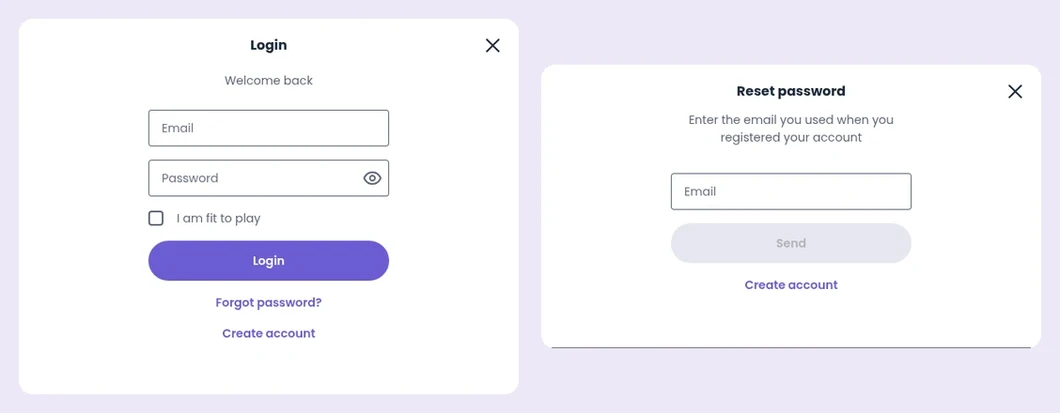
The two Miki windows you need, Login (left) and Reset password (right), seen from Toronto.
Myki, Miki Norway and an Unofficial Miki Site
The name trips up search engines. In Canada, “miki login” returns pages about myki, the public-transport card used in Melbourne, Australia. “Miki casino login” does better but still not well: the top results are mikiontario.com, a third-party site whose menu lists “Miki Login”, “Miki Register”, “Miki Casino App” and comparison pages, none of them run by the casino, and Norwegian pages about a Miki casino in Norway, including mikinorge.com and several “Miki logg inn” guides. The Ontario casino, on.miki.com, did not appear on the first page for any of these searches. Type the address yourself, and bookmark it after your first visit so the search is never needed again.
Resetting a Miki Password
- In the Login window, choose Forgot password?, the purple link under the Login button.
- The Reset password window asks for the email you used when you registered; type it carefully, since a misspelled address simply produces no message, and press Send.
- Follow the instructions Miki emails you to choose a new password, checking the spam folder if nothing arrives.
There is no separate form for a forgotten email address. If you no longer know which address you used, or the reset message does not arrive, open Live Chat from the bottom of the sidebar, which is visible before you sign in. The same window also shows a Create account link; ignore it if you already have an account, and recover the existing one instead.
Same Software as Casino Time
Miki runs on the platform of Gaming Innovation Group, the same software behind Casino Time, another Ontario casino. The two are separate businesses with separate accounts, so a Casino Time log-in will not open Miki, but the screens work alike. Our Casino Time login guide walks through how that platform handles locked accounts after wrong passwords, 2-step verification and location problems, which is a useful reference if Miki shows you a message you do not recognise.
No Miki App: Sign In Through the Browser
Neither Canadian app store lists a Miki app. Searching Google Play for “miki casino” brings up MegaCasino and SlotsMagic from Skill On Net, BetMGM Casino, PartyCasino and Hard Rock’s free social games, and the App Store shows a similar mix, so there is nothing of Miki’s to install. On a phone, open on.miki.com in Safari or Chrome, allow location when asked, and use the same Login button in the menu. Mikiontario.com’s “Miki Casino App” page does not change that. Casinos with native apps are compared in our Ontario casino apps guide.
Help, and Signs You Are on the Right Site
- Live Chat: the last item in the sidebar, shown before you log in.
- FAQ and Responsible Gaming links are in the menu and the footer; Play Responsibly in the sidebar opens the responsible gaming page directly.
- The right site shows “Licensed and regulated in Ontario” across the top, the iGaming Ontario and BetGuard marks beside it, and an “Ontario only” badge with ConnexOntario in the footer.
The Miki Ontario review covers the 1,693-game lobby, Interac payments, verification and the account rules in the terms.
FAQ’s – Frequently Asked Questions
- How do I log in to Miki in Ontario?
Open on.miki.com, press Login in the left sidebar, type your email and password in the window that opens, tick the fit-to-play box and select Login.
- Why does searching for miki login show Myki?
Google reads it as myki, Melbourne’s transit card. Search for miki casino ontario, or simply type on.miki.com, which did not appear on the first page of the searches we checked.
- How do I reset my Miki password?
Use the Forgot password? link, give the email address the account was opened with, and press Send. Live Chat helps if the email does not arrive.
- Is there a Miki casino app?
No. Neither the App Store nor Google Play in Canada lists a Miki app. Use on.miki.com in your phone’s browser, with location sharing switched on.
- Is mikiontario.com the official Miki site?
No. It is a third-party site about Miki with its own login page. The Ontario casino is on.miki.com, and recreational gambling wins there are not taxed in Canada.
Miki Login Recap
Type on.miki.com, because searches lead to Melbourne’s myki card, Norwegian Miki pages or an unofficial Ontario site, then sign in from the sidebar with your email and password.
A forgotten password needs only your registered email, and Live Chat is there before you log in. There is no app to download.










