


 You must be based in Ontario to enjoy all this online casino features
- Spin Casino App:
Ontario Players
Spin Casino App Ontario: The Right Download on Each Phone
Spin Casino App Ontario: The Right Download on Each Phone
🕑 Updated: 11 November 2026
 Content Writer
 Content Manager
Visit
Support
- Software Providers



Yes. Ontario players can get Spin Casino on iPhone, where the App Store calls it Spin Casino Real Money Slots, and on Android as Spin Casino Online Gambling, listed on Google Play under Zulu Digital. Skip the APK on spincasino.com: it serves the rest of Canada.
Pros
 Official apps on both stores
Google Play install, no APK
2-Step codes by text or email
Toll-free phone support
French among 16 languages
Cons
 Android listed as Zulu Digital
Wrong APK ranks in Google
Small Android rating sample
$50 minimum withdrawal
Which Spin Casino App to Install
Spin Casino’s Ontario app goes by two different names, one per store, and the listings do not cover the same provinces. The iPhone app describes itself as one download for Ontario, Alberta and the rest of Canada; the Android app is for Ontario and Alberta only.
The Two Listings Side by Side
| iPhone (App Store, Canada) | Android (Google Play, Canada) | |
|---|---|---|
| Name in the store | Spin Casino Real Money Slots | Spin Casino Online Gambling |
| Developer shown | Cadtree Limited | Zulu Digital |
| Rating | 4.55 from 2,333 ratings | 4.35 from 347 ratings |
| In the store since | 2 December 2022 | 14 July 2025 |
| Latest version | 22.0, 6 October 2026 | 22.1, 6 October 2026 |
| Size and reach | 44.5 MB, iOS 15.1 or later | 10,000+ downloads |
| Provinces named | Ontario (19+), Alberta and the rest of Canada (18+) | Ontario (19+) and Alberta (18+) |
At the time of writing the iPhone app sat 19th in the Canadian App Store’s free Casino chart. Both builds were last updated on 6 October 2026.
Why the Android Developer Reads Zulu Digital
The Google Play listing carries the developer name Zulu Digital rather than Cadtree, the company that holds Spin Casino’s Ontario registration. Three details tie it to the Ontario casino: its privacy-policy link opens spincasino.ca/ontario, its contact address, support@playersupportcentre.ca, is the same one Cadtree’s Jackpot City app uses, and its one-line summary reads “your favourite games for players in Ontario and Alberta”.
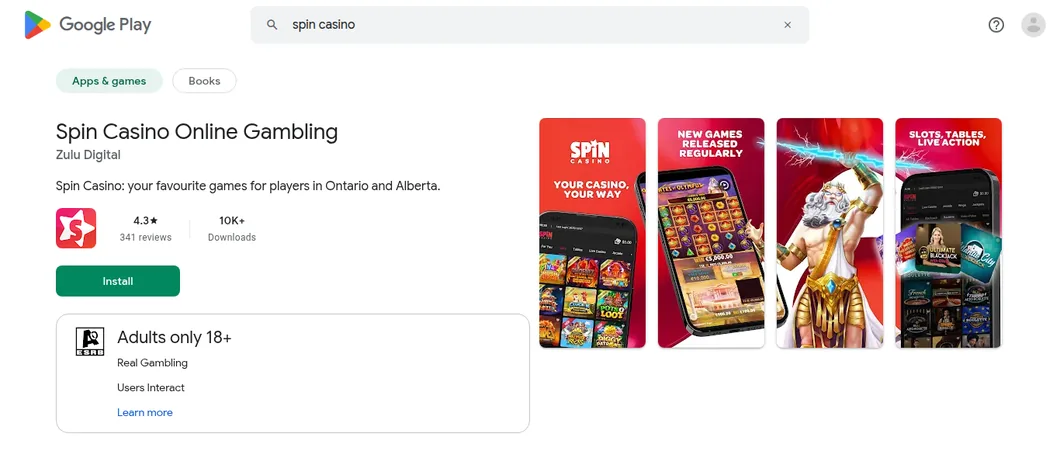
Google Play searched from Toronto: “spin casino” brings up Spin Casino Online Gambling as the featured first result, with the Zulu Digital name, the Ontario and Alberta line and the Adults only 18+ label.
The APK on spincasino.com Is Not the Ontario Route
Search Google for “spin casino app” and the first result, plus two more on page one, sit on spincasino.com, the brand’s site for the rest of Canada. Its footer names Baytree Interactive Ltd and a Kahnawake Gaming Commission licence, and its Android instructions send you through a download address at appforwardfast.com, then ask you to enable Unknown Sources in your phone’s security settings.
Ontario players need none of that. The Ontario help centre still says Android users download “from the website”, yet the Mobile Casino page on spincasino.ca/ontario has no download link at all, so Google Play is the way in. The same help centre lists checking that “you’ve downloaded the correct casino app” among its fixes for games that refuse to load.
Installing Spin Casino on Android
On Android, install from Google Play; nothing has to be side-loaded and no security setting needs changing.
Finding the Right Listing
- In Google Play, type spin casino into the search bar; the official app appears as the large featured result at the top.
- Check the card before installing: Spin Casino Online Gambling, developer Zulu Digital, 10K+ downloads and the Adults only 18+ label.
- Tap Install, open the app and sign in with your Spin Casino username and password, or register.
- Allow location access when the app asks, choosing Allow only while using the app.
When Location Will Not Switch On
If the location icon at the top right does not turn blue, pull down the quick-settings panel, long-press Location, open App location permissions, move the casino app out of “Not allowed” and pick the while-using option. After that, the help centre suggests switching on Google Location Accuracy (Improve Location Accuracy) in the Location Services menu.
Installing Spin Casino on iPhone
On iPhone there is a single Spin Casino listing, from Cadtree Limited. It requires iOS 15.1+ and 44.5 MB of space, and it is localised in 16 languages, French among them.
Installing from the App Store
- In the App Store, type Spin Casino into Search.
- Choose Spin Casino Real Money Slots with Cadtree Limited underneath, and tap Get.
- Open the app and sign in to the account you opened at spincasino.ca/ontario; the same app also serves Alberta and other provinces.
- In Settings > Privacy > Location Services, choose While Using the App for the casino app; back in the app, tap Enable on the white banner about location, then Allow.
The location icon at the top right turns blue once the check passes.
Age Label and Help Lines
Apple gives the app its own 17+ label, but the listing itself sets 19 as the minimum age in Ontario. Its list of help lines mixes ConnexOntario with services for Alberta, the rest of Canada and the UK’s GamCare; in Ontario, ConnexOntario is the one to call.
What the App Holds
The app opens the same Ontario lobby as the website. Seven tabs run from For You and Slots through Tables and Live Casino to Arcade, Bingo and Jackpots, and an All Games view can be narrowed to a single studio, Spribe, Pragmatic Play and Games Global being three of the choices.
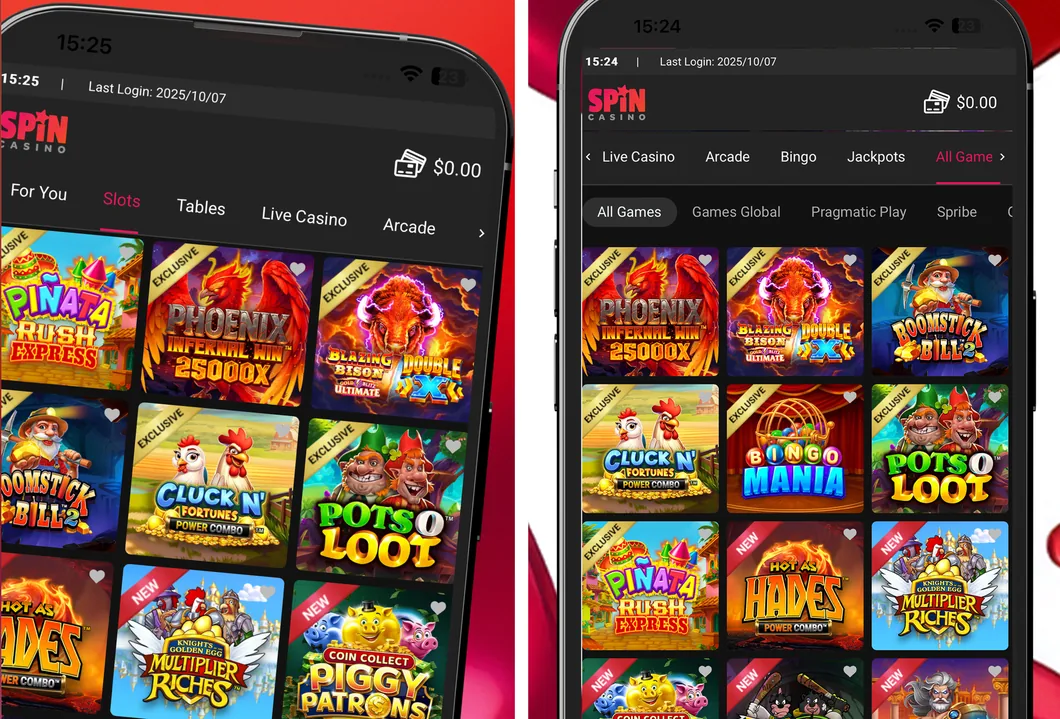
Two of Cadtree’s App Store screenshots: the Slots tab, and All Games with its studio filters; titles marked Exclusive include Phoenix Infernal Win 25000x and Pots O’ Loot.
Slots and Exclusives
Slots get their own tab and most of the screenshots. Titles badged Exclusive include Phoenix Infernal Win 25000x, Blazing Bison Gold Blitz Ultimate Double X, Boomstick Bill 2, Cluck N’ Fortunes Power Combo and Piñata Rush Express, while Hot as Hades Power Combo and Knights Golden Egg Multiplier Riches carry a New badge. The Ontario site’s mobile page adds Hyper Gold, Assassin Moon and StumpyMcDoodles.
Tables and Live Casino
The Tables tab is split into All Tables, Blackjack, Roulette, Video Poker and Baccarat. The mobile page picks out Multi Hand European Blackjack, Vegas Strip Blackjack and Real Auto Roulette, which shows “real action at the wheel in real time”, and its FAQ names American, European and French roulette. Dealer games have their own tab, with Ultimate Blackjack with Olivia in the screenshots.
Crash and Arcade Games
Crash games sit beside the slots: the App Store description names FlyX, in which you cash out before the multiplier crashes, and Spribe is one of the studio filters in All Games. Arcade titles have a tab of their own between Live Casino and Bingo.
Bingo and Jackpots
Bingo and Jackpots each get a tab; Bingo Mania appears in the All Games screenshot, and the App Store description mentions slots with fixed jackpots of up to 1 million. Game count, studios and live tables are covered in our Spin Casino Ontario review.
Banking in the App
Deposits and withdrawals run through the Bank tab, with the same methods as the website: a $10 minimum deposit and a $50 minimum withdrawal. Payout times by method are in our Spin Casino withdrawal guide.
Methods in the Cashier
| Method | Deposit | Withdrawal |
|---|---|---|
| Interac | Yes | Yes |
| Visa | Yes | Yes |
| Mastercard | Yes | No |
| American Express | Yes | No |
| Apple Pay | Yes | No |
| Paysafecard | Yes | No |
| eCheck | No | Yes |
Money paid in by card or Apple Pay comes back by Interac, Visa or eCheck. Compare other wallets in our Apple Pay casinos guide.
Depositing with Interac
- Open the Bank tab and choose Deposit, then Interac.
- Enter the amount, tap Continue, then Confirm.
- Pick your bank on the page that opens, sign in to online banking and approve the payment to the account shown.
Prepaid Card Limits
Prepaid deposits, Paysafecard and Flexepin included, are capped at $250 in total over a rolling seven days, and no more than five different prepaid cards can be used in that window. A deposit that would break either limit is declined until the oldest one drops out of the seven days.
How Fast Withdrawals Arrive
That depends on which of Spin Casino’s documents you read. The terms put each withdrawal on hold for 24 hours, during which it can be reversed, and nothing is processed at weekends; an April 2026 help article, by contrast, promises Interac and card payouts almost instantly for a day’s first request made after 7 a.m. Eastern. The review lays the four versions side by side.
Location, Security and Limits
Most problems in the app are location checks, and the help centre covers them along with account security and play limits.
Fixing Location Errors
- restart the phone to refresh its location;
- switch on GPS, Bluetooth, mobile data, Wi-Fi and precise location;
- shut down VPNs and remote-desktop tools (the help centre names RDP, AnyDesk, UltraViewer and TeamViewer), then wait about a minute before refreshing;
- try mobile data instead of Wi-Fi, or the reverse, and if Ontario is still refused, ask your internet provider where your IP address is registered.
2-Step Verification
On a phone, open the bottom menu and go to My Account > My Details > 2-Step Verification > Manage Setup. Pick Text Message or Email, confirm the contact shown and tap Send Verification Code, then type the code you receive. If you choose texts, Spin Casino emails the same code as a backup, so a missed message does not lock you out.
Deposit, Loss and Session Limits
Tap your username and choose Responsible Gaming to set daily, weekly or monthly deposit and loss limits, or a session reminder. Where two limits overlap, the lower one applies; cuts take effect at once, increases after 24 hours.
Self-Exclusion
The help centre describes a temporary exclusion of 24 hours to three months that lifts by itself, and a permanent one of six months to five years, set from the same Responsible Gaming menu. Our responsible gambling guide lists the Ontario help services.
Reaching Support
Live chat opens from the chat icon along the bottom edge of the app. The contact page of the help centre adds an email link for each Cadtree casino and a toll-free number, 1-888-378-1328, which Spin Casino shares with Ruby Fortune, Royal Vegas and Jackpot City. Signing in works the same in the app and the browser, as our Spin Casino login guide explains; complaints and email addresses are in the Spin Casino customer service guide.
FAQ’s – Frequently Asked Questions
- Does Spin Casino have an app in Ontario?
Yes, on both phones. On iPhone it is Spin Casino Real Money Slots from Cadtree Limited; on Android it is Spin Casino Online Gambling on Google Play.
- Why is the Spin Casino Android app listed under Zulu Digital?
That is the developer name on Google Play. The listing links to spincasino.ca/ontario for its privacy policy and says it is for players in Ontario and Alberta, which makes it the genuine Ontario app.
- Should I install the Spin Casino APK?
Not for an Ontario account. The APK steps belong to spincasino.com, the site for the rest of Canada, and need Unknown Sources switched on. Use the Google Play listing instead.
- What are the deposit and withdrawal minimums in the Spin Casino app?
Deposits start at $10 and withdrawals at $50, the same as on the website. Apple Pay, Mastercard and American Express can be used to deposit but not to withdraw.
- Are Spin Casino app winnings taxed?
No. Recreational gambling winnings are not taxable income in Canada, in the app or in a browser. Your bank may still charge its own fee on a payment.
Is the Spin Casino App Worth Installing?
Yes, provided you install the right build. The iPhone app holds 4.55 from 2,333 ratings and a place in the App Store’s Casino top 20; the Android app scores 4.35, but from only 347 ratings. Two-step codes by text or email, plus a toll-free number, round it out.
For a larger pool of ratings, Jackpot City, Spin Casino’s sister on the same support line, has 4.49 from 26,070 iPhone ratings, and Betano has 4.4 from 131,184 on Google Play. Every licensed app is ranked in our Ontario casino apps comparison.










