


 You must be based in Ontario to enjoy all this online casino features
- BetUnited Login:
Ontario Players
BetUnited Ontario Login: betuntd.ca, UILocID and Codes
BetUnited Ontario Login: betuntd.ca, UILocID and Codes
🕑 Updated: 11 November 2026
 Content Writer
 Content Manager
Visit
Support
- Software Providers



To log in to BetUnited in Ontario, go to betuntd.ca, select Sign In and use the email and password you registered with. Computers need the UILocID location app running first, and new devices get a six-digit code by email.
Pros
 Email codes confirm new devices
Optional two-factor authentication
Apps on both stores
Round-the-clock live chat
Cons
 Location app needed on computers
Domain is easy to mistype
Missing from some login searches
Low app store ratings
Signing In at betuntd.ca
BetUnited’s Ontario casino lives at betuntd.ca, spelled without the i and the e of “united”. Your email address is your username there: the help centre describes the email given at registration as your permanent log-in.
- Type betuntd.ca into the address bar and wait for the purple lobby to load.
- Select Sign In, the outlined button at the top right, beside the orange Sign Up.
- On a computer, a UILocID Required notice may appear first; the next section explains it.
- In the white form, enter the email and the password (the eye icon reveals it), tick “I am fit to play.” and press the green Sign In button.
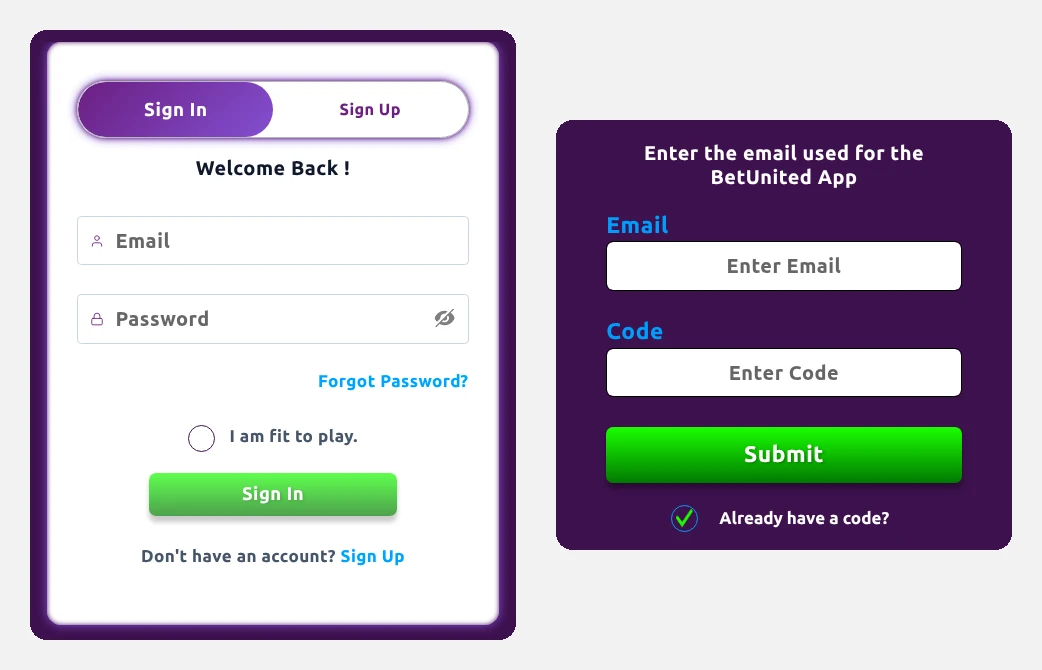
Captured from Toronto: BetUnited’s Sign In form, and the Forgot Password screen once “Already have a code?” is ticked.
Why Searches Struggle to Find It
The shortened domain does not help search engines. In Canada, “betunited login” puts the iGaming Ontario list of regulated sites first and betuntd.ca second. Spell it as two words, “bet united login”, and betuntd.ca drops off the first page entirely, replaced by a soccer club called SC United and other Ontario sportsbooks. “Betuntd login” leads with a Facebook page called Bet Untd. Typing the address, or opening the BetUnited Casino app, is the reliable way in.
UILocID: the Location App Computers Need First
On a Windows PC or a Mac, BetUnited will not let you sign in until its own location app, UILocID, is installed and running. Pressing Sign In without it brings up a purple notice with two buttons, DOWNLOAD and RETRY LOCATION.
- Windows: open the downloaded installer. If Windows shows its protected-PC warning, choose More info, then Run anyway, and give the administrator password if asked. Start UILocID from the Start menu, click its icon in the System Tray and check that Status reads Ready.
- Mac: open UILocID.pkg, select Continue, and enter your Mac password when asked before choosing Install Software. The app starts by itself and sits in the menu bar at the top right.
- Then: press RETRY LOCATION on the notice and sign in as normal.
Phones skip UILocID. The BetUnited app asks for your location at the start of each session instead: grant Precise location on Android or Allow While Using App on iPhone. Refusing still lets you log in, edit your profile and try demo games, just not play for money.
One-Time Codes in Your Inbox
Signing in from a new phone or computer triggers a six-digit code, sent only to your registered email address; the same codes protect sensitive account changes. A fresh code replaces the previous one, so always type the latest, and never read it out to anyone: BetUnited staff will not ask for it. If nothing arrives, the help centre suggests:
- looking in spam or junk, in Gmail’s category tabs such as Updates, or in the Other tab in Outlook;
- waiting a full minute before asking again, and checking that your mailbox is not full;
- adding noreply@betuntd.ca to your contacts and confirming the address under Account > Profile Settings.
For extra protection, two-factor authentication can be switched on under Account > Security Settings.
Forgot Password? The Code Route
- Choose Forgot Password?, the blue link under the password box.
- A full-screen page asks for the email used for the BetUnited App; type it and press Submit.
- When the code reaches your inbox, tick Already have a code?, enter the email and the code, then press the green Submit button and follow the steps that appear.
Think someone else has been in your account? The help centre’s advice is to reset the password straight away, switch on two-factor authentication and alert live chat, where the security team can freeze the account while it looks into it. A wrong or outdated email is changed by support once your identity is confirmed, and opening a second account is not the fix, because duplicates can both be closed.
Signing In on the BetUnited App
- iPhone: BetUnited Casino from United Interactive LLC, rated 1.4 from 20 ratings, version 1.0.4, a 56.9 MB download for iOS 15.0 or later. The help centre’s iOS 12 figure is out of date.
- Android: the same app is now on Google Play, rated 1.8 from 11 reviews with more than 1,000 downloads. An older help article still says it is missing from the store and points to an installation file on betuntd.ca; the store version saves you allowing installs from outside Google Play.
If the app refuses your details, the help centre suggests trying them at betuntd.ca in a browser first, which tells you whether the problem is the account or the app. With two-factor authentication on, use the most recent code; if all else fails, delete and reinstall the app, keeping about 500 MB of storage free. Our Ontario casino apps ranking shows how these ratings compare.
Breaks That Lock You Out on Purpose
- Timeout: from 24 hours to six weeks, set under Account > Responsible Gaming > Timeout. It signs you out at once, blocks log-ins and payments while it runs, then lifts automatically.
- Self-exclusion: periods of 6 Months, 1 Year and 5 Years, chosen under Account > Responsible Gaming > Self-Exclusion, confirmed with Set. Every device is signed out, and the period cannot be shortened once it starts.
- Session limit: a daily cap on playing time; when it is reached you get a notification and real-money games stop.
Live chat, opened from the chat button in the Customer Service Portal of the site or app, is staffed 24 hours a day, and the help centre aims to answer emails within two hours. Lobby size, payout times and support hours are in our BetUnited Ontario review.
FAQ’s – Frequently Asked Questions
- What is the BetUnited website in Ontario?
betuntd.ca, with no i or e. A search for bet united login may not show it on the first page, so type the address or use the BetUnited Casino app.
- Why does BetUnited ask me to install UILocID?
On a Windows PC or Mac, UILocID confirms you are in Ontario and must be running before you sign in. Phones do not need it; the app asks for your location instead.
- How do I reset my BetUnited password?
Choose Forgot Password?, enter your account email and press Submit. When the emailed code arrives, tick Already have a code?, enter it with your email and continue.
- Why has my BetUnited login code not arrived?
Check spam, the Gmail category tabs or the Outlook Other tab, wait a minute and make sure your inbox is not full. Only the newest code works.
- Can I log in during a BetUnited timeout?
No. A timeout of 24 hours to six weeks blocks log-ins until it ends, then lifts on its own. Wins from recreational play are not income in Canada’s tax system.
BetUnited Login Checklist
Go to betuntd.ca, sign in with the email you registered and your password, and on a computer install UILocID beforehand so the location check passes.
Expect a six-digit code by email on new devices and for resets, check Gmail’s other tabs if it is slow, and use the Google Play listing rather than the older installation file on Android.









