


 You must be based in Ontario to enjoy all this online casino features
- Luxury Casino Login:
Ontario Players
Luxury Casino Ontario Login: Lobby, Live Chat and Limits
Luxury Casino Ontario Login: Lobby, Live Chat and Limits
🕑 Updated: 11 November 2026
 Content Writer
 Content Manager
Visit
Support
- Software Providers



To log in to Luxury Casino in Ontario, open ontario.luxury.casino, choose Login, then Click Here to Log In, and sign in to the lobby with your username and password. Lost details go through the 24/7 live chat, and the Luxury Casino Ontario app takes the same log-in.
Pros
 24/7 chat recovers lost details
Logged-in time limits available
Biometric log-in on the app
Limits shared across seven casinos
Cons
 No self-service password reset
Balance removed after 60 quiet days
Keep me logged in pre-ticked
No telephone support
Two Steps Into the Luxury Casino Lobby
Luxury Casino splits the log-in across two addresses: the Ontario website at ontario.luxury.casino, and the casino lobby behind it at lobby-on.play.luxury.casino, where the username and password are typed. From inside Ontario, plain luxury.casino leads to the same lobby.
- Open ontario.luxury.casino and choose Login at the top right.
- On the Luxury Casino® Login page, choose Click Here to Log In. The lobby opens on its registration form.
- Choose Log In in the lobby to switch to the log-in window.
- Enter your username and your password, which is case-sensitive; the eye icon reveals it.
- Confirm I am fit to play, then press the blue Log In button.
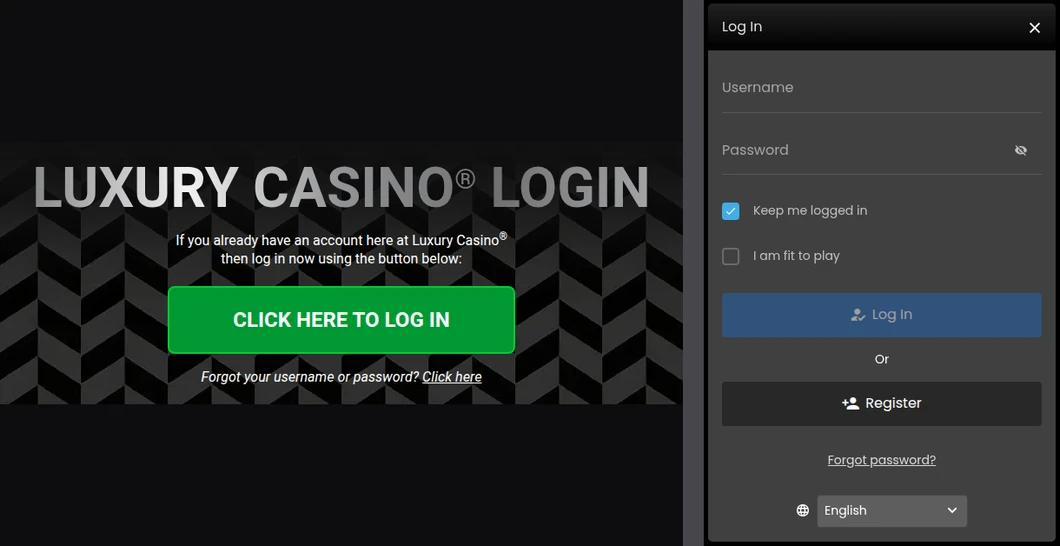
The Luxury Casino Ontario log-in page (left) and the log-in window in the casino lobby (right), both opened from Toronto.
Your Username Is Your Email, at Luxury
The lobby field says Username, and Luxury’s own FAQ explains what goes in it: at the end of registration your username, “which is your email address”, appears on screen with your password. That differs from the FAQs of three sister casinos, Zodiac, Yukon Gold and Grand Mondial, which describe a username of four or five letters followed by numbers. If you also play at one of them, keep each casino’s username apart rather than assuming they match.
The Two Tick Boxes
Keep me logged in comes ticked. Luxury’s FAQ advises against anything that remembers your password where children or other adults use the computer, so clear the box on a shared device. I am fit to play starts empty, and you tick it at every log-in.
Forgotten Username or Password: Luxury Uses Live Chat
Luxury Casino has no self-service reset form. Both recovery links open the Casino Rewards live chat, which is staffed around the clock.
- On the website: “Forgot your username or password? Click here”, under the log-in button, opens the chat window.
- In the lobby: Forgot password?, under the Register button, opens the same chat.
- By email: on the contact page, choose Login/Password as the query type and send it to support@crhelpdesk.com. Luxury aims to answer emails within 48 hours, so use chat if you want to play today.
The agent will check who you are, but never needs your password: Luxury’s FAQ says nobody at the casino knows it, and that you should not give it to anyone, even if contacted.
What the Apollo Global Account Means for Your Login
Apollo Entertainment Ltd runs Luxury Casino alongside Captain Cooks, Casino Classic, Golden Tiger, Grand Mondial, Yukon Gold and Zodiac in Ontario. Your first account at any of them creates a Global Account, and each later account becomes a sub-account linked to it. That has three consequences for logging in.
- Limits travel: deposit and loss limits and responsible gaming settings are managed at the Global Account, so a limit set at Luxury also stops you at a sister casino.
- Each casino keeps its own log-in: the username and password you use at Luxury are not automatically those of a sister site.
- One chargeback locks them all: a deposit that is charged back or disputed can void winnings and lock all your accounts on the Casino Rewards network.
Shared Log-In Details Can Cost the Balance
Luxury’s terms treat every action taken with your correct username and password as yours, biometric log-in included. If the casino finds you have given your log-in details to someone else, it can close or suspend the account without refunding the balance. Tell the support centre straight away if you see a log-in, bet or deposit you did not make.
Sixty Days Without Play, and Other Reasons the Lobby Says No
Most refused log-ins at Luxury come down to activity, verification or a limit you set yourself.
- Dormancy at 60 days: with no bet, deposit or withdrawal for 60 days, the account turns dormant and Luxury removes the balance. Ask support to return the cash: Luxury restores it once you answer its verification or security questions. Luxury only commits to warning you about “material funds”, meaning at least the $50 minimum withdrawal. Payout times, fees and limits are covered in our Luxury Casino withdrawal guide.
- Verification: an account with incorrect or incomplete registration details can be suspended until the documents Luxury asks for are checked.
- Outside Ontario: you confirm you are wagering from within the province, and playing from elsewhere can void winnings and suspend the account.
- Logged-in duration limits: daily, weekly and monthly caps on time logged in, set in the casino software or through support. Lowering one is immediate; raising or removing it waits 24 hours.
- Take a break: 24 or 48 hours, 1, 2 or 3 weeks, 1 month, 6 weeks, 2 months or 3 months.
- Self-exclusion: 6 months or 1, 2, 3, 4 or 5 years, and it cannot be reversed once applied. BetGuard, Ontario’s province-wide exclusion, is separate and handled at BetGuard.ca or on 1-833-776-7171.
The Luxury Casino Ontario App
The app takes the same username and password as the lobby. On the Canadian App Store, Luxury Casino Ontario by Apollo Entertainment Ltd rates 4.4 from 2,415 ratings, needs iOS 16.0 or later and weighs 40.9 MB. On Google Play the same app rates 4.27 from 1,328 ratings, with more than 50,000 installs. Luxury’s terms allow biometric log-in on your device: the biometrics stay on the phone, and you must register only your own. Our Ontario casino apps compared guide sets it beside the rest. Step-by-step install advice for both phones is in our Luxury Casino app guide.
Parts of Luxury’s FAQ still describe a downloadable Windows program and Flash. You do not need either: log in through the browser lobby or the app.
Reaching the Luxury Support Centre
The support centre runs 24 hours a day, seven days a week, by live chat and email, and both are shared with the other Casino Rewards casinos. Chat is the quicker route. Email goes to support@crhelpdesk.com, with a 48-hour target, and complaints that support cannot settle go to complaints@crhelpdesk.com. There is no telephone line; every channel is in our Luxury Casino customer service guide. The Luxury Casino Ontario review covers the games, payments and limits in full.
FAQ’s – Frequently Asked Questions
- Is my Luxury Casino username my email address?
According to Luxury’s FAQ, yes: the username is the email you registered with, shown on screen at the end of registration. Sister casinos such as Zodiac and Yukon Gold describe a username of letters and numbers instead.
- How do I reset my Luxury Casino password?
Through live chat. Forgot your username or password? on the website and Forgot password? in the lobby both open the 24/7 Casino Rewards chat. You can also email support@crhelpdesk.com with Login/Password as the query; replies aim for 48 hours.
- Does my Luxury Casino login work at Yukon Gold or Zodiac?
Not automatically. Each Apollo casino has its own account, linked to one Global Account that carries your limits and responsible gaming settings across all seven Ontario sites.
- What happens to my Luxury Casino balance after 60 days?
With no bet, deposit or withdrawal for 60 days, the account turns dormant and the balance is removed. Cash can be returned on request after verification; Luxury only commits to a warning when at least $50 is left.
- Does Luxury Casino charge fees to withdraw, or are winnings taxed?
Luxury’s FAQ lists $50 for a direct bank transfer, or $100 above $3,000, and no fee on other methods. Gambling wins are not taxable income for recreational players in Canada.
Luxury Casino Ontario Login: Key Points
Start at ontario.luxury.casino, choose Click Here to Log In, then log in to the lobby with your username, which Luxury’s FAQ says is your email, and your password. A forgotten username or password goes through the 24/7 live chat, as there is no reset form.
Clear Keep me logged in on shared devices, remember that your limits follow you across all seven Apollo casinos, and play or move money at least every 60 days so the balance is not removed.








