


 You must be based in Ontario to enjoy all this online casino features
- Royal Panda Login:
Ontario Players
Royal Panda Ontario Login: Right Address, Resets and Locks
Royal Panda Ontario Login: Right Address, Resets and Locks
🕑 Updated: 11 November 2026
 Content Writer
 Content Manager
Visit
Support
- Software Providers


To log in to Royal Panda in Ontario, go to royalpanda.com/en-ca-on, choose Log In, enter your email and password and confirm you are fit to play. The /en-ca address Google shows first is the rest-of-Canada site, and with no app, phones log in through the browser.
Pros
 Ontario has its own address
Password reset by email link
Optional multi-factor log-in
Live chat around the clock
Cons
 Google shows the Malta site first
Fake Royal Panda apps on Play
No app in Canadian stores
Only an international phone line
Logging In at royalpanda.com/en-ca-on
The Ontario casino lives at royalpanda.com/en-ca-on, and its log-in takes the email address and password on your account. Typing plain royalpanda.com from inside Ontario sends you there automatically.
- Go to royalpanda.com/en-ca-on and choose Log In at the top right.
- Enter your email and password; the eye icon shows what you typed.
- Leave Remember me unticked on shared or public computers.
- Select the I confirm that I am fit to play box. Royal Panda’s note explains it: you are not under the influence of alcohol or anything else that may impair your judgment.
- Choose Log In, or Continue with Google to sign in with a Google account, and allow the location check.
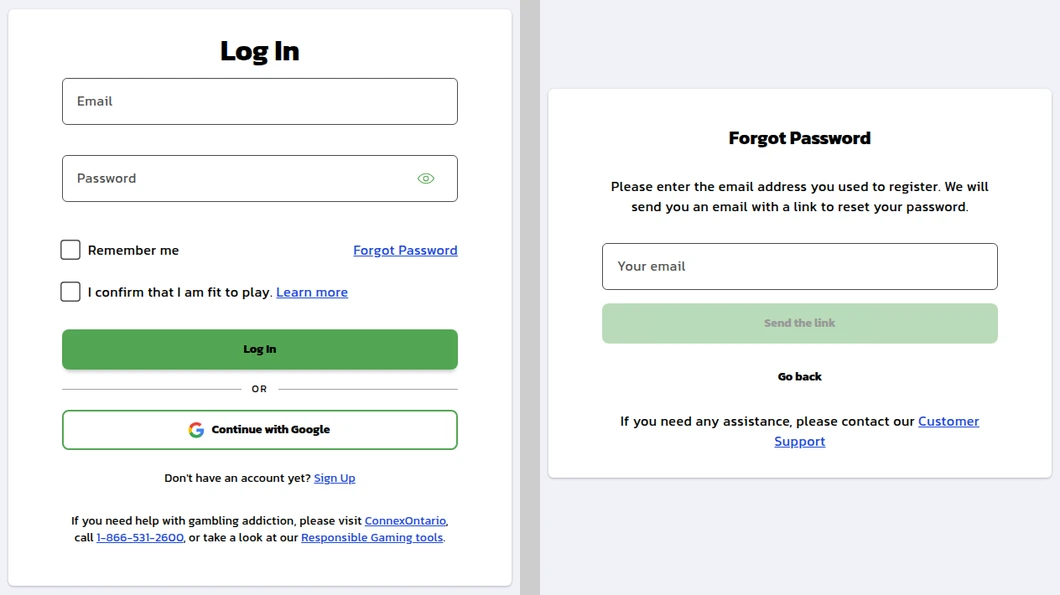
Royal Panda’s Ontario log-in page opened from Toronto (left), and the Forgot Password page it links to (right).
The Address Google Shows First
Search “royal panda login” in Canada and the top result is royalpanda.com/en-ca, the rest-of-Canada site licensed in Malta, with its own catalogue and its own terms. Opened from Ontario, it shows a banner asking whether you want the Canadian – Ontario site instead. Choose Yes, take me there! before you log in. Your Ontario account belongs at /en-ca-on, and the footer there names Tigergen Limited and the AGCO.

A Lookalike Site and Fake Apps
royalpandaontario.ca still calls itself “Royal Panda Official Site”, and it is not the operator’s. Google Play in Canada also carries three listings named Royal Panda from LANDMARK (QLD) LIMITED, filed as music or puzzle apps rated for everyone, while describing themselves as a casino. None comes from Tigergen or the LeoVegas group, and Royal Panda has no app in either Canadian store. Never type your Royal Panda password into any of them.
Forgotten Royal Panda Password, Username or Email
A password reset needs only the email you registered with. Everything else, from a forgotten email to a locked account, goes to Customer Support.
Resetting a Royal Panda Password
Choose Forgot Password on the log-in page, enter the email you used to register and choose Send the link. Follow the link in the email to set a new password: Royal Panda asks for 8 to 16 characters with at least one upper-case letter, one lower-case letter, one number and one special character.
Ten Wrong Attempts Lock the Account
More than 10 incorrect passwords lock the account. Royal Panda’s instruction for a lock is to contact Customer Support, by live chat or email, to regain access.
Username and Email
The log-in form asks for your email, so a forgotten username does not stop you signing in. If you have forgotten which email you used, Customer Support recovers it. Changing the email on the account is done only through live chat, following the agent’s instructions, so that nobody else can redirect your account. If registration tells you an email is already in use, you have an account: reset its password rather than opening a second one, which the terms forbid.
Multi-Factor Authentication and Phishing
Royal Panda’s Ontario terms let you switch on multi-factor authentication for log-ins from your profile settings after registering. It is off unless you choose it, and it is the simplest protection against a stolen password.
- If you typed your details into a fake site: reset the password at once, then tell Customer Support where it happened, including the web address.
- Messages asking for your password: Royal Panda says it never asks for your log-in details by email or on unverified websites.
- Someone else in your account: report it straight away to have your log-in details reset. Under the terms, any use of the account counts as yours unless the operator was grossly negligent.
- Shared devices: leave Remember me unticked and log out when you finish.
Royal Panda Location Checks and Travel
Royal Panda runs an IP location check at every log-in and will not let you continue if you block it. You can only use the account while physically in Ontario.
- Travelling: logging in from outside Ontario can lead to a temporary suspension of the account. When you are back in the province, contact Customer Support by chat or email to regain access.
- VPNs and proxies: they break the terms, and Royal Panda can block the account and its funds if it finds suspicious activity while one is in use.
- Moving abroad: tell Customer Support first, because Royal Panda may not be able to keep the account open from a country where it does not operate.
- Stuck after a log-out: a bet interrupted by a disconnection is frozen and waits for your next log-in. Clearing the browser history, cookies and cache fixes most repeat errors.
Breaks, Inactive Accounts and Closing
Some log-in refusals are limits you have set, or the result of time. These are the Ontario terms, version 1.5 from April 2026.
- Session limit: a pop-up warns you just before the limit, then Royal Panda logs you out.
- Time out: 1 day, 1 week, 1 month, 2 months or 3 months, from your profile or through Customer Support. It cannot be reversed once confirmed.
- Self-exclusion: 6 months, 1 to 5 years or permanent. It logs you out at once, and you cannot log in until it ends. A permanent exclusion, or a closure for gambling addiction, cannot be reopened. Withdraw your balance first.
- BetGuard: Ontario’s province-wide exclusion is separate from Royal Panda’s own, and is handled at BetGuard.ca or on 1-833-776-7171.
- Inactive account: 12 months without a log-in, with real money still in the account, makes it inactive. Royal Panda warns you at least 30 days beforehand and may then freeze the account so you cannot log in; Customer Support reactivates it. One help-centre article describes a $5 monthly fee on dormant accounts, but the Ontario terms contain no such fee.
- Closing: use Close Account in the Profile tab, or ask Customer Support. To reopen an account you closed yourself, ask support; how long it takes depends on why it was closed.
Logging In on a Phone Without an App
Royal Panda has no app in the Canadian App Store or on Google Play, so on a phone you log in through the mobile browser at royalpanda.com/en-ca-on, with the same email and password. The help centre still mentions an iOS app and gives steps for reinstalling one, but neither store carries it in Canada. For an icon on your home screen, use the browser’s “add to home screen” option: it is a shortcut to the site, and the log-in is the same. The sister brand LeoVegas does have an Ontario app, set out in our LeoVegas login guide.
Contacting Royal Panda Support
Live chat runs 24 hours a day from the website. If the chat button is missing, every agent is busy: leave a message or try again later. Ontario players have their own address, support-on@royalpanda.com, and the Ontario terms list a Stockholm number, +46 8 124 11 401, which is an international call. The Royal Panda Ontario review covers the games, payments and limits in full.
FAQ’s – Frequently Asked Questions
- Why does Google send me to a different Royal Panda site?
The top Canadian result is royalpanda.com/en-ca, the rest-of-Canada site licensed in Malta. Opened from Ontario, it asks whether to switch you; choose Yes, take me there! Your Ontario account works at royalpanda.com/en-ca-on.
- How do I reset my Royal Panda password?
Choose Forgot Password on the log-in page, enter the email you registered with and choose Send the link. If you have entered a wrong password more than 10 times, the account is locked: contact Customer Support to regain access.
- Is there a Royal Panda app for Ontario?
No. Royal Panda has no app in either Canadian store, and the Google Play listings called Royal Panda come from other companies. Log in through the mobile browser at royalpanda.com/en-ca-on instead.
- Why can I not log in after travelling outside Ontario?
Logging in from outside the province can trigger a temporary suspension of the account. Once you are back in Ontario, contact Customer Support by live chat or at support-on@royalpanda.com to have it lifted.
- Does Royal Panda charge fees, or are winnings taxed in Ontario?
The Ontario terms allow a 5% charge on withdrawals of deposits that were never wagered, from $10 upwards, and set no fee on inactive accounts. Royal Panda deducts no tax, and Canada does not tax recreational gambling winnings.
Royal Panda Ontario Login: Key Points
Log in at royalpanda.com/en-ca-on with your email and password, not at the /en-ca address Google shows first, and never on royalpandaontario.ca or a Google Play app using the name. A forgotten password is reset by email, while a lock after 10 wrong attempts, a new email or a suspension after travel goes to Customer Support.
There is no app, so bookmark the Ontario address on your phone, and log in at least once a year if you keep money in the account.










