


 You must be based in Ontario to enjoy all this online casino features
- LeoVegas Login:
Ontario Players
LeoVegas Ontario Login: Right Address, Resets and Locks
LeoVegas Ontario Login: Right Address, Resets and Locks
🕑 Updated: 11 November 2026
 Content Writer
 Content Manager
Visit
Support
- Software Providers


To log in to LeoVegas in Ontario, open leovegas.com from inside the province, where it serves the Ontario site at leovegas.com/en-ca-on, or open the LeoVegas app. Choose Log In, enter your email and password, tick the fit to play confirmation and allow the location check.
Pros
 Password reset by email link
Ten tries before a lock
Plays in the mobile browser
Dedicated address for phishing reports
Cons
 No log-in outside Ontario
Email changes only through chat
App rated 3.1 stars
How to Log In to LeoVegas in Ontario
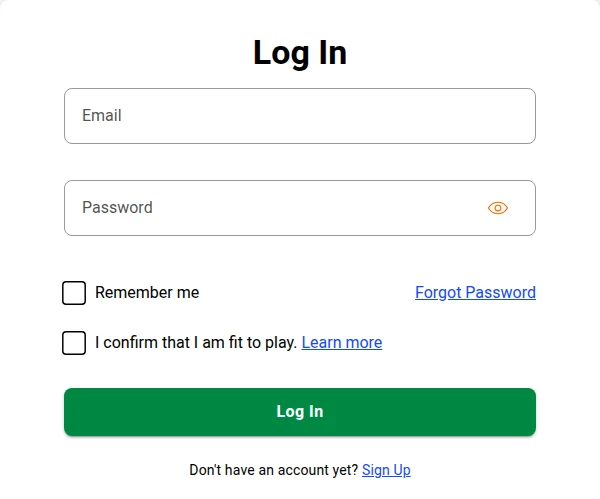
LeoVegas signs you in with your email address and password, on a log-in page of its own rather than a pop-up window.
- Open leovegas.com from inside Ontario. The Ontario site sits at leovegas.com/en-ca-on. Or open the LeoVegas app.
- Choose Log In.
- Add your email and password; the eye icon lets you see the password.
- Tick I confirm that I am fit to play. Tick Remember me only on a device nobody else uses.
- Choose Log In and allow the location check.
One Address, Two Different Sites
LeoVegas has no separate Ontario domain. Inside Ontario, leovegas.com serves the Ontario site, run by Tigergen Limited under AGCO licence OPIG1337312, for players aged 19 and over. Elsewhere in Canada, the same address serves a site licensed in Malta. Before you log in, scroll to the footer: it should name Tigergen Limited and show 19+ and the iGaming Ontario mark. leovegas.ca is not a LeoVegas site at all, but a parked domain the operator does not own.
“Email Already Registered”
If sign-up tells you your email is already registered, you already have an account. Use the lost password link instead, and LeoVegas emails you help to get back in. Each player can hold only one account, and a second one gets closed, so if your email, address or other details have changed, ask support to update the account you have.
Forgotten Password and Account Locks
LeoVegas resets a forgotten password with an email link, and a locked account almost always comes down to one of four causes, from too many wrong passwords to a VPN.
Resetting Your Password
Choose Log In, then Forgot Password, and enter the email address you registered with. LeoVegas sends an email with a link; follow it to create the new password. LeoVegas asks for 8 to 16 characters, with at least one uppercase letter, one lowercase letter, one number and one special character, and a password you do not use anywhere else.
Why the Account Is Locked
- Wrong password more than 10 times: the account locks, and support unlocks it.
- Documents awaited: until LeoVegas receives and checks requested verification documents, the account can stay locked.
- Self-exclusion: an exclusion set at LeoVegas or through an outside register such as BetGuard blocks log-in until it ends; a permanent one cannot be reversed.
- A VPN: using one breaches the terms, and the account may become inaccessible.
Changing Your Email Address
The registered email cannot be changed on screen. Contact live chat and follow the agent’s instructions; LeoVegas does it this way so nobody else can switch the address to take over the account.
Location: Ontario Only
Every LeoVegas customer in Canada has to allow an IP location check at sign-up and at log-in, and without it the log-in will not go through. The check keeps Ontario accounts in Ontario. In the app, LeoVegas also asks to share your location. If you said no the first time, the request does not come back, so switch it on in the phone’s settings: on iPhone, Settings > Privacy > Location Services > LeoVegas; on Android, touch and hold Location in the quick settings, open App location permissions and choose LeoVegas.
Travelling Outside Ontario
LeoVegas is stricter here than Betty or bet365: you can only access the account and play while physically in Ontario. Logging in from somewhere it is not licensed can get the account temporarily suspended. If that happens, contact support by chat or email once you are back in Ontario. If you are moving abroad for good, tell support first.
When the Site or App Will Not Load
On a computer, refresh the page, check your connection, clear the cache and cookies, or try another browser. On a phone, force-quit and restart the app, switch between Wi-Fi and mobile data, check for an app update, or reinstall it. If you are logged out mid-game, your bet is frozen and waits for you the next time you connect.
The LeoVegas App
The app is LeoVegas Real Money Casino, published in the Canadian App Store by Gears of Leo AB. Its listing names iGaming Ontario and the AGCO, and it needs iOS 16.0 or later. On devices that support it, the app offers biometric unlock. You do not have to use it: LeoVegas plays in the mobile browser on iPhone and Android too, an alternative worth knowing, given the app’s rating of 3.1 from 80 reviews. Our Ontario casino apps compared guide shows where that rating sits. The Google Play copies of the name are covered in our LeoVegas app guide.
Keeping Your LeoVegas Account Secure
- Genuine LeoVegas emails and texts come only from noreply@leovegas.com, and LeoVegas never asks for your password or payment details by email or SMS.
- Forward suspicious emails to phishing@leovegas.com, and simply delete suspicious texts.
- If you typed your details into a fake site, reset the password straight away and tell support which site it was.
- Never share your log-in, even with family, and report any activity you do not recognise.
Log in now and then, too. The help centre linked from the Ontario site says an account with no activity for 365 days becomes dormant and is charged $5 a month from its balance, as long as the balance is over $1; LeoVegas emails about 30 days beforehand, and logging in stops the fee. Payout times and limits are covered in our LeoVegas withdrawal guide. Support is live chat and email at support-on@leovegas.com; there is no phone line.
New to LeoVegas? Creating an Account
- Choose Sign Up, enter your email address and a password, and confirm you are ready to play responsibly.
- Add your first and last name as they appear on your ID, date of birth, mobile number, address and occupation.
- Set a deposit limit and a loss limit; both are optional, but worth doing now.
- Confirm you are playing for yourself, read the terms and accept them.
Deposit only with payment methods in your own name. Uploaded documents are acknowledged within 30 minutes and usually reviewed within three business days; you can follow progress under Account Overview. Players must be 19 or over and in Ontario; deposits start at $10. The LeoVegas Ontario review covers the games, payments and support in full.
FAQ’s – Frequently Asked Questions
- How do I log in to LeoVegas in Ontario?
Open leovegas.com from inside Ontario, or the LeoVegas app, and choose Log In. Enter your email and password, tick I confirm that I am fit to play, and allow the location check. The Ontario site is at leovegas.com/en-ca-on.
- How do I reset my LeoVegas password?
Choose Forgot Password on the log-in page and enter your registered email. LeoVegas emails a link for creating a new password of 8 to 16 characters, mixing upper and lower case, a number and a special character.
- Why is my LeoVegas account locked?
Usually because the password was entered wrongly more than 10 times, requested documents have not been verified yet, a self-exclusion is running, or a VPN was detected. Support can tell you which, and unlock it where possible.
- Can I log in to LeoVegas outside Ontario?
No. You can only access the account and play while in Ontario, and logging in from an unlicensed location can suspend it temporarily. Contact support by chat or email once you are back.
- Is leovegas.ca the LeoVegas Ontario site?
No. leovegas.ca is a parked domain that LeoVegas does not own. The Ontario site is leovegas.com, opened from inside the province, with Tigergen Limited and 19+ in the footer.
LeoVegas Ontario Login: Key Points
Log in at leovegas.com from inside Ontario, at the en-ca-on address, or in the LeoVegas app, with your email, your password and the fit to play box ticked. Check the footer names Tigergen Limited, and ignore leovegas.ca.
A forgotten password is reset by email link, ten wrong attempts lock the account, and the account works only inside Ontario. Email changes go through live chat, and messages from anyone but noreply@leovegas.com are not from LeoVegas.





