



 You must be based in Ontario to enjoy all this online casino features
- Spin Casino Login:
Ontario Players
Spin Casino Ontario Login: Username, 2-Step Codes, Location
Spin Casino Ontario Login: Username, 2-Step Codes, Location
🕑 Updated: 11 November 2026
 Content Writer
 Content Manager
Visit
Support
- Software Providers



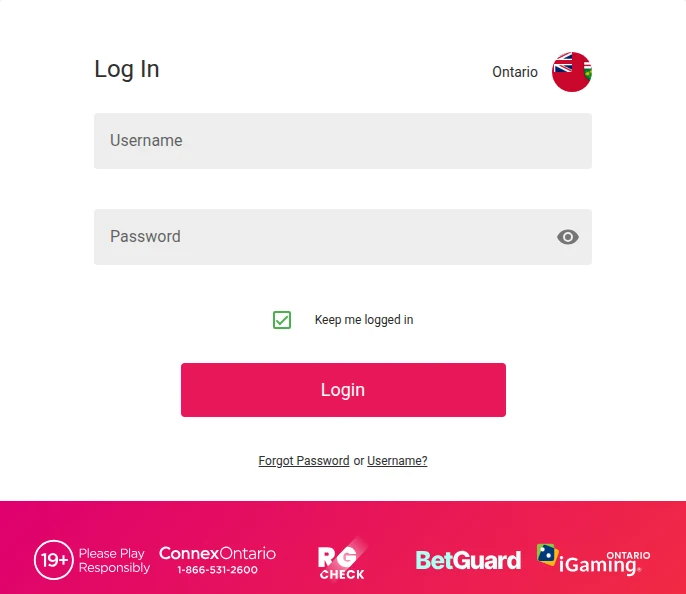
To log in to Spin Casino in Ontario, go to spincasino.ca/ontario or the Ontario app and choose Login. The sign-in page opens at auth.spincasino.ca, marked Ontario: enter your username and password, add the one-time code if 2-Step Verification is on, and allow location services.
Pros
 2-Step codes by text or email
Text codes copied to email
Toll-free phone line for help
Separate links for each detail
Cons
 Lookalike sites crowd the search
Stays logged in by default
Inactivity fee after six months
How to Log In to Spin Casino in Ontario
Spin Casino signs you in with a username, not an email address, on a separate sign-in page at auth.spincasino.ca that is marked Ontario.
- Go to spincasino.ca/ontario, not spincasino.com, or open the Ontario app.
- Choose Login. The sign-in page opens with Ontario and the provincial flag at the top of the form.
- Enter your username and password; the eye icon shows the password as you type.
- Keep me logged in is ticked by default. Untick it on a computer or phone that other people use.
- Choose Login, enter the one-time code if 2-Step Verification is on, and allow location services.
Make Sure It Is the Ontario Spin Casino
A search for Spin Casino turns up several sites that are not the Ontario casino. spincasino.com/ca is the international Spin Casino, run by Baytree Interactive under a Kahnawake licence, and its province selector even lists Ontario. Its payment methods are not the Ontario ones either, as our Spin Casino withdrawal guide shows. Others, such as spin-ontario.ca, spincasino-ontario.ca, spincasino-ontario.com and ca-spincasino.com, simply borrow the name. None is on the iGaming Ontario register. Type spincasino.ca/ontario yourself rather than clicking through from search.
Four Casinos, Four Sign-Ins
Cadtree Limited runs four casinos in Ontario: Spin Casino, Jackpot City, Ruby Fortune and Royal Vegas. They share terms, a help desk and a phone line, but each has its own site and its own sign-in, so your Spin Casino username is the one to use here. An exclusion, however, covers every account you hold with the four. Our Jackpot City login guide covers the sister casino.
2-Step Verification at Spin Casino
With 2-Step Verification on, Spin Casino sends a one-time code (OTP) that you enter at each log-in, confirming the request comes from you. You choose text or email; if you choose text, the code goes to your email as well, so a lost text does not lock you out.
- Open the drop-down next to your username on a computer, or the menu at the bottom of the screen on a phone, and choose My Account.
- In My Details, find 2-Step Verification and choose Manage Setup.
- Choose Text Message or Email, confirm, and check the number or address shown.
- Choose Send Verification Code, enter the code and enable 2-Step Verification.
To switch it off, go back to Manage Setup and choose Off. If your phone number or email changes, update your contact details in My Details first; the 2-Step settings follow automatically.
Forgotten Spin Casino Username or Password
Under the Login button, the line Forgot Password or Username? has a link for each.
Resetting a Spin Casino Password
Choose Forgot Password, enter your username and submit. Spin Casino emails a reset link to your registered address. It can take a few minutes, so check the junk or spam folder before asking again.
Recovering the Username
Choose Username?, enter the email address you registered with and submit, and the instructions arrive by email.
Still Locked Out
If the details are right and you still cannot get in, the account may be under review while documents are checked, or closed or excluded, including through BetGuard, iGaming Ontario’s central self-exclusion. Clearing the browser’s cookies and cache can fix a sign-in page that keeps failing. After that, live chat is the route: an agent has to look at the account.
Location Services: Why Spin Casino Will Not Let You Play
Spin Casino has to confirm your location before it lets you play, so location services must be on and allowed when asked. If the check fails, the help centre suggests a short list of fixes.
- Restart the device to refresh its location.
- Turn on the location options your device offers, such as GPS, Bluetooth, Wi-Fi, mobile data and precise or high-accuracy location.
- Close any VPN or remote-access program, such as RDP, AnyDesk, UltraViewer or TeamViewer, then wait about 60 seconds before refreshing the page.
- Switch between Wi-Fi and mobile data; Wi-Fi usually gives the stronger fix.
- Still refused inside Ontario? Your internet provider may place your IP address elsewhere, so ask it where the address is located.
In the iPhone app, set the casino app to While Using the App under Settings > Privacy > Location Services, with Precise Location on, then choose Enable on the white location banner in the app and Allow. On Android, turn on Improve Location Accuracy under Location Services > Google Location Accuracy.
The Spin Casino App
The iPhone app is Spin Casino Real Money Slots, published in the Canadian App Store by Cadtree Limited, and it needs iOS 15.1 or later. On Android, the help centre points to a download from the website, and the Google Play listing, Spin Casino Online Gambling, appears under the name Zulu Digital; it is still the official Ontario app, and our Spin Casino app guide walks through installing it on each phone. The username and password are the same as on the site. The Ontario casino apps compared guide puts its rating in context.
Keeping Your Spin Casino Account Secure
- Switch on 2-Step Verification, so a stolen password is not enough on its own.
- Choose a strong password you use nowhere else: the terms make you responsible for activity on the account when the right details are entered.
- Never share the username or password, even with a relative.
- Keep your phone number and email current in My Details, because codes and reset links go there.
Log in at least every six months. Under the terms, an account with no log-in or log-out for more than six consecutive months is inactive, once all your Cadtree accounts are. Spin Casino then notifies you of any balance, and if you neither reply nor withdraw within 30 days, it can deduct C$10 a month until the balance runs out or the account is active again. A simple log-in keeps it active. Support is live chat, around the clock, an email link per brand on the help centre, and the toll-free line 1 888 378 1328, all covered in our Spin Casino customer service guide.
New to Spin Casino? Creating an Account
- Choose New to Spin Casino? Sign up on the sign-in page, or Sign Up on the Ontario homepage.
- Fill in your personal details exactly as they appear on your government-issued ID.
- Tick the box agreeing to the terms and confirming you are over 19, then choose Register.
- Switch on location services when asked.
Until the account is verified, you cannot play. Upload a government-issued photo ID and a proof of address no older than six months under My Account > Verification. If uploading fails, email them to verifyme@playersupportcentre.ca with your username, as PDF, JPEG or PNG files under 20 MB. The minimum deposit is $10. The Spin Casino Ontario review covers the games, payments and support in full.
FAQ’s – Frequently Asked Questions
- Where is the Spin Casino Ontario login page?
Choose Login on spincasino.ca/ontario, which opens the sign-in page at auth.spincasino.ca, marked Ontario. Sign in with your username, not your email. spincasino.com is the international Spin Casino, not the Ontario one.
- How do I reset my Spin Casino password?
Choose Forgot Password under the Login button, enter your username and submit. A reset link goes to your registered email within a few minutes; check the spam folder if it does not appear.
- I forgot my Spin Casino username. What do I do?
Choose Username? under the Login button and enter the email address you registered with. Spin Casino emails the instructions to that address.
- How do I turn on 2-Step Verification at Spin Casino?
Go to My Account, then My Details, and choose Manage Setup next to 2-Step Verification. Pick text or email, send yourself a code and enter it. Codes sent by text also go to your email.
- Will Spin Casino charge me if I stop logging in?
Only after more than six months without a log-in, once all your Cadtree accounts are inactive, and a 30-day notice goes unanswered. Then C$10 a month can be deducted from the balance. One log-in keeps the account active.
Spin Casino Ontario Login: Key Points
Log in through spincasino.ca/ontario or the Ontario app, with your username and password, and switch on 2-Step Verification for a code at every log-in. Ignore spincasino.com and the lookalike domains.
Forgot Password needs your username and Username? needs your email. When location fails, close any VPN or remote-access program, wait a minute and refresh, and log in at least every six months to keep the account active.









