


 You must be based in Ontario to enjoy all this online casino features
- Casino Days Login:
Ontario Players
Casino Days Ontario Login: /on Address, Resets and Location
Casino Days Ontario Login: /on Address, Resets and Location
🕑 Updated: 11 November 2026
 Content Writer
 Content Manager
Visit
Support
- Software Providers


To log in to Casino Days in Ontario, open casinodays.com/on, not the bare casinodays.com, or the Casino Days app. Choose Log in, enter the email and password you registered with, switch on the fit to play confirmation, and allow the location check that confirms you are in Ontario.
Pros
 Simple email and password log-in
Password reset by email link
Account visible outside Ontario
Clear location troubleshooting steps
Cons
 Bare domain serves other markets
Detail changes need an email
No deposits outside Ontario
How to Log In to Casino Days in Ontario
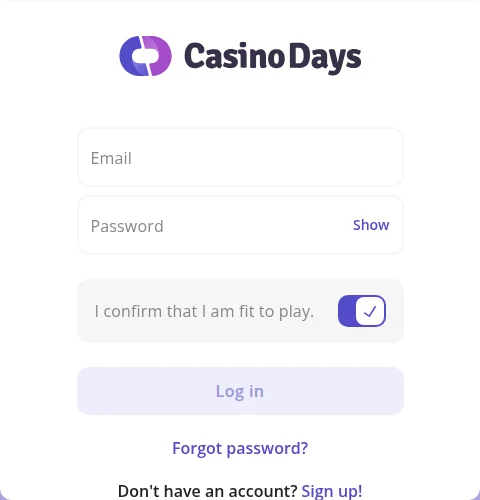
Casino Days uses your email address as your log-in name. The Log in button sits at the top right of the page on a computer and at the bottom left on a phone.
- Open casinodays.com/on, with the /on at the end, or the Casino Days app.
- Choose Log in.
- Enter the email and password you registered with. Show lets you check the password as you type it.
- Switch on I confirm that I am fit to play. Casino Days asks for this confirmation before every log-in.
- Choose Log in, and allow location access when your browser or phone asks.
Why the /on Matters
casinodays.com is one site serving nine markets, each on its own path: /on for Ontario, /ab for Alberta, /ca for the rest of Canada, and others for markets as far apart as New Zealand and Finland. Only Ontario and Alberta carry a Canadian provincial licence. The iGaming Ontario register lists casinodays.com/on, and your Ontario account lives there and nowhere else, so bookmark that address rather than the bare domain.
One Account, Even If You Forget the Password
Each player may hold one personal account at Casino Days, and you cannot open one for someone else. The operator’s own advice is plain: if you forget your password, do not register again, but request a reset from the log-in window.
Forgotten Password and Changes to Your Account
A forgotten password is fixed from the log-in window in a couple of minutes, by email. Changing the details on the account takes longer, because Casino Days handles those through its support team.
Resetting a Casino Days Password
Under the Log in button, choose Forgot password?. Casino Days asks for the email address associated with your account and, once you press Send reset link, emails you a link for setting a new password. If nothing arrives, check your spam folder before asking the chat team.
Changing Your Password
Once you are logged in, open the menu, choose My Account and change the password in the Profile section. Do it straight away if you think someone else has seen your details.
Changing Your Email, Name or Address
Other details cannot be edited on screen. Email helpdesk@casinodays.com with the details you want changed, the reason, and a document that shows them, such as ID for a change of name. The account currency is set by your country of residence and cannot be changed.
Nobody From Casino Days Will Ask for Your Password
No Casino Days representative will ever ask for your password, so anyone who does is not from the casino. The Ontario terms also make keeping it confidential your responsibility: the operator does not accept losses from misuse of your log-in details.
Location Checks: When Casino Days Will Not Let You Play
Ontario rules require Casino Days to confirm that you are physically in the province before you play, and its terms allow it to check each time you access the site and periodically afterwards. The check runs through Xpoint, a third-party geolocation service, and needs location permission on both your device and your browser.
Switching Location On
Turn location on in the device settings first: Privacy > Location on Windows, Location Services on a Mac or an iPhone, and Location on Android. Then allow it in the browser: in Chrome or Edge, set Location under Site settings or Site permissions to Ask before accessing; in Safari, allow location for websites.
In Ontario but Still Blocked
Turn off any VPN, iCloud Private Relay, ad blocker, and on Android, Developer Options. Switch from mobile data to Wi-Fi or the other way round, and give the device a moment to refresh its position. On a phone, Casino Days suggests switching airplane mode on for 15 seconds and then off again. If it still fails, contact the chat team with a short description and the steps you have already tried.
Logging In from Outside Ontario
From outside the province you can still log in and see your account details, but playing and depositing only work once you are back. If you have moved away for good, the chat team will take you through the next steps.
The Casino Days App
The iPhone app is Casino Days: Online Casino, published in the Canadian App Store by Golden Nebula Limited, the same company that holds the Ontario licence, and it needs iOS 15.6 or later. On Android it is the Google Play package com.casinodays.canada. Its listing is for Ontario players only, aged 19 and over, and the log-in is the same email and password as on the website. See how it compares in our guide to Ontario casino apps compared. Its store text and the data it declares are set out in our Casino Days app guide.
Keeping Your Casino Days Account Secure
- Log in only at casinodays.com/on or in the official app.
- Use a password you do not use anywhere else, and protect your email account, since reset links go there.
- Never share your password, whoever asks for it.
- Keep to one account; a second one is against the rules.
- Set deposit and loss limits early: lowering them is instant, but raising them takes 24 hours.
Help comes through live chat, around the clock, and by email at helpdesk@casinodays.com, which aims to reply within 24 hours; there is no support phone line. A formal complaint is acknowledged within 24 hours and resolved within 90 days, and if you disagree with the outcome you can take it to iGaming Ontario.
New to Casino Days? Creating an Account
Registration runs through a sign-up form supplied by a third party, Regily, so switch off blockers that stop embedded content before you start.
- Choose Sign up at casinodays.com/on.
- Enter your email address and set a password.
- Confirm your nationality, full name, gender and address exactly as they appear on your ID; a missing detail gets the application rejected.
- Set your deposit limits during sign-up or straight after it.
You must live in Ontario, temporarily or permanently, be 19 or older and be in the province when you play. Casino Days asks for documents once certain limits are reached, and sometimes at sign-up: ID, proof of address no older than three months and, depending on the method, proof of payment, uploaded in the Verification section of your profile. Reviews take 24 to 48 hours, and the minimum deposit is $20. The Casino Days Ontario review covers the games, payments and support in full.
FAQ’s – Frequently Asked Questions
- Where do I log in to Casino Days in Ontario?
At casinodays.com/on or in the Casino Days app. Choose Log in, enter your email and password, switch on the fit to play confirmation and allow location access. The bare casinodays.com serves other markets, and your Ontario account is not there.
- How do I reset my Casino Days password?
Choose Forgot password? in the log-in window and enter the email address on your account, and Casino Days emails you a reset link. Do not open a new account instead: each player may hold only one.
- Why can I not play at Casino Days when I am in Ontario?
Usually because of location settings. Allow location on both the device and the browser, and turn off VPNs, iCloud Private Relay, ad blockers and Android Developer Options. Switching between Wi-Fi and mobile data, or toggling airplane mode for 15 seconds, also helps.
- Can I use Casino Days outside Ontario?
You can log in and see your account details, but playing and depositing only work once you are back in the province. If you have moved away permanently, contact the chat team.
- Can I change my Casino Days email address or name?
Not on screen. Email helpdesk@casinodays.com with the details to change, the reason and a document that shows them, such as ID for a new name. The account currency is fixed by your country of residence.
Casino Days Ontario Login: Key Points
Log in at casinodays.com/on, not the bare domain, or in the Casino Days app, with your email and password and the fit to play switch turned on. Keep location permission on for both the device and the browser, and turn off VPNs and Private Relay.
A forgotten password needs only the Forgot password? link and your email inbox. Other changes go by email to helpdesk@casinodays.com, and a second account is never the answer.










