You must be based in Ontario to enjoy all this online casino features
- Titan Play Login:
Ontario Players
Titan Play Ontario Login: Email or Username, Reset, Apps
Titan Play Ontario Login: Email or Username, Reset, Apps
🕑 Updated: 11 November 2026
 Content Writer
 Content Manager
Visit
Support
- Software Providers




To log in to Titan Play in Ontario, open titanplay.ca, click LOG IN, then use your account’s email or username and password. A forgotten password also needs your birth date, and the Android app comes from the site, not Google Play.
Pros
 Email or username accepted
Birth date protects resets
24/7 chat without signing in
Instant self-service closure
Cons
 Android app not on Google Play
iPhone app rated 1.6
Unrelated Titan log-ins in search
Reopening after exclusion takes a call
Logging In at titanplay.ca
Titan Play, the Ontario casino and sportsbook of Shark77 Limited, signs you in from a dark Account Login window at titanplay.ca. The first box is labelled Email or Username, and either detail works, so it does not matter which one you remember.
- Open titanplay.ca and choose Allow all, Allow selection or Deny on the Cookiebot banner.
- Click LOG IN, the outlined button at the top right, just left of the red REGISTER.
- Under Email or Username, type either detail, then your password.
- Tick “I confirm that I am fit for play.”, then press the orange LOG IN button.
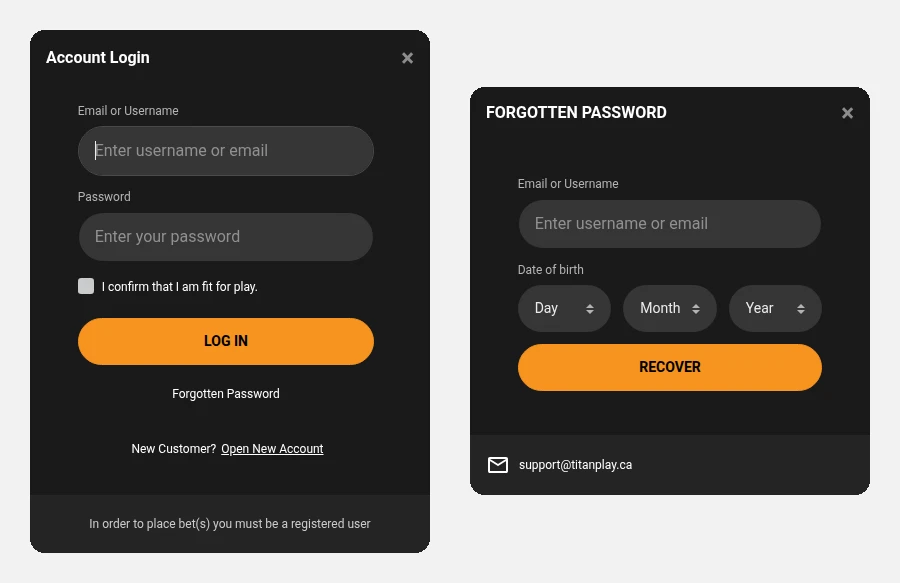
Opened from Toronto: Titan Play’s Account Login (left) and the Forgotten Password window, with its date-of-birth check (right).
Titan Mail and Other Titans in the Results
In Canada, a search for “titan play login” gets the casino right at the top, with titanplay.ca first and its iPhone app second. Further down, though, the word Titan pulls in log-in pages that have nothing to do with gambling: Titan Mail, an email service at app.titan.email, and the log-in pages of titanperformance.ca and app.titan.com. None of these accepts your casino details, and none should ever be given them. If a page asks for your Titan Play password, the address bar should read titanplay.ca.
Recovering a Password: Have Your Date of Birth Ready
Titan Play’s reset form carries an extra identity check: it wants your birth date as well as an account detail.
- Open the Account Login window and click Forgotten Password, beneath the LOG IN button.
- Type the email or the username, then select your birth day, month and year in the three menus.
- Press RECOVER and open the email Titan Play sends; its link lets you choose a new password. The FAQ suggests looking in the Junk or Spam folder if it does not show up.
If you have lost track of both the email address and the username, the form cannot help, and the FAQ sends you to customer support. The address support@titanplay.ca is printed at the bottom of the same window.
Changing a Password You Already Know
Signed in and simply want a new password? Click your username at the top right, choose Change password and fill in three fields: Old password, New Password and Confirm New Password. Save New Password applies it. The same username menu also holds Bet List, where casino, live casino and sports activity can be filtered by date.
The iPhone App and the Android Download
Titan Play publishes two apps, but only one sits in a store:
- iPhone: “Titanplay” from SHARK77 LIMITED on the Canadian App Store, rated 1.6 from 14 ratings, version 1.18.2, a 42.7 MB download for iOS 15.1 or later.
- Android: there is no Titan Play listing on Google Play. Instead, the site footer, under Mobile Apps, has a Download android Application button that fetches an installation file of about 52 MB directly, outside the store.
Installing that file means letting your browser install apps from outside Google Play, a setting Android asks you to approve before the file will open. If you would rather not, the mobile site at titanplay.ca takes the same email or username and password. Better-rated apps from other operators are listed in our Ontario casino app rankings.
A Platform Shared With BetNova
Titan Play is a white-label site on Orbit, the platform that also runs BetNova for a different operator, which is why the two log-in and reset windows look identical. Our BetNova login guide covers BetNova’s location check on a computer and its session limit, a useful reference if Titan Play shows a similar message. The accounts themselves are separate.
Live Chat Asks Who You Are First
Support works around the clock, and you do not need to be logged in to reach it:
- Live chat: start it from the round chat button at the bottom right or any Live Chat banner; a pop-up asks for your email or username before you submit. If no agent is free, you are told how to leave a request by email instead.
- Email: support@titanplay.ca handles account, payment and technical problems.
- Verification: Titan Play checks identity with a government photo ID and a selfie taken with a phone camera, so have both ready if support asks.
Closing, Self-Excluding and Dormant Accounts
- Closing: the Deactivate Account button in the Responsible Gaming area of My Account closes it at once, while a request emailed to support from the address on the account can take up to 24 hours.
- Self-exclusion: you choose 6 months, 1 year or 5 years and are signed out on the spot. When the period ends, the account stays closed until you ask to reopen it, which involves a conversation with the customer protection team and a further 24 hours.
- Dormancy: a year (365 days) of inactivity closes an account holding nothing, at no cost; with funds left, you get a 28-day window to tell Titan Play how to return them. Placing a bet or making a deposit wakes the account up, and no monthly fee applies.
- One account each: a second account, or someone else using yours, can lead to closure, and the terms rule out tools that hide your location.
Our Titan Play Ontario review covers the 2,679-game lobby, the sportsbook and the withdrawal caps.
FAQ’s – Frequently Asked Questions
- Can I log in to Titan Play with my email?
Yes. Either your email address or your username goes in the first box of the Account Login window, followed by the password and the fit-for-play tick.
- Why does the Titan Play password reset ask for my date of birth?
It is an extra identity check. Enter your email or username plus the birth date on the account, press RECOVER, and a reset link arrives by email.
- Is there a Titan Play app for Android?
Not on Google Play. The footer of titanplay.ca has an Android file to download directly, which needs installs from outside the store allowed; otherwise use the mobile site.
- How do I contact Titan Play if I cannot log in?
Open live chat from the bottom-right button and give your email or username, or write to support@titanplay.ca. Both run 24/7 and need no sign-in.
- Does Titan Play close inactive accounts?
After 365 days without activity, yes: an empty account closes at no cost, while a balance triggers a 28-day notice. Canada does not tax the wins of someone who gambles for fun.
Titan Play Login Summary
Use titanplay.ca, where one box takes the email or the username, and tick the fit-for-play box each time. Resetting also means confirming your birth date.
iPhone users have an App Store app; on Android the app is a direct download from the footer, and the mobile site is the alternative. Live chat works before you log in.