


 You must be based in Ontario to enjoy all this online casino features
- Pinnacle Login:
Ontario Players
Pinnacle Ontario Login: Email or Client ID, Recovery
Pinnacle Ontario Login: Email or Client ID, Recovery
🕑 Updated: 11 November 2026
 Content Writer
 Content Manager
Visit
Support
- Software Providers



To log in to Pinnacle in Ontario, go to pinnacle.ca and sign in with your email or Client ID and password, after ticking I am fit for play. Pinnacle.com and pinnacle.bet are the international sites, and other Pinnacle companies crowd the search.
Pros
 Email or Client ID log-in
Last ten log-ins visible
No inactivity fee
Optional email 2FA
Cons
 No native app
Recovery needs a security answer
Account recovery by email only
Unusable outside Ontario
Logging In at pinnacle.ca
Pinnacle’s Ontario account lives at pinnacle.ca, and one log-in covers the sportsbook, the casino at casino.pinnacle.ca and the live casino. The fields sit in the site header, and the same form has its own page at pinnacle.ca/en/account/login.
- Enter your email or Client ID; either one signs you in.
- Type your password, then confirm the I am fit for play box.
- Press LOG IN. If you switched on two-factor authentication, enter the code Pinnacle emails you.
- On a computer, let the GeoComply plugin check your location; Pinnacle repeats the check while you stay logged in.
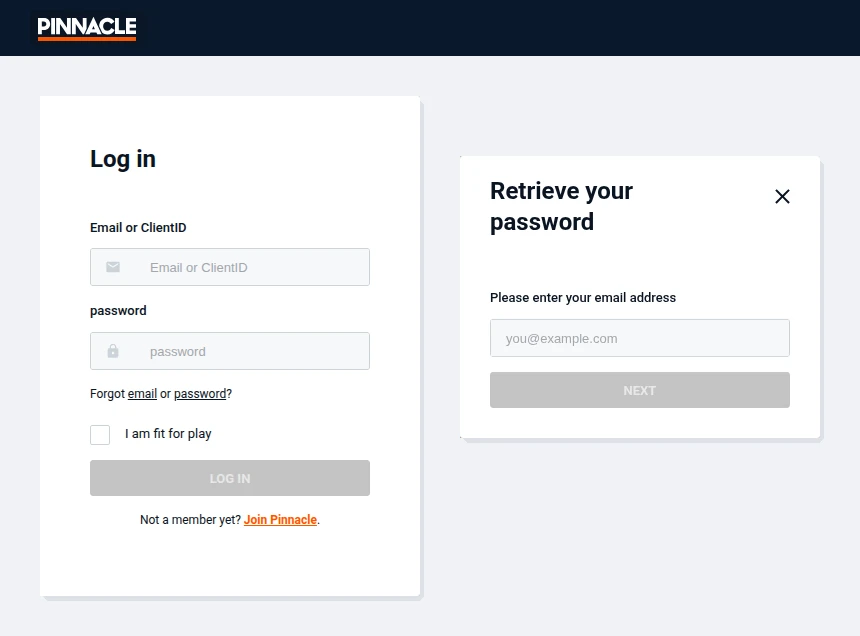
Pinnacle’s Ontario log-in page (left) and its Retrieve your password window (right), opened from Toronto at pinnacle.ca.
Your Client ID
Pinnacle gives every account a Client ID, two letters followed by six or seven digits, sent by email when the account is activated and shown at the top right once you are signed in. It works in place of your email at log-in, and Pinnacle asks for it in complaints and email requests.
Pinnacle.com, Pinnacle.bet and Other Pinnacles
The word Pinnacle belongs to many businesses, so a plain “pinnacle login” search in Canada fills with fund managers, banks, training portals and health clinics. The betting results include pinnacle.com and pinnacle.bet, Pinnacle’s international sites, and casino.pinnacle.com, none of which hosts an Ontario account; Pinnacle’s own help centre points players in other provinces to Pinnacle.com. Lower down, sites such as pinnaclecasino.win and pinnacle-sports1.com, which calls itself an “Official Site”, are not Pinny (Ontario) Limited. Type pinnacle.ca yourself.
Password Recovery with a Security Question
Pinnacle’s reset is stricter than most: it checks a security question and sends a temporary password instead of a link.
- Under the password field, choose password in “Forgot email or password?”.
- In “Retrieve your password”, enter the registered email, press NEXT and answer your security question.
- Log in with the temporary password Pinnacle emails you.
- Create a new password when prompted: at least eight characters, with a letter, a number and a special character.
Forgotten the security answer, or stuck? Write to customerservice@pinnacle.ca from your registered email. Pinnacle’s help centre says password recovery is not handled over live chat, for security reasons.
Forgotten Email or Client ID
- Email: choose email in “Forgot email or password?” and enter your first name, last name, date of birth and country of residence. If they match, the window shows your registered address with only its first and last letters visible.
- Client ID: at the bottom of the same Forgot email window, request the ID and it is emailed to your registered address.
- Changing the email: write to Customer Service from the current address; if you have lost it, write from the new one with your Client ID and the reason.
Locked Accounts and Login History
- Not activated: a new account must be activated from the email link before the first log-in. Check spam, or request a new link at the bottom of the Join page.
- Several failed log-ins: the account is temporarily suspended; contact Customer Service for the unblocking steps.
- Documents requested: Pinnacle emails instructions, and access returns once they are approved.
- Something looks wrong: My Account > Password and Security > Last Logins lists the date, time and IP address of your last ten log-ins. If someone else got in, email customerservice@pinnacle.ca from your registered address and Pinnacle suspends the account.
Two-factor authentication is optional: switch it on under My Account > Password & Security, and every log-in then needs a code sent to your registered email, never to another address.
Location: Ontario Only, Even on a Trip
A Pinnacle.ca account cannot be used anywhere outside Ontario, according to its help centre. The GeoComply plugin checks your location at each log-in and periodically afterwards; on a phone, the terms say the check works only on selected mobile carriers and may fail while roaming. Turn off any VPN or proxy before signing in.
No App: Save Pinnacle to Your Home Screen
Pinnacle has no app in the App Store or Google Play. Its help centre suggests a shortcut instead: in Safari on an iPhone, tap Share and then Add to Home Screen; in Chrome on Android, open the menu and choose Add to Home screen. The icon opens the same site and log-in. Operators with native apps are listed on our Ontario casino apps compared page.
Inactivity, Closing and Support
Pinnacle charges no inactivity fee in Ontario. An account with no deposit and no bets for 12 months becomes inactive, with a warning in the 11th month, and is closed after 84 months. To close it sooner, email customerservice@pinnacle.ca from your registered address. Live chat runs 24/7 at support.pinnacle.ca, but account recovery goes by email. The Pinnacle Ontario review covers the casino, the sportsbook and payments.
FAQ’s – Frequently Asked Questions
- Can I log in to Pinnacle with my Client ID?
Yes. The log-in accepts your email or your Client ID, two letters and six or seven digits. It arrives by email when the account is activated and appears at the top right once you are signed in.
- How do I reset my Pinnacle password?
Choose password under Forgot email or password?, enter your email and answer your security question. Pinnacle emails a temporary password; log in with it and set a new one.
- I forgot which email I used for Pinnacle. What now?
Choose email under Forgot email or password? and give your first and last name, date of birth and country. If they match, Pinnacle shows the address with only its first and last letters.
- Does Pinnacle have an app in Ontario?
No. Pinnacle has no App Store or Google Play app; add pinnacle.ca to your home screen from Safari or Chrome instead. The shortcut opens the normal site and log-in.
- Does Pinnacle charge for inactive accounts?
No fee is set in the Ontario terms. After 12 months without deposits or bets the account becomes inactive, and it is closed after 84 months. In Canada, a recreational player’s gambling wins are not taxable.
Pinnacle Ontario Login in Brief
Type pinnacle.ca yourself, then sign in with your email or Client ID and tick I am fit for play. Password recovery needs your security answer and ends with a temporary password.
Keep your registered email working, because 2FA codes, recovery and account changes all depend on it, and remember the account only works inside Ontario.









