


 You must be based in Ontario to enjoy all this online casino features
- GGPoker Login:
Ontario Players
GGPoker Ontario Login: Client, App and GGPass
GGPoker Ontario Login: Client, App and GGPass
🕑 Updated: 11 November 2026
 Content Writer
 Content Manager
Visit
Support
- Software Providers
To log in to GGPoker in Ontario, open the GGPoker client on Windows or Mac, or the GGPoker Ontario: Poker Games app, and use your GGPass email and password. ggpoker.ca itself has no log-in button, and Google often lists the global ggpoker.com first.
Pros
 Four two-factor methods
Passkey log-in available
Fund password guards withdrawals
One GGPass for every account
Cons
 No log-in on the website
Resets need a verified email
Global app in the same store
Android app rated 2.8
Where GGPoker Ontario Players Log In
There is no log-in button on the ggpoker.ca website. GGPoker Ontario signs you in inside its software: the downloadable client for Windows or Mac, or the GGPoker Ontario: Poker Games app on iPhone and Android.
- Download the client from ggpoker.ca/download, or install the Ontario app from the App Store or Google Play.
- Open it and sign in with the email address and password of your account.
- If you have two-factor authentication on, enter the code from your chosen method.
- Let the software confirm you are in Ontario; only players located in the province can play.
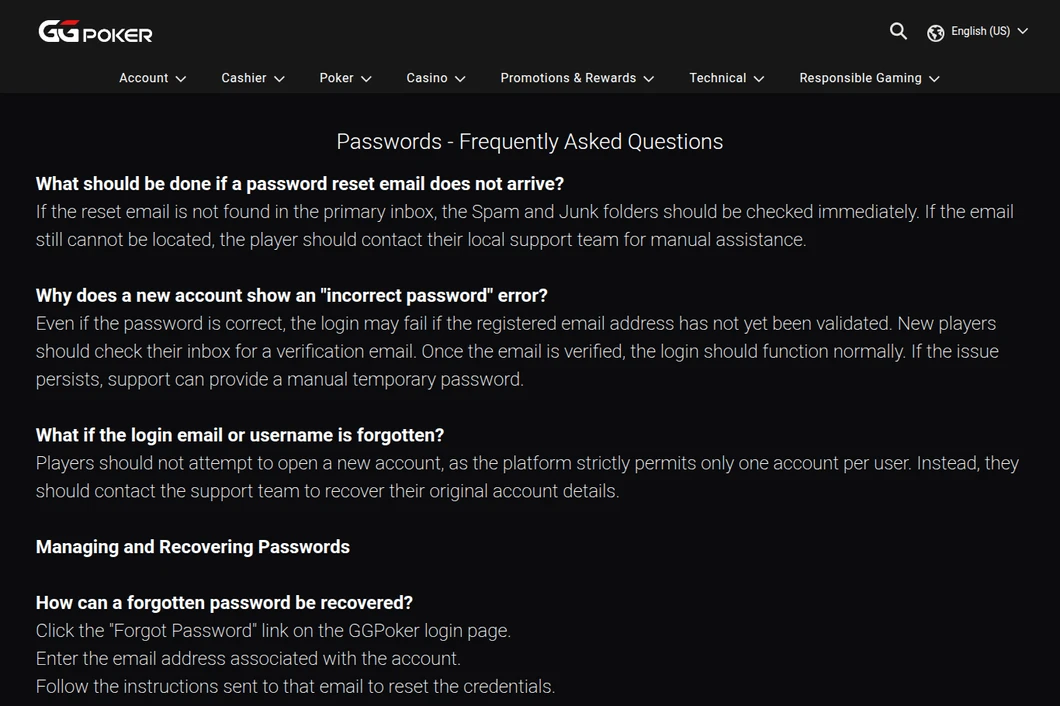
GGPoker Ontario’s help centre at help.ggpoker.ca, read from Toronto: the Passwords FAQ explains the Forgot Password link on the log-in screen and what to do when the reset email is missing.
ggpoker.com, GGPass Pages and the Global App
Google Canada’s first result for “ggpoker login” is ggpoker.com, the global site; opened from Toronto it forwarded us to ggpoker.ca. Further down come GGPass pages, including fp.ggpoker.co.uk, a password page for GGPoker UK. GGPoker’s own help explains that Ontario runs a separate version of GGPoker and cannot accept temporary registrations from visitors. On the Canadian App Store, the global GGPoker – Real Online Poker app sits beside the Ontario one, so install the one with “Ontario” in its name.
GGPass: One Set of Credentials
Your GGPoker Ontario account sits under GGPass, the single sign-on that GGPoker uses across its network, including ClubGG and WSOP Plus. Changing your email in GGPass changes the log-in for every account under it.
- Social log-in: a Google, Facebook or Apple ID can be linked to GGPass and used instead of email and password, although the help centre notes that some jurisdictions still ask for the GGPass password as well.
- Passkey: sign in with a fingerprint, face scan, PIN or security key instead of a password, under GGPass Account > Account Security > Passkey.
- New email address: click your avatar, then GGPass Account > My GGPass > Email Address, and confirm with the code sent to the new address.
Forgotten GGPoker Password, Email or Username
The log-in screen has a Forgot Password link: enter the account email and follow the instructions sent to it. It only works if that email address was verified when you signed up.
- No reset email: check spam and junk, then contact the local support team.
- “Incorrect password” on a brand-new account: the email has probably not been validated yet. Verify it from your inbox and try again; support can also issue a temporary password.
- Forgotten username or email: write to support from the address you registered with. Do not open a second account; GGPoker allows one per person.
- Lost access to your email: support takes you through a verification process before changing it.
- A strong password: 10 to 20 characters mixing upper and lower case, numbers and symbols, without your name or birth date, and not saved in your browser.
Two-Factor Options and the Fund Password
GGPoker gives you four ways to receive a second factor: a verified email address, a verified mobile number, Google Authenticator or Telegram. They are set under GGPass Account > 2FA Security.
- 2FA set to On: every log-in asks for a code, except on a device where you chose “Don’t ask again on this device”.
- “Remember password” ticked: 2FA is skipped too, so untick it if you want the code every time.
- 2FA set to Off: no code at log-in, but your chosen method is still used for other sensitive actions.
- Fund password: a second password for withdrawals and transfers. If you forget it, only an email from your registered address, followed by a security check, can reset it; chat cannot.
Location, IP Addresses and Security Holds
GGPoker checks that your connection comes from Ontario, and an IP address that points elsewhere can block the log-in or briefly restrict the account while it investigates.
- VPNs, proxies and SmartDNS are banned under GGPoker’s Security & Ecology Policy and trigger blocks.
- Legitimate networks can mislead it too: some mobile carriers route data through other regions, hotel and office Wi-Fi may use servers elsewhere, and satellite providers such as Starlink can assign misleading addresses.
- A message that the account is suspended or under investigation: write to security@ggnetwork.com.
- Prohibited software running beside the client can bring a security-policy error; close it and log in again.
Self-Exclusion and Dormant GGPoker Accounts
- Permanent self-exclusion is chosen under the avatar > Responsible Gaming > Self-Exclusion. It logs you out immediately, cannot be reversed by support, and any new account opened afterwards is closed.
- Twelve months without a deposit, withdrawal or bet: the terms treat the account as dormant, and GGPoker tries to return any balance to your last deposit method. Logging in alone does not stop this clock.
The GGPoker Ontario App
GGPoker Ontario: Poker Games from NSUS Limited rates 4.42 from 2,782 ratings on the Canadian App Store, but 2.8 from 401 ratings on Google Play, where it has 100,000+ downloads. It uses the same GGPass credentials as the desktop client, and passkeys make phone log-ins quicker. Other Ontario apps are ranked on our Ontario casino apps compared page.
Support for GGPoker Log-In Problems
The Ontario support team answers at help@ggpoker.ca and through AskGG chat at help.ggpoker.ca. For account recovery, write from your registered email address, because several fixes (a forgotten username or a fund password reset) are only accepted that way. The GGPoker Ontario review covers rake, tournaments and payments.
FAQ’s – Frequently Asked Questions
- Where do I log in to GGPoker in Ontario?
In the GGPoker client for Windows or Mac, or in the GGPoker Ontario: Poker Games app. The ggpoker.ca website has no log-in button; it only hosts the downloads.
- What is GGPass?
GGPoker’s single sign-on. One email and password, or a linked Google, Facebook or Apple ID, opens every account under it, including GGPoker Ontario and ClubGG.
- How do I reset my GGPoker password?
Use Forgot Password on the log-in screen and enter your account email. The reset only works if that email was verified; if nothing arrives after checking spam, contact support.
- Can I play GGPoker Ontario while visiting from abroad?
No. GGPoker’s help says Ontario runs its own version and cannot accept temporary registrations; you must be located in Ontario to play.
- Does GGPoker close inactive accounts?
After 12 months with no deposit, withdrawal or bet, the account counts as dormant and GGPoker tries to return any balance to your last deposit method. In Canada, prize money won recreationally is not taxed.
GGPoker Ontario Login Checklist
Sign in through the client or the Ontario app, not on the website, with your GGPass email and password or a passkey. Verify your email early, because both log-in and password resets depend on it.
Turn on 2FA, add a fund password, and avoid VPNs and hotel or office Wi-Fi that can place you outside Ontario.










