


 You must be based in Ontario to enjoy all this online casino features
- Fever Slots Login:
Ontario Players
Fever Slots Ontario Login: Username, Reset and Right Site
Fever Slots Ontario Login: Username, Reset and Right Site
🕑 Updated: 11 November 2026
 Content Writer
 Content Manager
Visit
Support
- Software Providers


To log in to Fever Slots in Ontario, open www.feverslots.ca, press the orange Login button and type your username and password; email addresses are not accepted. Other Fever Slots sites, including ca.feverslots.com, are not licensed in Ontario.
Pros
 Reset with username or email
Live chat without signing in
Verification status in your account
Self-service limits at any hour
Cons
 Username only, no email sign-in
Unlicensed lookalike sites in search
Remember Me ticked by default
No app on either store
Logging In at feverslots.ca
The Ontario casino lives at www.feverslots.ca, and it identifies you by username, not by email address. Keep the name you picked at registration handy before you start.
- Go to feverslots.ca and answer the cookie banner, either with Accept All Cookies or through Manage Cookie Preferences.
- Select the orange Login button at the top right of the page, to the left of Join.
- In the Log In window, type your username and then your password.
- Look at the Remember Me. box before pressing Log In: it is already ticked when the window opens, which suits a personal phone but not a shared or work computer.
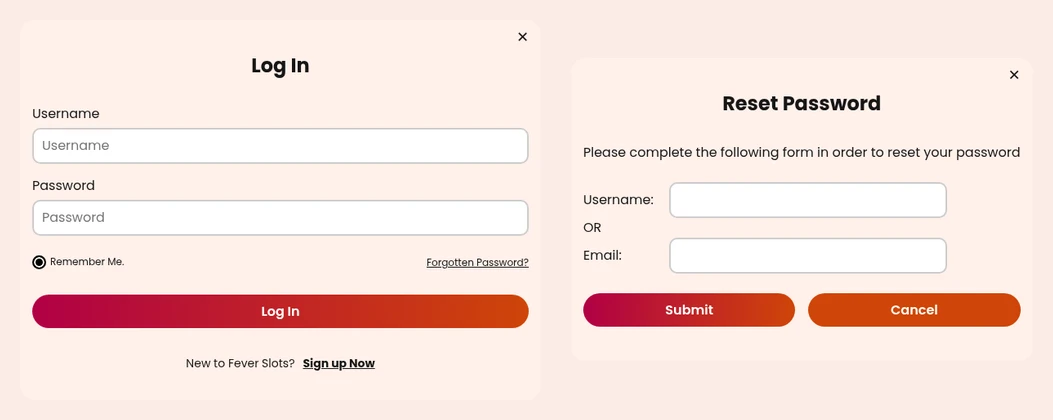
Seen from Toronto: the Fever Slots sign-in window, and beside it the form for a forgotten password.
Three Fever Slots Sites, and Only One for Ontario
Searching “fever slots login” in Canada brings up a whole family of addresses. feverslots.ca comes first, but the list continues with feverslots.com, whose footer cites the British Gambling Commission (account 39175) and Alderney, with nz.feverslots.com, and with ca.feverslots.com, which, despite the “ca”, carries only an Alderney licence and no AGCO registration. spinfever.com also turns up; it is SpinFever, a different casino altogether. The Ontario site is the one whose footer names The Six Gaming Limited with AGCO registration OPIG1229310, beside the BetGuard and iGaming Ontario marks.
Lost Password, or Forgot the Username
- In the Log In window, click Forgotten Password? under the password box.
- A form titled Reset Password shows two boxes, Username and Email, joined by an OR: fill in whichever you remember.
- Press Submit (Cancel takes you back), then open the message Fever Slots sends.
Whichever detail you type, the FAQ says the instructions go to the email address registered on the account. If you have stopped using that inbox, the reset cannot reach you, so ask support for help before trying again rather than submitting the form several times.
Fever Slots and Amazon Slots: One Operator, Two Sites
The Six Gaming Limited, an Alderney company, runs both Fever Slots and Amazon Slots in Ontario, and the two behave alike: sign-in by username, the same reset form and the same location advice in the FAQ. They are still two casino websites, and the terms limit you to one account per website, so a Fever Slots account is opened and recovered at feverslots.ca.
One sign of how closely they are tied: the terms page on feverslots.ca still defines the casino website as on.amazonslots.ca, known as Amazon Slots, because the operator uses one set of rules for both. For the phone and computer settings behind Error 212, see our Amazon Slots login guide, which lists each path; the Fever Slots FAQ gives the same ones.
When Fever Slots Thinks You Are Outside Ontario
Real-money play needs a confirmed Ontario location, and the FAQ names the situations that most often get in the way:
- Wi-Fi switched off: playing over a cellular connection still needs Wi-Fi turned on, even without joining a network, and Location Services must be enabled.
- Close to the provincial border: near the Quebec or Manitoba line, your location is checked more often to confirm you are still in Ontario.
- Remote spots: with few cell towers or Wi-Fi networks around, there may not be enough signal to place you at all.
- A phone used as a hotspot: the FAQ advises against playing on a device tethered to another phone.
- A VPN or IP-masking tool: the terms say the site looks for software that hides your location, so switch it off.
When all of that is in order and spins still fail, the FAQ points to your internet provider: ask where your IP address is registered, because it must sit inside Ontario.
Verifying Your Account After Signing In
Signed in without trouble, yet a withdrawal sits at pending? The first explanation the FAQ gives is missing documents. Once signed in, open My Account, then Account Details, and look for the Verification Status section, which lists what is needed and where each item stands.
- Photo ID: a driving licence or passport, plus a selfie, sent through the Provide link. On a computer you first get a QR code to scan with your phone.
- Payment proof: a photo of your card with the cardholder name and last four digits visible and the middle eight covered.
- Format and timing: JPG, PNG or PDF files, with up to three working days for review; the FAQ asks you to email only once that time has passed.
No App: Sign In From the Browser
Fever Slots has no app in either Canadian store. Search the App Store or Google Play for the name and you get free social games with “Fever” in the title, such as Slot Fever, Cash Fever and Rhino Fever Slots, none of them from The Six Gaming. Even its sister Amazon Slots has an Android app, but Fever Slots is played only through Safari, Chrome or another browser. Once logged in on a phone, My Account sits behind the menu at the top right, and the cashier button is listed under Your Trophies. For casinos that do publish apps, see the roundup of Ontario casino apps.
Support and the Account Rules Worth Knowing
- Chat: Get In Touch in the menu opens a panel headed “We’re here to help”, with a Message us button and a topic search, even when you are signed out.
- Email: support@thesixgaming.ca, with replies within two business days; send one message per problem, because follow-ups and new threads slow things down.
- Limits without support: deposit limits, loss limits, a break or self-exclusion can be set at any hour from Responsible Gaming at the foot of every page; raising a loss limit takes 24 hours.
- Closing the account: done by Player Services on request.
- Idle accounts: more than a year without signing in or out makes an account inactive; after a notice and 30 days, Fever Slots may take C$10 a month from the balance.
The slot catalogue, the live tables and the cashier are covered in our Fever Slots Ontario review.
FAQ’s – Frequently Asked Questions
- Can I sign in to Fever Slots with my email address?
No. The Log In window takes a username and password only. Your email still matters for resets: you can type it instead of the username when you have forgotten your password.
- Which Fever Slots website is for Ontario?
www.feverslots.ca. The similar ca.feverslots.com is licensed in Alderney rather than by the AGCO, feverslots.com carries a British licence, and spinfever.com is another casino.
- How do I reset my Fever Slots password?
Select Forgotten Password?, enter your username or your email, and press Submit. The instructions always go to the email address registered on the account.
- Is there a Fever Slots app?
No. Neither Canadian store carries one. Games such as Cash Fever or Slot Fever are unrelated social slots, so play at feverslots.ca in your phone’s browser.
- Why does Fever Slots say I am not in Ontario?
Check that Wi-Fi and location are on and that no VPN or phone hotspot is in use. Near the border, checks repeat more often. A recreational player owes the Canada Revenue Agency nothing on wins.
Fever Slots Login Essentials
Sign in at www.feverslots.ca, not ca.feverslots.com, with your username and password, and untick Remember Me. on a shared device.
The reset form finds you by username or email, Get In Touch reaches a live chat without signing in, and there is no app to install.









