


 You must be based in Ontario to enjoy all this online casino features
- Knightslots Login:
Ontario Players
Knightslots Ontario Login: Sidebar Sign-In and Resets
Knightslots Ontario Login: Sidebar Sign-In and Resets
🕑 Updated: 11 November 2026
 Content Writer
 Content Manager
Visit
Support
- Software Providers



To log in to Knightslots in Ontario, open knightslots.ca and use the fields in the left sidebar: username or email, password, then LOGIN. There is no app, and the site’s Open App button leads to a missing Google Play page.
Pros
 Log-in visible without a pop-up
Reset by username, email or phone
Ontario email address for support
Login time limits available
Cons
 No app; Open App link is broken
Chat only after logging in
Chat closes early evening
C$5 monthly after six idle months
Logging In at knightslots.ca
Knightslots puts its log-in in the dark sidebar on the left of the desktop site, directly under the logo, so there is no button to open first. The two boxes take a username or an email address, plus the password.
- Open knightslots.ca and deal with the cookie notice at the bottom of the screen.
- In the sidebar, fill in Username Or Email, then Password; the eye icon on the right shows the characters.
- Press LOGIN, the white-outlined button beside the red REGISTER one.
- Allow location sharing if the browser asks, because Knightslots must place you in Ontario before real-money play.
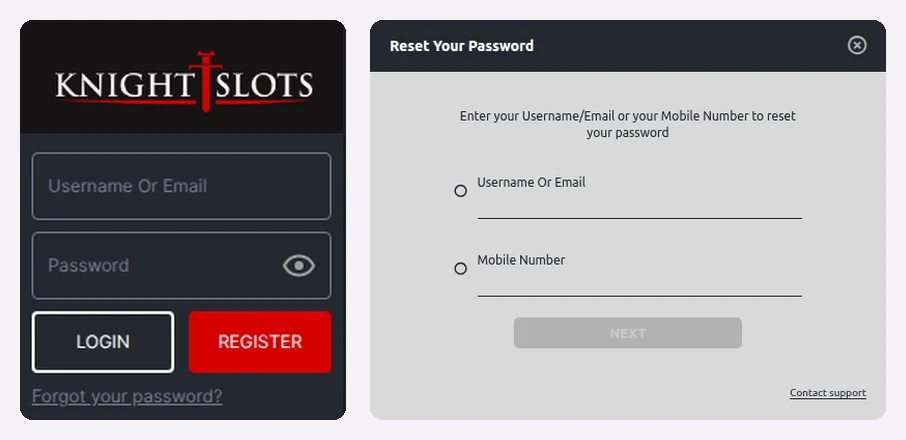
Knightslots’ sidebar sign-in (left) next to the password-reset window it opens (right), captured from Toronto.
knightslots.com in the Search Results
A Canadian search for “knightslots login” puts knightslots.ca first, then a run of pages from knightslots.com, the international site. From an Ontario connection, knightslots.com sends you on to knightslots.ca, so little harm is done, but the Ontario account is the one registered with SkillOnNet Ltd under the AGCO and lives at the .ca address. Type it in and bookmark it.
How to Tell You Are on the Ontario Site
Three things confirm it before you type anything. The strip across the top shows the 19+ badge, ConnexOntario and the BetGuard and iGaming Ontario marks. The footer names SkillOnNet Ltd, its Malta office and the AGCO licence agreement with iGaming Ontario. And the address bar reads knightslots.ca, whichever link brought you there.
A Forgotten Knightslots Password
“Forgot your password?” is the small underlined link beneath LOGIN in the sidebar. That link brings up Reset Your Password, where the account can be found two ways:
- Username Or Email: tick it and enter either detail;
- Mobile Number: tick it and enter the mobile number you registered.
Press NEXT and follow the steps Knightslots sends you. A Contact support link sits in the corner of the same window for when neither route works. Knightslots runs on SkillOnNet’s shared system, so the reset behaves exactly as it does at SlotsMagic, described in our SlotsMagic login guide.
No App, and an Open App Button That Leads Nowhere
Knightslots has no Ontario app on either store. The phone version of the site does show an Open App button, but it points to a Google Play address that answers “the requested URL was not found”, so tapping it gets you nowhere. Searching the Canadian Google Play store for the name brings up unrelated games such as Knight of Slots from Gamblershome, and the App Store search returns other casinos and role-playing games. Sign in through the phone’s browser instead, with the details you already use. Our Ontario casino apps page covers the operators that do publish apps.
Help When the Log-In Fails
Knightslots’ help page lists just two channels, and one of them needs you to be signed in already:
- Live chat opens only after logging in, for 18 hours a day from 06:00 GMT; that is 01:00 to 19:00 in Toronto this winter, an hour later in summer.
- Email at support.ontario@knightslots.ca is therefore the route when you cannot get in.
- Phone: +1 343-303-5151 appears on the responsible gaming page rather than the help page.
In the top banner, 1-866-531-2600 belongs to ConnexOntario’s free help line, not to Knightslots. The help page has no list of frequently asked questions, so for anything the reset window cannot solve, write in.
Account Rules That Touch Your Log-In
- One account only: per person, email address and mobile number; extra accounts can be suspended.
- Six months away: an account nobody has accessed for six consecutive months counts as inactive, and Knightslots may then deduct C$5 monthly.
- Dormancy: 48 months with no sign-in freeze the account until you complete a reactivation.
- Login time limits: daily, weekly or monthly caps set in My Account; when one runs out you are logged out until it resets. A shorter limit applies at once, a longer one only after 24 hours.
- Closing: the Close Account option sits in your Personal Area.
The Knightslots Ontario review covers the 6,261-game lobby, payments and the sister casinos.
FAQ’s – Frequently Asked Questions
- Where is the Knightslots login?
On a computer it sits in the left sidebar, under the logo: Username Or Email, Password and a LOGIN button. On a phone, sign in through the browser with the same details.
- How do I reset my Knightslots password?
Click Forgot your password? under LOGIN; in the window that opens, pick Username Or Email or Mobile Number, type it and press NEXT.
- Does Knightslots have an app?
No. The Open App button on the mobile site leads to a Google Play address that no longer exists, and neither Canadian store lists a Knightslots app.
- Why can I not open Knightslots live chat?
The chat needs you to be logged in and is staffed 18 hours a day from 06:00 GMT. Locked out? Write to support.ontario@knightslots.ca, or ring +1 343-303-5151.
- Does Knightslots charge for an idle account?
Yes: C$5 monthly becomes possible once nobody has accessed the account for six consecutive months. Canada leaves recreational gambling wins untaxed.
Knightslots Login Quick Guide
Sign in from the sidebar at knightslots.ca with a username or email, and let Forgot your password? find the account from those details or the mobile number on file.
Ignore the Open App button, email support when chat is out of reach, and access the account at least every six months to stay clear of the C$5 charge.









