


 You must be based in Ontario to enjoy all this online casino features
- Royal Vegas Login:
Ontario Players
Royal Vegas Ontario Login: auth.royalvegas.ca and Recovery
Royal Vegas Ontario Login: auth.royalvegas.ca and Recovery
🕑 Updated: 11 November 2026
 Content Writer
 Content Manager
Visit
Support
- Software Providers



To log in to Royal Vegas in Ontario, go to royalvegas.ca/ontario, choose Login and enter your username and password on the auth.royalvegas.ca page marked Ontario. The royalvegascasino.com site that Google often lists first is a different casino, with its own log-in.
Pros
 Self-service password and username
Code by text or email
Toll-free support line
Ontario badge on sign-in page
Cons
 Google lists another casino first
No Android app
C$10 monthly fee when inactive
Signing In at auth.royalvegas.ca
Royal Vegas’s Ontario casino is at royalvegas.ca/ontario, and its Login button opens a separate sign-in page at auth.royalvegas.ca, marked with an Ontario badge and a red Ontario flag beside the title.
- Open royalvegas.ca/ontario, or the Royal Vegas Casino Real Money app on an iPhone.
- Choose Login at the top right.
- On the sign-in page, check for the Ontario badge, then type your Username and Password; the eye icon shows the password.
- Leave Keep me logged in ticked only on your own device; it comes ticked.
- Choose Login, enter the one-time code if 2-Step Verification is on, and allow location access.
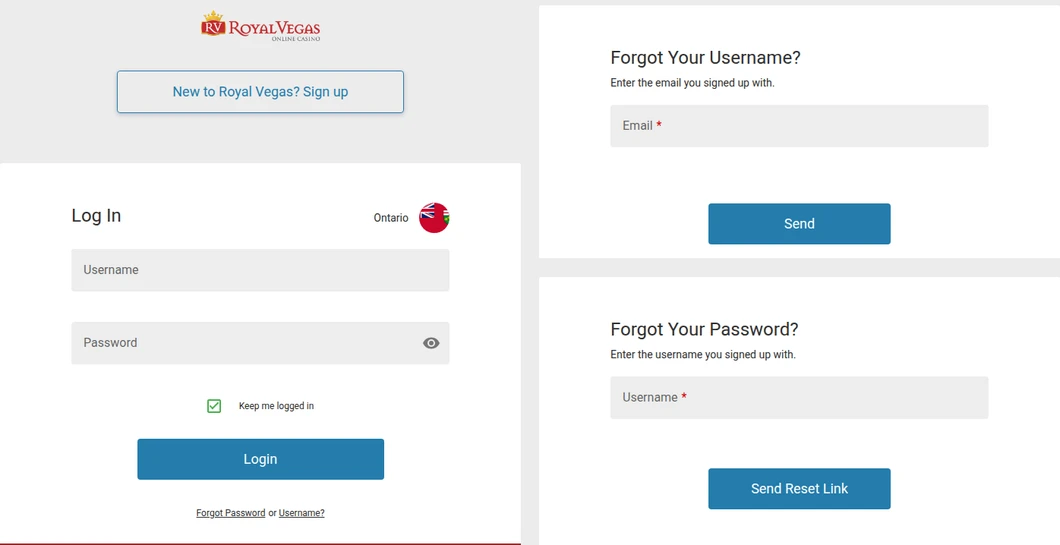
Royal Vegas’s Ontario sign-in page at auth.royalvegas.ca (left), with the two recovery pages behind “Forgot Password or Username?” (right). All three were opened from Toronto.
The Royal Vegas Google Shows First
Search “royal vegas login” in Canada and the first result is royalvegascasino.com/ca. That site belongs to Baytree Interactive Ltd, licensed in Kahnawake, and its own Login button leads to a different sign-in system, auth.royalvegascasino.com, where your Ontario account does not exist. Opened from Toronto, it shows a province selector across the top; choose Ontario there and you land on royalvegas.ca/ontario. The plain royalvegas.ca does the same job: it asks for your province before anything else.
Forgotten Royal Vegas Password or Username
Both can be recovered without contacting anyone. The link under the Login button, “Forgot Password or Username?”, splits into two pages.
- Password: choose Forgot Password, enter the username you signed up with and choose Send Reset Link. The link arrives at your registered email address.
- Username: choose Username?, enter the email you signed up with and choose Send; the instructions go to that address.
- No email? It can take a few minutes; check the junk or spam folder before trying again.
If you have both and the log-in still fails, the help centre names two reasons that only a person can clear: documents or an account under review, and an account that is closed or excluded. For either, open live chat.
2-Step Verification at Royal Vegas
With 2-Step Verification on, every log-in asks for a one-time code. You choose whether it comes by text message or email; if you pick text, Royal Vegas sends the same code to your email as well, so a missed text does not lock you out.
- Switching it on: open the menu under your username, go to My Account > My Details, choose Manage Setup next to 2-Step Verification, pick Text Message or Email, confirm the number or address shown, then enter the code sent to it.
- New phone or email: update your contact details in My Details first; the 2-Step settings follow automatically.
Location Checks at Royal Vegas
The terms let Royal Vegas check your location at intervals and block anything it cannot place in Ontario. When the games will not open although you are in the province, the help centre’s fixes are specific.
- Remote access and VPNs: close any VPN and remote connection programs, such as RDP, AnyDesk, UltraViewer or TeamViewer, then wait about 60 seconds before refreshing the page.
- Your internet address: if location is on and allowed, the problem may be where your internet provider places your IP address; ask the provider.
- On the iPhone app: under Settings > Privacy > Location Services, set the casino app to “While using the app” or “Ask Next Time”.
- Weak fixes: restart the device, switch on GPS, Wi-Fi and precise location, and try mobile data instead of Wi-Fi, or the reverse.
Inactive, Excluded and Closed Royal Vegas Accounts
Royal Vegas’s Ontario terms and help centre set out what happens to accounts that go quiet, take a break or close.
- Six months without a log-in: the account counts as inactive. Royal Vegas tries to tell you about any cash balance; if you do not withdraw it within 30 days of that notice, a C$10 administration fee can come off every month until the balance is zero or you log in again.
- Temporary self-exclusion: 24 hours to three months, set under Responsible Gaming; the account reopens by itself when it ends.
- Permanent self-exclusion: six months to five years. Coming back means answering the removal questions over live chat or email; the Responsible Gambling team reviews them, and an approved account reopens after 24 hours.
- BetGuard: Ontario’s province-wide exclusion is separate from Royal Vegas’s own, at BetGuard.ca or 1-833-776-7171.
- Closing: the terms route closures only through Player Services, so contact support rather than looking for a button.
The Royal Vegas App on iPhone and Android
On the Canadian App Store, Royal Vegas Casino Real Money by Cadtree Limited rates 4.54 from 582 ratings, needs iOS 15.1 and takes 44.6 MB; it signs in with the same username and password as the website. There is no Royal Vegas app on Google Play in Canada, and searching the name there returns unrelated slot games. The help centre says Android users get the app from the website; in practice they log in through the mobile browser, which has the same lobby. The Royal Vegas app guide shows why the site’s Android button opens the iPhone listing. Our Ontario casino apps compared guide covers the rest.
Support for Royal Vegas Log-In Problems
Royal Vegas shares its help centre and support team with three other Cadtree casinos in Ontario: Jackpot City, Spin Casino and Ruby Fortune. Each keeps its own account and sign-in. Live chat opens from the chat icon at the bottom of the help centre, there is an email link for each brand on the contact page, and the toll-free line is 1 888 378 1328. Formal complaints go to complaints@playersupportcenter.ca. The Royal Vegas Ontario review covers the games, payments and withdrawal rules in full.
FAQ’s – Frequently Asked Questions
- Why does the Royal Vegas login not recognise my Ontario account?
You are probably on royalvegascasino.com, the Kahnawake-licensed site that Google often lists first, whose log-in uses a different system. Go to royalvegas.ca/ontario, or pick Ontario in that site’s province selector, and sign in at auth.royalvegas.ca.
- How do I reset my Royal Vegas password?
Choose Forgot Password under the Login button, enter your username and choose Send Reset Link. The reset link goes to your registered email address; check the spam folder if it has not arrived after a few minutes.
- I forgot my Royal Vegas username. What now?
Choose Username? under the Login button, enter the email address you signed up with and choose Send. Royal Vegas emails you the details.
- Does Royal Vegas have an Android app in Ontario?
No. Royal Vegas Casino Real Money is on the Canadian App Store only. On Android, log in through the mobile browser at royalvegas.ca/ontario with the same username and password.
- Does Royal Vegas charge a fee if I stop playing?
After six months without a log-in, and 30 days after Royal Vegas tells you about any cash balance, a C$10 monthly administration fee can apply until the balance is zero or you log in. Winnings from recreational play are not taxable in Canada.
Royal Vegas Ontario Login: Key Points
Start at royalvegas.ca/ontario and sign in at auth.royalvegas.ca under the Ontario badge, not on the royalvegascasino.com site Google tends to show first. Both a lost password and a lost username can be recovered from the log-in page, and 2-Step Verification adds a code by text or email.
Close VPNs and remote desktop tools before the location check, use the browser on Android, and log in at least every six months so the account is not charged as inactive.









