You must be based in Ontario to enjoy all this online casino features
- theScore Casino Login:
Ontario Players
theScore Casino Ontario Login: SMS Codes and theScore Bet
theScore Casino Ontario Login: SMS Codes and theScore Bet
🕑 Updated: 11 November 2026
 Content Writer
 Content Manager
Visit
Support
- Software Providers



To log in to theScore Casino in Ontario, go to thescore.casino or open the theScore Casino app, choose Log In and enter your email and password. It is the same account as theScore Bet, so one password reset changes both, and a new location can bring a 6-digit SMS code.
Pros
 One account with theScore Bet
Password reset by email only
Live chat around the clock
Restricted balances can be withdrawn
Cons
 No alternative to SMS codes
Dormant after 12 months
Dropped iOS 16 and Android 11
Logging In at thescore.casino
theScore Casino signs you in with the email address and password on your account, and the web log-in page sits at thescore.casino/login. The same details work in the theScore Casino app.
- Go to thescore.casino, or open the theScore Casino app.
- Press Log In, in the top right corner.
- Enter your email and password; SHOW reveals what you typed.
- Choose Log In. If you are signing in from a new or untrusted location, enter the 6-digit code theScore texts to your phone.
- Let the location check run: GeoComply in a computer browser, or location permission in the app.
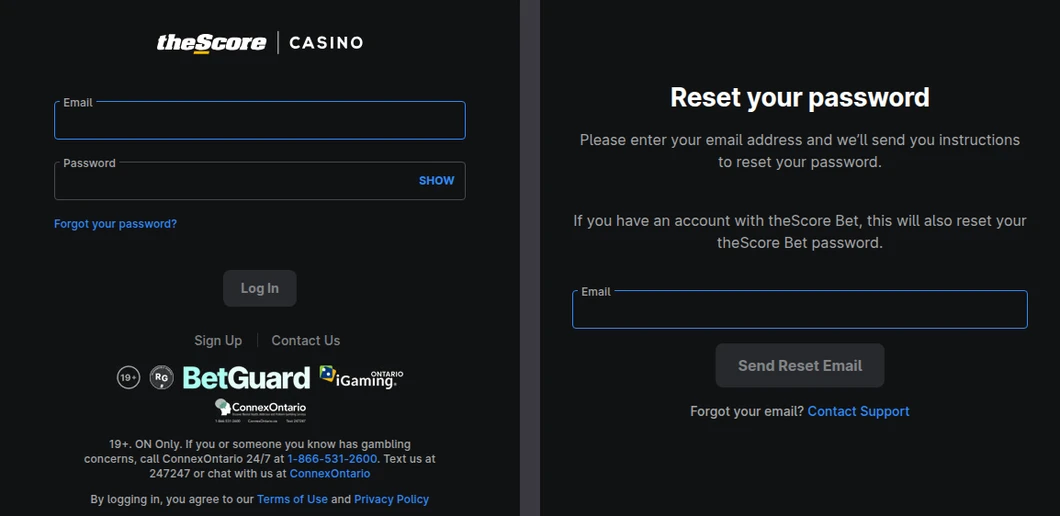
theScore Casino’s log-in page opened from Toronto (left), and its password reset page, which states that the reset also changes a theScore Bet password (right).
One Account with theScore Bet
The reset page says it in so many words: if you have an account with theScore Bet, resetting your theScore Casino password also resets the theScore Bet one. Both are run by Score Media and Gaming Inc., and the account behind them is one: closing it closes both. Responsible gambling limits go a step further, shared between theScore Casino, theScore Bet and Hollywood Casino, which the same company runs.
Forgotten theScore Password or Email
A password reset needs only the email on your account. A forgotten email goes to Customer Support, which the reset page links to directly.
Resetting the Password
Choose Forgot your password? under the password field, enter your email and choose Send Reset Email. The email links to a page where theScore confirms it is you with its multi-factor check, then lets you set a new password. If you are logged in and only want a new password, change it from the Account Information screen; that route asks for two-factor authentication too.
A Forgotten Email Address
Choose Contact Support next to “Forgot your email?” on the reset page. Support answers around the clock by live chat in the app, or at support@thescore.casino.
The 6-Digit SMS Code
With two-factor authentication on, theScore checks your location at log-in, and when it sees a new or untrusted location it texts a 6-digit code to the phone number on your account. You enter it before the account opens.
- On or off: the code may be switched on automatically when you register, depending on your region. You can turn it off under My Account > Settings > Login Preferences, although it is the main guard against someone else using your password.
- No text, no code: theScore has no alternative to SMS, so a phone plan without text messages cannot receive it. If the code does not arrive or you have changed numbers, contact support by live chat or email.
- Activity you did not make: Account History in My Account lists your bets, casino play and transactions. Report anything unexpected to Customer Support straight away.
- Shared devices: sign out fully when you finish, keep a screen lock on your phone, and do not share the password with family or friends.
theScore Location Checks: GeoComply, Apps and Alberta
You must be physically in the province to play, and theScore verifies it throughout. Most failed checks come down to a permission, a program running in the background or the device itself.
- Computer: on your first web log-in theScore asks you to verify your location through GeoComply; after that you allow GeoComply’s check from a browser pop-up. The browser also needs location permission.
- Programs that break the check: remote desktop software, a VPN or proxy, and Zoom running alongside GeoComply. Quit them, and uninstall a remote desktop program if the check keeps failing.
- iPhone: Settings > Privacy > Location Services > theScore Casino, allow location and switch on Precise Location.
- Android: Settings > Apps and Notifications > theScore Casino > Permissions, and switch on Location.
- Device tampering: a rooted or jailbroken phone, or an emulator, is refused. theScore’s fix is to disconnect the phone from any computer, check it is not rooted or jailbroken, and reinstall the app from the App Store or Google Play.
Ontario and Alberta Balances
theScore Casino is live in Ontario and Alberta, and one account works in both, but the money stays with the province it was deposited in. Funds deposited in Alberta show as a Restricted Balance while you are in Ontario, and the other way round. You cannot play with a restricted balance, but you can withdraw it at any time, and withdrawals take from it first. Back in the province where you deposited, it returns to your playable balance.
Limits, Breaks and Dormant theScore Accounts
Some log-in refusals are limits you set yourself, or the result of time.
- Daily time limit: once you reach it, theScore logs you out until the limit resets the next day. To withdraw in the meantime, email support@thescore.casino.
- Cool-off: from 1 day to 3 months. It logs you out and blocks bets and deposits until it ends.
- Self-exclusion: 6 months, 1 year, 5 years or lifetime. It covers every PENN Entertainment real-money product and its physical casinos, you cannot log in while it lasts, and the balance is returned by cheque to the address on your account.
- BetGuard: Ontario’s province-wide exclusion is separate from theScore’s own, and is handled at BetGuard.ca or on 1-833-776-7171.
- Dormant account: 12 months without a log-in makes the account dormant under theScore’s Ontario terms, and an unclaimed balance may then be forfeited. Log in at least once a year, or withdraw what you do not plan to play.
- Closing: ask Customer Support. theScore suspends the account rather than deleting it, and it stays closed unless you ask to reopen it, which theScore can refuse after a self-exclusion.
The theScore Casino App
theScore Casino rates 4.72 from 1,707 Canadian ratings on the App Store, where it needs iOS 17.0 and 231.7 MB, and 3.33 from 60 ratings on Google Play, with more than 10,000 installs. It has dropped iOS 16 and Android 11: new downloads on those versions ended on 14 September 2026 for iPhone and 27 October 2026 for Android. An existing install keeps working for now, and the website still lets you log in and withdraw. The theScore Bet app, rated 4.74 from 30,150 on the App Store, opens the same account; theScore: Sports News & Scores is the media app for news and scores. Our Ontario casino apps compared guide sets the casino app beside the rest.
Contacting theScore Support
Live chat inside the app runs 24 hours a day. You can also email support@thescore.casino or request a callback on 1-855-550-1238, and the log-in page carries a Contact Us link of its own for problems before you sign in. Complaints get a response within five business days. The theScore Casino Ontario review covers the games, payments and limits in full.
FAQ’s – Frequently Asked Questions
- Is my theScore Casino log-in the same as theScore Bet?
Yes. theScore’s reset page states that resetting your theScore Casino password also resets your theScore Bet password, because one account sits behind both. Responsible gambling limits are shared with Hollywood Casino as well.
- How do I reset my theScore Casino password?
Choose Forgot your password? on the log-in page, enter your email and choose Send Reset Email. The link in the email takes you through theScore’s identity check, then lets you set a new password.
- Can I turn off the theScore Casino SMS code?
Yes, under My Account > Settings > Login Preferences. While it is on, theScore texts a 6-digit code when you log in from a new or untrusted location, and there is no alternative to SMS for receiving it.
- Can I use my theScore Casino balance in Alberta?
Not money deposited in Ontario. Funds stay with the province they were deposited in and show as a Restricted Balance elsewhere. You can still withdraw a restricted balance at any time.
- Does theScore Casino charge fees, or are winnings taxed in Ontario?
theScore’s terms say it does not charge for deposits or withdrawals in the normal course of events, and that it will contact you before any charge for excessive transactions. If you play for fun, your winnings are not taxed in Canada.
theScore Casino Ontario Login: Key Points
Log in at thescore.casino or in the theScore Casino app with your email and password, and keep the phone on your account to hand for the 6-digit code. The account is the one you use at theScore Bet, so a password reset changes both, and a forgotten email goes to Customer Support.
Clear VPNs and remote desktop tools before the GeoComply check, remember that Alberta deposits are restricted in Ontario, and log in at least once a year so the account does not go dormant.