


 You must be based in Ontario to enjoy all this online casino features
- PointsBet Login:
Ontario Players
PointsBet Ontario Login: 60-Minute Locks, Resets, Face ID
PointsBet Ontario Login: 60-Minute Locks, Resets, Face ID
🕑 Updated: 11 November 2026
 Content Writer
 Content Manager
Visit
Support
- Software Providers





To log in to PointsBet in Ontario, go to on.pointsbet.ca or the PointsBet Sportsbook & Casino app, choose LOG IN and enter your email and password, or use Face ID in the app. Three wrong passwords lock the account for 60 minutes.
Pros
 Lock lifts itself after an hour
Face ID log-in in the app
Live chat link at log-in
Phone support around the clock
Cons
 Only three tries before a lock
One email change per 30 days
Android app rated 2.7
Logging In at on.pointsbet.ca
PointsBet signs you in with the email address on your account and your password, and in the app you can use Face ID instead. One log-in covers the sportsbook and the casino, with a single balance between them.
- Go to on.pointsbet.ca from a device in Ontario, or open the PointsBet Sportsbook & Casino app.
- Select LOG IN from the top right corner.
- Enter your email and password; the password is case-sensitive.
- Check I am eligible and fit to play, then press LOG IN.
- Allow location access, so PointsBet can confirm you are in Ontario.
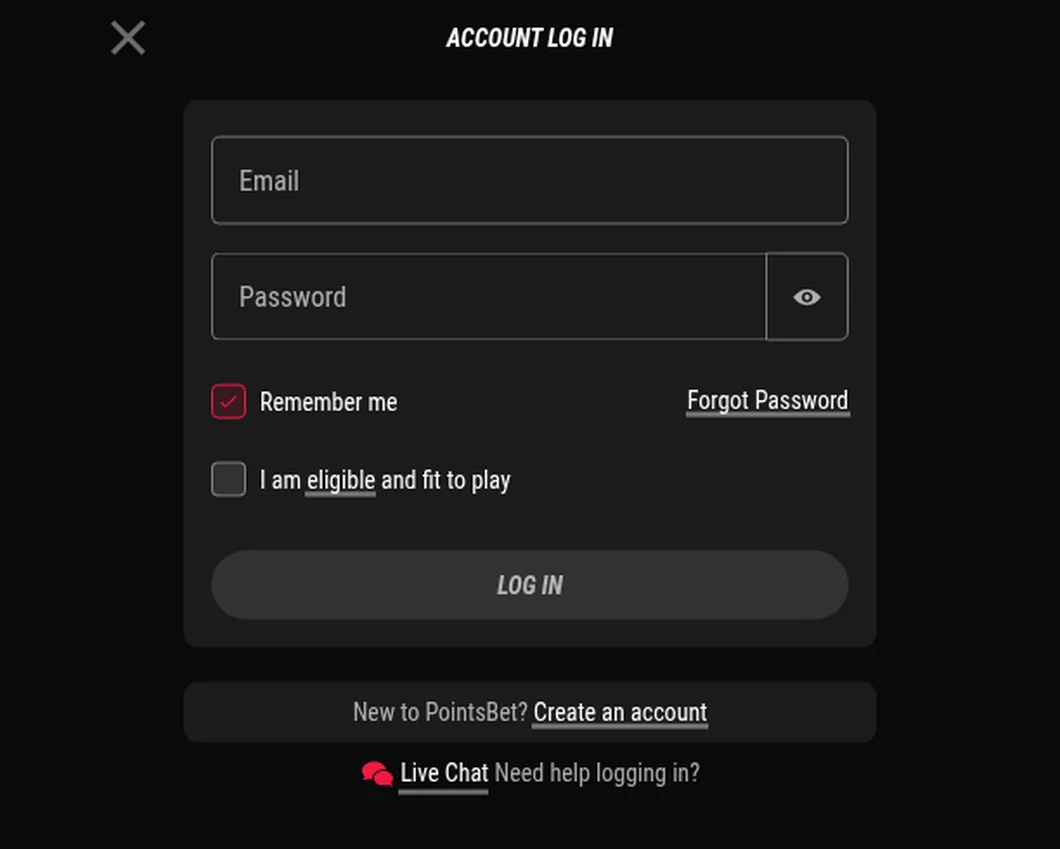
The PointsBet Account Log In window, opened from Toronto. “Remember me” is ticked by default, and the Live Chat link underneath works before you sign in.
Remember Me Is Already Ticked
The log-in window opens with Remember me already selected. That is convenient on your own phone and a risk on a shared or public computer, so untick it there. If the window shows Alberta branding, you are on PointsBet’s sibling site for that province; the Ontario footer names the AGCO and iGaming Ontario.
Three Wrong Passwords Lock You Out for an Hour
PointsBet’s lock is short and automatic. After three log-ins with the wrong password you see “For your security your account has been locked”, and the account stays locked for 60 minutes. When the hour is up you can try again or reset the password; you do not need to contact anyone.
Resetting a PointsBet Password
- Choose Forgot Password in the log-in window.
- Enter your email and your date of birth; both must match the account.
- Choose EMAIL RECOVERY LINK and open the email PointsBet sends straight away, checking junk or spam if it is not in the inbox.
- Follow the link, enter the new password and choose SET MY NEW PASSWORD, then log in with it.
Forgotten the Email Address
Since the email is your log-in, PointsBet’s live chat team can tell you which one is on the account once you confirm a few details. A quicker check first: search your inbox for “PointsBet”, since the address its emails reached is the one linked to the account.
Face ID and App Log-In Errors
If the app answers a log-in with “Something went wrong, please try again”, PointsBet lists four fixes, in this order: log in with your email and password instead of Face ID; delete the app and install it again so you have the latest version; make sure no VPN is running; and try the website instead of the app.
For other app trouble, its checklist adds a forced restart of the app, the Check for App Updates button under the profile tab, clearing cookies and cache, and a strong Wi-Fi or 4G/5G signal with Bluetooth and GPS location switched on. On the website the list is shorter: no VPN, refresh the page, clear cookies and cache, and check the Wi-Fi.
Changing Your Email or Phone Number
Both changes are done in My Account > Personal Details > Edit, and both are guarded by codes, with tight time windows.
- Email: your mobile number must be verified first. After you choose Update, PointsBet texts a 6-digit code that you have 60 seconds to enter, then sends a second 6-digit code to the new email address. You can change the email only once every 30 days.
- Phone number: enter the new number and choose Update; a 6-digit code goes to your email and expires after five minutes.
Keep both current. The email is your log-in and the place reset links go, and the phone is what unlocks an email change.
Location, Idle Sessions and Breaks
PointsBet checks your province at every log-in, so a VPN or a weak signal can stop you getting in at all, and live streams also work only while you are in Ontario. Once in, the site logs you out after 30 minutes without activity.
- Time-on-site limit: a daily cap you set yourself. Tightening it is immediate; loosening it waits 72 hours from midnight on the day you ask, then a further 24-hour cool-off.
- Take a Break: 1 to 90 days, from My Account > Responsible Gambling.
- Self-exclusion: 6 months, 1 year or 5 years in the same section; a permanent exclusion goes through support.
- Temporary closure: by phone or live chat, after a few identity questions; support can reopen the account later.
- Suspended account: check your email for a message from the Accounts team, which replies within five business days, or contact support.
The PointsBet App
Search for PointsBet Sportsbook & Casino on the App Store or Google Play. On iPhone the seller is PointsBet Canada Operations 1 Inc, the same company as on the iGaming Ontario register, and the app holds 4.4 from 1,862 ratings; on Android it holds 2.7 from 938, so the website may be the smoother route there. Both stores label it 18+, but Ontario’s age of 19 applies. Installing it is covered in our PointsBet app guide, and our Ontario casino apps compared guide ranks it against the rest.
Support and New Accounts
Support is open 24/7 by phone on 1-833-441-1940, by live chat, including the link in the log-in window, and by email at customercare@pointsbet.com, with replies promised within 24 hours. To open an account, register with details that match your ID exactly: a failed automatic check means sending documents however small the mismatch. Verification takes up to 24 hours, and a first withdrawal check by the payments team 3 to 5 business days. You must be 19 or older and in Ontario. The PointsBet Ontario review covers the games, payments and the operator’s regulatory record in full.
FAQ’s – Frequently Asked Questions
- What happens after three wrong PointsBet passwords?
The account locks for 60 minutes, with the message “For your security your account has been locked”. When the hour is up, try again or reset the password with your email and date of birth.
- Why does PointsBet say “Something went wrong” when I log in?
PointsBet suggests logging in with your email and password instead of Face ID, reinstalling the app, turning off any VPN, or trying the website instead of the app.
- How often can I change my PointsBet email address?
Once every 30 days. You need a verified mobile number first; PointsBet then texts a code to enter within 60 seconds and sends a second code to the new email.
- I forgot which email I used for PointsBet. What now?
Contact live chat, which can confirm the address once you answer a few security questions. Or search your inbox for PointsBet: the address its emails reached is the one on the account.
- Does PointsBet log me out when I am idle?
Yes. A session ends after 30 minutes without activity, and PointsBet checks your location again when you log back in, so keep location services on.
PointsBet Ontario Login: Key Points
Log in at on.pointsbet.ca or in the PointsBet Sportsbook & Casino app with your email and password, or Face ID in the app. Three wrong passwords lock the account for an hour, and a reset needs your email and date of birth.
Keep your phone and email current, because each is needed to change the other, untick Remember me on shared devices, and use the Live Chat link in the log-in window if you are stuck.










