


 You must be based in Ontario to enjoy all this online casino features
- Casino Time Login:
Ontario Players
Casino Time Ontario Login: Lockouts, Face ID and Location
Casino Time Ontario Login: Lockouts, Face ID and Location
🕑 Updated: 11 November 2026
 Content Writer
 Content Manager
Visit
Support
- Software Providers



To log in to Casino Time in Ontario, go to ontario.casinotime.ca, choose Login in the left-hand menu and enter your email and password, ticking the fit-to-play box. More than five wrong passwords lock the account, and only Customer Support can unlock it.
Pros
 Live chat open before log-in
Optional 2-Step Verification
Face ID through a home-screen shortcut
Detailed location troubleshooting guide
Cons
 Locked accounts need support
No native app in either store
Email changes only through support
No account access outside Ontario
Logging In at ontario.casinotime.ca
Casino Time signs you in with the email address you registered and your password; there is no username. It is a browser casino with no store app, so the steps are the same on a computer and a phone.
- Go to ontario.casinotime.ca, where the casino runs; casinotime.ca is the address on the iGaming Ontario register.
- Choose Login in the menu on the left, under Sign up.
- Type in your email and password; the eye icon displays the password.
- Tick I’m eligible and fit to play, then choose Login.
- Allow location access when the browser asks, so Casino Time can confirm you are in Ontario.
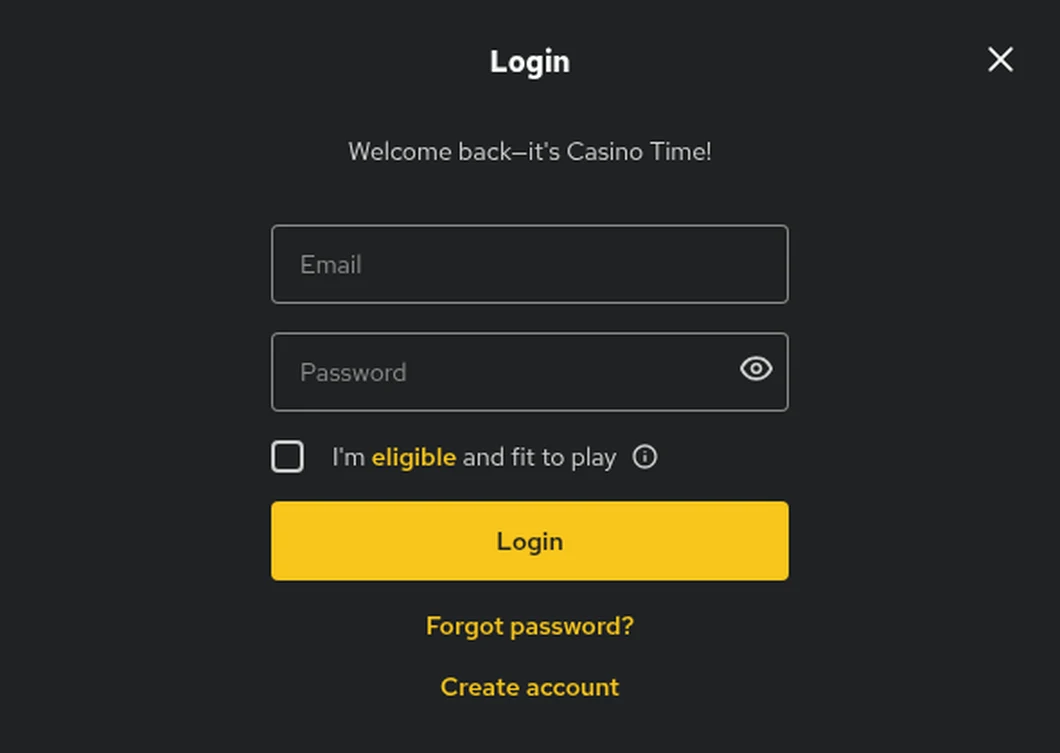
The Casino Time log-in window, opened from Toronto. Live Chat sits at the bottom of the left-hand menu even before you sign in.
Help Before You Log In
Casino Time’s live chat is in the left-hand menu whether or not you are signed in, which matters here, because several log-in problems can only be solved by its support team. Email goes to customersupport@casinotime.ca, and the team works from Kingston.
Forgotten Password and the Five-Attempt Lock
A forgotten password you can fix yourself; a locked account you cannot, and the line between the two is the fifth wrong password.
Resetting a Casino Time Password
In the log-in window choose Forgot password?, enter the email address you registered with, choose Send and follow the instructions in the email. If nothing arrives, check the spam or junk folder before asking for another.
Locked After Wrong Attempts
Enter the wrong password more than five times and Casino Time puts a security lock on the account; using the wrong email address repeatedly has the same effect, and the message you see calls the account restricted. A password reset does not clear this lock: Casino Time asks you to contact Customer Support by live chat or at customersupport@casinotime.ca, and the team unlocks the account and helps with a new password if you need one.
2-Step Verification and Account Security
Casino Time has an optional second check at log-in, which it calls 2-Step Verification, under Profile in My Account. With it on, a password alone is not enough to get into the account. If a one-time code does not arrive, Customer Support handles it.
- A strong password: Casino Time recommends 8 to 16 characters, upper- and lower-case letters, numbers and special characters, and a password used nowhere else.
- Phishing: Casino Time never asks for your log-in details by email or text. Do not reply to one that does, do not open its links, and forward it to customersupport@casinotime.ca.
- If you typed your details into a fake site: change your Casino Time password at once and tell Customer Support what happened.
- Email and personal details: you cannot edit the email, name, address or date of birth yourself; Customer Support handles the change.
Face ID Without an App
There is no Casino Time app in the Canadian App Store or on Google Play, but the help centre shows how to get close to one. On an iPhone, open the site in Safari, tap Share and choose Add to Home Screen; then, under Settings > Face ID & Passcode (or Touch ID & Passcode), turn on Password AutoFill, and save the password when Safari asks. Your next log-in fills in with Face ID or Touch ID. Android phones have a similar home-screen shortcut.
Casino Time adds a caveat: these are your phone’s features, set up at your own risk, and its support team cannot troubleshoot them. Our Ontario casino apps compared guide shows which operators do have native apps.
Location: No Account Access Outside Ontario
Casino Time checks your location through the browser at log-in, and the check is strict: outside the province you cannot get into the account at all, even elsewhere in Canada, and leaving Ontario during a session ends it until you are located again.
If you are told you are not in Ontario when you are, the help centre’s five steps are, in order:
- Turn on Wi-Fi and Bluetooth, and leave Bluetooth on while you play.
- Allow location for your browser, on the phone and in the browser’s own site settings, and remove casinotime.ca from any block list.
- Clear the browser’s cache and cookies, then reopen it.
- Close remote desktop programs, Zoom and any VPN, including VPN browser extensions.
- Try another browser or device, then contact support.
Within about a kilometre of the provincial border you may be blocked, and your IP address can place you in a neighbouring jurisdiction; move further inland, or use a phone with location services on and several Wi-Fi networks in range.
Limits, Inactivity and Closing the Account
Some log-in problems are rules you, or time, have set.
- Session limit: 30 minutes to 12 hours, with a reality check every 30, 60 or 120 minutes if you want one.
- Time-out: 24 hours, or 7, 30, 60 or 90 days. Self-exclusion runs 6, 12 or 60 months and covers Casino Time only; BetGuard covers every regulated Ontario site.
- Inactivity: after 12 months with no transaction the account becomes inactive, and Casino Time then takes $5 a month from the balance until it reaches zero or you play again. Withdraw first if you are stepping away.
- Closing: My Account > Account Closure > Close Account, confirmed with your date of birth. The balance must be $0, and a closed account cannot be reopened for 30 days; after that, Customer Support reopens it.
One account per person: if your details change, support updates the existing account rather than opening another. To join, register at ontario.casinotime.ca, confirm the link Casino Time emails you, and verify your identity from My Account; you must be 19 or older and in Ontario. The Casino Time Ontario review covers the games, bingo and payments in full.
FAQ’s – Frequently Asked Questions
- What happens after five wrong Casino Time passwords?
More than five wrong attempts put a security lock on the account. A password reset will not lift it: contact Customer Support by live chat or at customersupport@casinotime.ca, and the team unlocks the account.
- Is there a Casino Time app?
No. Casino Time runs in your phone’s browser. You can add it to your home screen and, on an iPhone, log in with Face ID or Touch ID through Password AutoFill.
- Can I check my Casino Time account while travelling?
Not outside Ontario. Casino Time blocks access to the account itself, not just play, anywhere outside the province, including elsewhere in Canada, and a session ends if you leave Ontario during it.
- Why does Casino Time ask me to turn on Bluetooth?
Its location troubleshooting starts with Wi-Fi and Bluetooth switched on, which help the browser place you accurately. Then allow location, clear cache and cookies, and close VPNs or remote desktop tools.
- Can I change my Casino Time email address myself?
No. For security, the email, name, address and date of birth cannot be edited in the account. Contact Customer Support by live chat or email, and the team guides you through the change.
Casino Time Ontario Login: Key Points
Log in at ontario.casinotime.ca with your email and password from the Login button in the left-hand menu. A forgotten password is reset by email, but more than five wrong attempts lock the account until Customer Support releases it, by live chat or email.
Switch on 2-Step Verification in your profile, use a home-screen shortcut with Face ID in place of an app, and expect a strict location check: no account access outside Ontario, and Wi-Fi and Bluetooth help it place you.









