


 You must be based in Ontario to enjoy all this online casino features
- Jackpot City Login:
Ontario Players
Jackpot City Ontario Login: Recovery and Two-Step Codes
Jackpot City Ontario Login: Recovery and Two-Step Codes
🕑 Updated: 10 November 2026
 Content Writer
 Content Manager
Visit
Support
- Software Providers


To log in to Jackpot City Ontario, open jackpotcity.ca/ontario, choose Login and sign in on the operator’s Ontario page at auth.jackpotcity.ca with your username and password, plus a one-time code if two-step verification is on. Location access must be enabled.
Pros
 Self-service password reset link
Two-step codes by text or email
Toll-free phone and 24/7 chat
Same login on every device
Cons
 Username cannot be changed later
Location services must stay on
C$10 monthly fee when inactive
How to Sign In at Jackpot City Ontario
Jackpot City has an Ontario casino and an international one, and the log-in only works on the first. These are the steps.
- Go to jackpotcity.ca and choose Ontario in the province selector, or open jackpotcity.ca/ontario/ directly. Check for the Ontario 19+ mark: a page showing 18+ belongs to the international site.
- Select Login. It takes you to the operator’s sign-in page at auth.jackpotcity.ca, which carries an Ontario badge.
- Enter your username and password and choose Login. Keep me logged in is ticked by default; untick it on a shared device.
- If two-step verification is switched on, type the one-time code sent to your phone or email.
- Allow location access when asked. Jackpot City has to confirm you are in Ontario before any game opens.
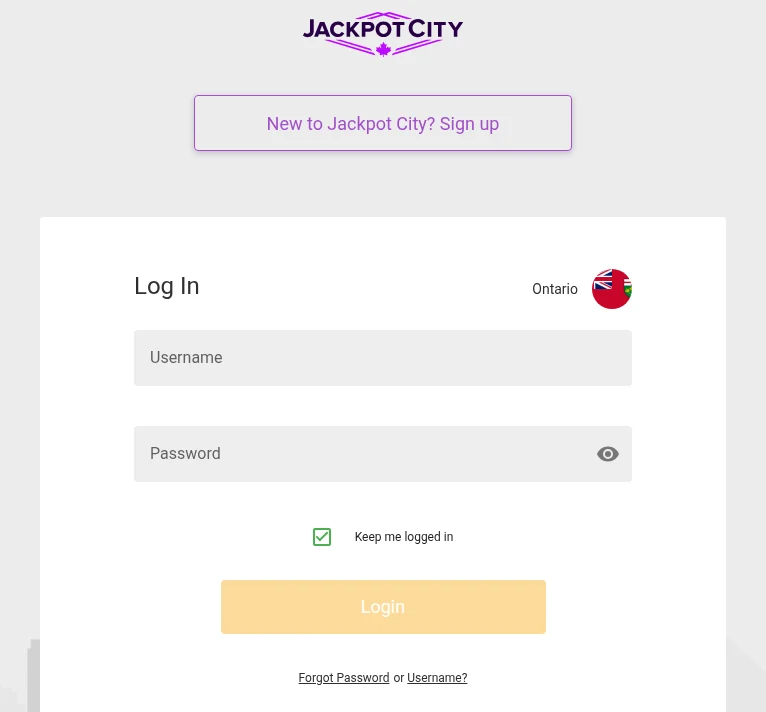
The Jackpot City Ontario sign-in page, read from Toronto, with the Ontario badge beside Log In and the recovery link under the button.
One Username for Every Device
The same username and password work on a computer, a phone and a tablet, and the FAQ asks you to log out of any device you are not using. Choose the username carefully when you register: Jackpot City says that once it is created, it cannot be changed.
Logging In on the App
The iPhone app is listed as Jackpot City Real Money Casino, published by Cadtree Limited, and needs iOS 15.1 or later; the Android app is on Google Play. You sign in with the same details as on the website, and our Jackpot City app guide covers installing either version. Search results for “Jackpot” also show free social slot apps such as Jackpot Party and Jackpot World, which have nothing to do with the casino.
Two-Step Verification at Jackpot City
Two-step verification adds a one-time code (OTP) to every log-in. Once it is on, you enter your username and password as usual, then the code Jackpot City sends you by text or email, which confirms the request really comes from you. It is the single most useful setting on the account: a stolen password is not enough to get in without the code.
Keep the phone number and email on the account up to date, since the code goes there. If you change either, update the account before you next need to log in.
Forgotten Details and Other Log-In Problems
The FAQ’s first advice is simple: check the username and password, then contact Live Help. These are the cases it covers, and a few the terms add.
Forgot Your Password
On the sign-in page, choose Forgot Password, enter the username you signed up with and select Send Reset Link. To change a password you still know, the FAQ points you to the Live Help team, where an agent makes the change.
Forgot Your Username
Choose Username? next to the password link, enter the email address you registered with and select Send. Because the username cannot be changed, this is the way to get it back rather than to replace it.
Location Not Confirmed
Geolocation has to be enabled: if it is off, or you are outside Ontario, no game will open. The terms add that the location is checked again at intervals while you play, and that software designed to get round the check is detected. Switch location services on for the browser or the app, and play only while you are in the province.
Verification Pending
Jackpot City asks for a government-issued photo ID and a proof of address no older than six months. Live verification through Jumio is usually instant; documents sent for manual review are normally checked within a day. If requested documents are not provided, the terms allow the account to be suspended until verification is complete.
Cookies Switched Off
The site states that cookies must be enabled to register and log in. If the sign-in page keeps returning you to the start, check your browser’s cookie settings or try a private window.
A Self-Exclusion or BetGuard Registration
A self-exclusion arranged with Jackpot City, or a registration with BetGuard, iGaming Ontario’s central register, blocks the account. The terms say that even if BetGuard is briefly unavailable and a log-in goes through, the session is ended as soon as the check catches up. If you want to stop, that is the system working; ConnexOntario offers free help around the clock on 1-866-531-2600.
Keeping Your Jackpot City Account Secure
The terms make you responsible for anything done with your username and password, even if the account is used because your device was compromised. Five habits cover most of the risk.
- Choose a strong password you use nowhere else, as the terms ask.
- Switch on two-step verification.
- Never let anyone else use the account, a relative included: the terms say so explicitly.
- Log out of devices you are not using, and untick Keep me logged in on shared ones.
- Tell Player Support at once if you suspect someone else has your details.
Player Support answers 24/7 by live chat, by email at jackpotcity@playersupportcentre.ca and by phone on 1 888 378 1328, toll-free in Canada. Each channel, and the complaint rules, are covered in our Jackpot City customer service guide.
Inactive Accounts and the Monthly Fee
An account with no log-in or log-out for more than six consecutive months becomes inactive, but the rule only applies once all of your accounts are inactive. Jackpot City then tries to tell you that a cashable balance is waiting. If you neither reply nor withdraw within 30 days of that notice, an administration fee of C$10 a month can be deducted until the balance reaches zero or you log in again.
The simplest way to avoid it is to withdraw what you do not plan to use before a long break.
Jackpot City and Its Three Sister Casinos
Cadtree Limited runs four casinos in Ontario: Jackpot City, Spin Casino, Ruby Fortune and Royal Vegas. They share the same terms and a help centre, and every Help Centre link on the Jackpot City Ontario pages goes to help.jackpotcity.ca. Each casino has its own site and its own sign-in, so your Jackpot City username is the one to use here. Our Spin Casino login guide covers the sister casino.
New to Jackpot City? Creating an Account
Choose New to Jackpot City? Sign up at the top of the sign-in page, or Sign Up on the Ontario homepage.
- Register with your legal name, date of birth and address, exactly as they appear on your ID.
- Pick your username and password. The username is permanent, so choose one you will remember.
- Verify your identity, usually instantly through Jumio.
- Choose deposit and time limits before the first deposit.
Players must be at least 19 and located in Ontario. Deposits start at $10, and each withdrawal is held for a rolling 24 hours, during which it can be reversed, with no processing at weekends. Our Jackpot City withdrawal guide covers the $50 minimum and the help centre’s faster route. Our Jackpot City Ontario review covers the games, payments and support in full.
FAQ’s – Frequently Asked Questions
- Where is the Jackpot City Ontario login page?
Choose Login on jackpotcity.ca/ontario, which takes you to the sign-in page at auth.jackpotcity.ca, marked Ontario. If the site you are on shows 18+ rather than 19+, it is the international Jackpot City, not the Ontario casino.
- How do I reset my Jackpot City password?
Choose Forgot Password on the sign-in page, enter the username you signed up with and select Send Reset Link. If you have forgotten the username too, the Username? link asks for your sign-up email instead. Live Help can also change a password for you.
- Can I change my Jackpot City username?
No. Once the unique casino username has been created it cannot be changed, so pick one you will remember. If you lose it, the forgotten-username page sends it to the email address you registered with.
- Why does Jackpot City ask for a code when I log in?
That is two-step verification. Once switched on, it sends a one-time code by text or email that you enter at each log-in, confirming the request comes from you.
- Is there a fee if I stop logging in to Jackpot City?
After more than six consecutive months with no log-in, and once all your accounts are inactive, Jackpot City sends a notice. If you neither reply nor withdraw within 30 days, a C$10 monthly administration fee can be charged on the balance.
Jackpot City Ontario Login: A Recap
Start at jackpotcity.ca/ontario, check for the 19+ mark, and sign in on auth.jackpotcity.ca with your username and password, adding the two-step code if you have switched it on. Keep location services enabled, because no game opens until Ontario is confirmed.
If something goes wrong, the reset link and the forgotten-username page solve most problems on their own, and Player Support is there around the clock by chat, email or toll-free phone.









