


 You must be based in Ontario to enjoy all this online casino features
- Swiper Login:
Ontario Players
Swiper Ontario Login: Email Sign-In, Recovery and 2FA
Swiper Ontario Login: Email Sign-In, Recovery and 2FA
🕑 Updated: 11 November 2026
 Content Writer
 Content Manager
Visit
Support
- Software Providers




To log in to Swiper in Ontario, go to on.swiper.com, press LOG IN and sign in with the email you registered plus your password, confirming you are fit to play. Searches also return swiper-ca.com, a third-party lookalike, and other products called Swiper.
Pros
 24/7 chat and phone support
2FA by text, email or app
Deposits work before location
QR code to install the app
Cons
 Generic name clutters searches
Lookalike swiper-ca.com site
App rated 1.8 on iPhone
CAD 5 monthly after 180 idle days
Logging In at on.swiper.com
Swiper’s Ontario casino and sportsbook share one account, and the white LOG IN box identifies you by the email address you registered, not by a username.
- Go to on.swiper.com and press LOG IN, the first of the two buttons in the header; the box also has its own page, on.swiper.com/ca/login.
- Enter the e-mail you registered, then the password; an eye icon reveals it, useful because capitals matter.
- Tick the eligibility box, then select the green LOG IN button.
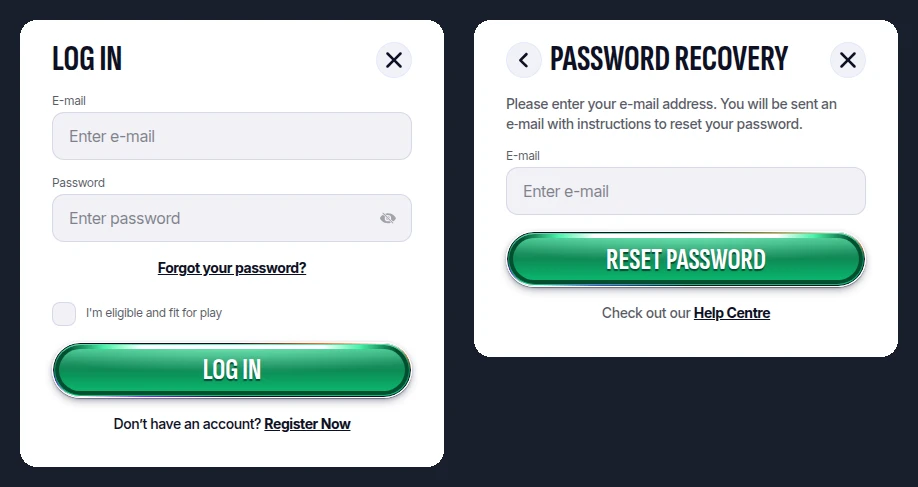
The LOG IN box (left) and, behind it, Password Recovery (right), both opened from Toronto at on.swiper.com.
A Common Name, and a Lookalike Site
“Swiper” is also the name of a JavaScript slider library, a Liberty University service and swiperbot.app, and all three show up in a Canadian search for “swiper login”. Add “casino” and another trap appears: swiper-ca.com, a third-party site that advertises “18+” play, which is not Ontario’s age, and whose LOG IN button passes through its own redirect link to ca.swiper.com, the Swiper site serving the other provinces. From Ontario that address bounces you back to on.swiper.com, the only one under AGCO registration OPIG1456605.
Password Recovery by Email
- Under the password field, select Forgot your password?.
- In PASSWORD RECOVERY, enter your registered email, then press RESET PASSWORD.
- Open Swiper’s email and follow its instructions to choose a new password.
Do not remember which email you registered? There is no form for that: Swiper’s help centre says a support agent sends a reminder once you contact them by live chat or email. A new password that the site refuses usually needs fresh cookies, so clear them or switch browser; Swiper recommends the latest Chrome. If the error persists, attach a screenshot of it when you write to support.
Two-Factor Codes at Swiper
Swiper’s help centre describes its 2FA as a code sent to your registered mobile number before the first log-in, and again whenever you sign in after clearing your browser history. You switch it on under Password in your Swiper profile:
- choose whether the one-time code arrives by email or by text message;
- link Google Authenticator, Authy or a similar authenticator by typing the setup key or scanning the QR code;
- wait until Swiper confirms the two are synchronised, and press Resend if no code turns up within a minute.
Swiper runs on the same platform as ToonieBet, so the authenticator fixes in our ToonieBet login guide apply here as well.
Before You Can Bet: the Location Pop-Up
Signing in and depositing work before Swiper has placed you; betting does not. The location request arrives as a pop-up, which starts by itself when you bet on a casino game, so a browser that blocks pop-ups for on.swiper.com stops you at that point. Keep Wi-Fi on, even on a computer, and prefer a fixed connection to mobile data, whose signal the help centre calls inconsistent. Remote-access programs and VPNs can also block the check, as can a phone picking up a US cell tower near the border.
The Swiper App and the Footer QR Code
The Ontario app, Swiper Ontario – Live Casino, comes from Canadix Limited itself. It rates 1.8 from 20 ratings on the Canadian App Store, at version 1.1.4, a 159.2 MB download needing iOS 15, and 2.0 from 7 on Google Play with over 1,000 installs. A SWIPER APP link in the site footer shows a QR code: point your phone’s camera at it for two or three seconds to reach the download. The app uses your website log-in. Our ranking of Ontario casino apps shows where these scores sit.
180 Days Without Signing In
Section 8 of Swiper’s terms ties activity to log-ins. Go 180 days in a row without one and the account is designated inactive; from then on, CAD 5.00 is deducted monthly from real money until you sign in again or nothing is left. Swiper warns by email 30 days ahead and invites you to withdraw. A zero or negative balance is never charged, a self-excluded account is not designated inactive, and charges can be refunded if illness kept you away. Once dormant, the account is suspended and refuses log-ins altogether.
Contact and Account Changes
- Live chat and phone, both 24/7; the number is +1-844-743-4982.
- Email: support@on.swiper.com, printed in the footer of every page.
- Personal details: name, address and similar fields change only through support, with the corrected details and why they changed.
- Closing or reopening: also through support, by chat or email. Only one account per player is allowed, and duplicates are closed.
For the games and the cashier, read our Swiper Ontario review next.
FAQ’s – Frequently Asked Questions
- Do I log in to Swiper with a username or an email?
With your email. The Swiper LOG IN box asks for the e-mail you signed up with plus the password, and the eligibility tick, before you press LOG IN.
- How do I reset my Swiper password?
Click Forgot your password? beneath the password box, type your registered email in Password Recovery and press RESET PASSWORD. Swiper emails the instructions for setting a new one.
- I forgot which email I used for Swiper. What now?
Contact Swiper by live chat or email. There is no self-service form, but its help centre says an agent will send you a reminder of the address.
- Is swiper-ca.com the official Swiper site?
No. It is a third-party site advertising 18+ play, and its LOG IN button routes through its own link to ca.swiper.com. The Ontario casino is on.swiper.com.
- Does Swiper charge for an inactive account?
Yes, after 180 straight days with no sign-in: CAD 5.00 a month from the real-money balance, after an email 30 days ahead. Casino winnings of recreational players are not income in Canada.
Swiper Login Essentials
Type on.swiper.com rather than trusting the search, where swiper-ca.com and unrelated Swipers compete, then use your email and password.
Recovery runs by email, 2FA codes can come by text or email, and the location pop-up must be allowed before you bet. A visit at least every 180 days avoids the CAD 5.00 monthly charge.







