


 You must be based in Ontario to enjoy all this online casino features
- LuckyCasino Login:
Ontario Players
LuckyCasino Ontario Login: luckycasino.ca and Fit to Play
LuckyCasino Ontario Login: luckycasino.ca and Fit to Play
🕑 Updated: 11 November 2026
 Content Writer
 Content Manager
Visit
Support
- Software Providers




To log in to LuckyCasino in Ontario, go to luckycasino.ca/login, enter your email and password and press LOG IN, I’M FIT TO PLAY. Search results also show luckycasino.com, Glitnor’s Malta-licensed site, and casino-lucky.ca, which is not the operator.
Pros
 Ontario log-in tops Google
Two-factor authentication available
Not-fit-to-play button at sign-in
Account closure from My Account
Cons
 Lockout after three failed attempts
Lookalike casino-lucky.ca site
Apps rated around two stars
Limits reset on UTC time
Logging In at luckycasino.ca
LuckyCasino’s Ontario sign-in is a full page at luckycasino.ca/login, and it asks you to confirm you are fit to play in the same click that logs you in.
- Go to luckycasino.ca/login; the PLAY NOW buttons on the home page lead to the same page.
- Type your E-mail and Password. The eye icon reveals the password.
- Press LOG IN, I’M FIT TO PLAY. The button below it, I’M NOT FIT FOR PLAY, does not sign you in; it opens the Responsible Gambling page.
- If you have switched on two-factor authentication, complete that step too, and allow the location check.
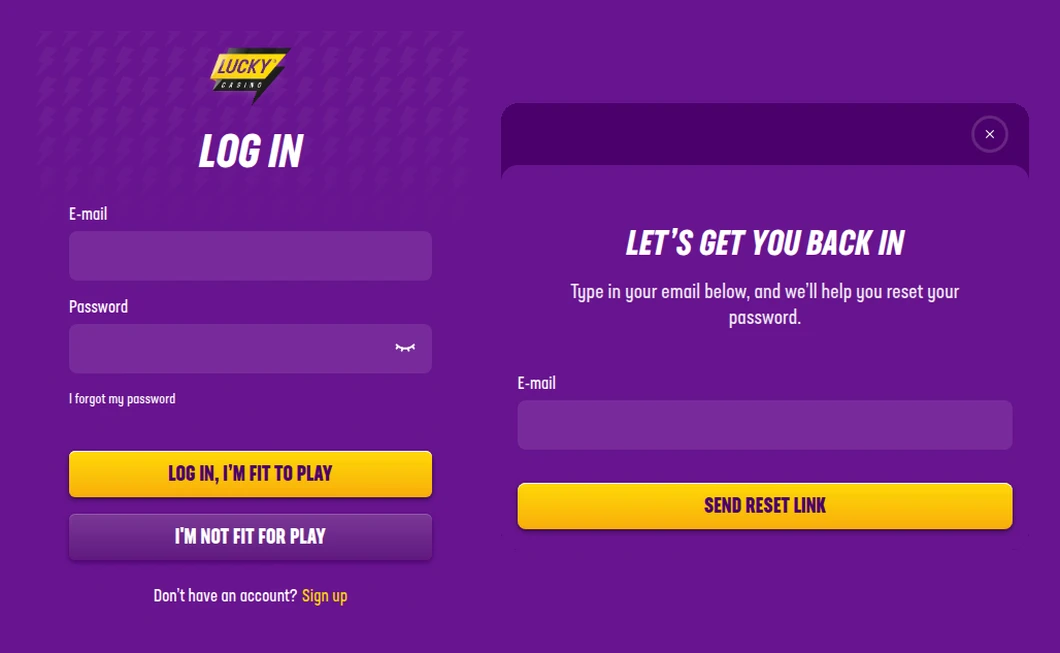
The luckycasino.ca log-in page (left) and the reset window behind “I forgot my password” (right), captured from a Toronto connection.
luckycasino.com, casino-lucky.ca and Other Lucky Names
Google Canada puts luckycasino.ca/login first for “lucky casino login”, which makes LuckyCasino easier to find than most brands. The other results still need care. Third is the Swedish log-in page of luckycasino.com, Glitnor’s international site, run by Glitnor Services Limited under a Malta Gaming Authority licence; the .com help centre’s own log-in guide also appears, along with Lucky Nugget and Lucky Days, which are other brands. Then there is casino-lucky.ca, which calls itself the “Official Site”, is not on the iGaming Ontario register and has its own log-in and sign-up boxes asking for an email and password. Keep your details for luckycasino.ca.
Lockouts and Forgotten LuckyCasino Passwords
Three wrong passwords in a row lock a LuckyCasino account for a while, so it pays to reset rather than keep guessing.
- After three failed attempts: the account is temporarily blocked, and the help centre asks you to contact Support.
- Forgot the password: choose I forgot my password under the password field. In the “Let’s get you back in” window, type your email and press SEND RESET LINK.
- Want a new one: open the side menu (three lines, top left), go to My Account and choose Change Password; you will need the current password first.
- Other blocks: a limit you have reached, a closed account, or a missing email or home address on file can also stop the log-in. LuckyCasino may freeze or close an account automatically when key details are missing.
Two-Factor Authentication and Password Rules
LuckyCasino’s help centre recommends two layers of protection, and both are in your hands.
- Two-factor authentication: switch it on in your account settings.
- A strong password: at least 8 characters, mixing upper and lower case, numbers and symbols, and not shared with anyone.
- No one from LuckyCasino will ask for it: never send log-in details by email, phone, SMS or social media.
- Where your data sits: personal information is stored on servers in Ontario, according to the same help article.
The Ontario terms add that LCKY Entertainment is not responsible for misuse of an account after you give your log-in details to someone else, on purpose or by accident.
When the Location Check Fails
You must be physically in Ontario to play, and the terms let LuckyCasino check your location while you bet and at other intervals. Its help centre adds a cause most sites leave out: cookies that remember a location from a previous visit somewhere else.
- Clear the browser’s cache and cookies, or open the site in an incognito or private window.
- Allow location access for the browser and in the device settings.
- Turn off any VPN or proxy; the terms forbid using them to hide or alter your location.
- Try another browser or another device, and switch between Wi-Fi and mobile data.
- Restart the device, update it, and as a last step power the modem off for 30 minutes.
Limits, Breaks and Closing a LuckyCasino Account
Several of the reasons a log-in fails are tools you set yourself, all under My Account > Responsible Gambling.
- Session limit: a maximum daily playtime, set next to deposit and loss limits under Manage Limits. All limits run on UTC, so a daily limit resets at 7 pm Toronto time in winter and 8 pm in summer. Lowering applies at once; raising or removing waits 24 hours.
- Timeout: 1 day, 7 days, or 1, 2 or 3 months. The account reopens by itself afterwards, and not before.
- Self-exclusion: 6 months, 1 year or 5 years. You are logged out immediately and cannot sign in until it ends. Withdraw first: a balance under $10 can only come out through Support, for a 5 CAD fee.
- Closing: My Account, then Close Account at the bottom. It signs you out straight away, and Support can reopen a normal closure if you change your mind.
- A year away: an account with a real-money balance and no access for 12 months is treated as dormant. LuckyCasino tries to reach you, and you can log in at any time to withdraw.
The LuckyCasino Apps for iPhone and Android
Both apps come from Glitnor companies rather than from LCKY Entertainment, and both are linked from luckycasino.ca. On the Canadian App Store, Lucky Casino: Real Money Games by Glitnor Sweden AB rates 2.16 from 19 ratings and needs iOS 15.1. On Google Play, LuckyCasino: Online Gambling by Glitnor Marketing Limited rates 2.1 from 16 ratings, with 1,000+ downloads.
Searching Google Play from Ontario for “lucky casino”, as two words, returns social slot apps and not this one; type luckycasino as one word and it comes first. Either app signs in with the email and password you use on the website. For the wider picture, see our Ontario casino apps compared page.
Help with a LuckyCasino Log-In
Live chat on luckycasino.ca runs 24/7, email goes to support@luckycasino.ca, and the help centre is at helpdesk.luckycasino.ca; there is no phone line. A locked or blocked account counts as a routine account matter, which LuckyCasino says it resolves itself rather than passing to iGaming Ontario. If you meant the other brand, see our Lucky Days login guide; the LuckyCasino Ontario review goes through its games, payments and withdrawal rules.
FAQ’s – Frequently Asked Questions
- Why is my LuckyCasino account blocked?
Three failed log-in attempts block it temporarily, and Support can lift the block. A closed account, a limit you have reached, or a missing email or home address on file can also stop the log-in.
- Is casino-lucky.ca the official LuckyCasino site?
No. It calls itself the official site but is not on the iGaming Ontario register. LuckyCasino’s Ontario site is luckycasino.ca, run by LCKY Entertainment Limited of Toronto, so do not type your email and password on casino-lucky.ca.
- How do I reset my LuckyCasino password?
On luckycasino.ca/login choose I forgot my password, type your email in the window that opens and press SEND RESET LINK. If you still know the current password, change it under My Account instead.
- Does LuckyCasino have two-factor authentication?
Yes. Its help centre says you can switch on two-factor authentication in your account settings, and asks for a password of at least 8 characters mixing upper and lower case, numbers and symbols.
- Does LuckyCasino charge a fee on dormant accounts?
Its Ontario terms set no inactivity fee. An account with a real-money balance and no access for 12 months is treated as dormant; LuckyCasino tries to contact you, and you can log in to withdraw. Casual players owe no tax on gambling wins in Canada.
LuckyCasino Login: Before You Start
Use luckycasino.ca/login, sign in with your email, and confirm you are fit to play with the yellow button. Stop after two wrong passwords and use the reset link, because the third locks the account.
Switch on two-factor authentication, ignore casino-lucky.ca, and remember that limits and timeouts you set yourself can be the reason a log-in is refused.







