You must be based in Ontario to enjoy all this online casino features
- NorthStar Bets Withdrawal:
Ontario Players
NorthStar Bets Withdrawals in Ontario: Limits and Timing
🕑 Updated: 27 November 2026
 Content Writer
 Content Manager
Visit
Support
- Software Providers






A NorthStar Bets withdrawal in Ontario goes out through Interac e-Transfer, a Visa card or PayPal, from $20, with no maximum of its own. Approval takes a few hours to a day; Mastercard, Amex, Apple Pay and Google Pay only deposit, and the northstarbets.com help pages set other limits.
Pros
 PayPal pays out winnings
No NorthStar maximum payout
Approval within 24 hours
No withdrawal fees
Cons
 $20 minimum withdrawal
Mastercard and Amex deposit only
Safety checks up to 72 hours
Removed methods cannot return
NorthStar Bets Withdrawal Methods in Ontario
Three working routes pay winnings out of an Ontario NorthStar account: Interac e-Transfer, Visa and PayPal. Each one has to carry a deposit first, which is what registers it on your account as a payout option.
| Method | Funds the account | Pays winnings | Worth knowing |
|---|---|---|---|
| Interac e-Transfer | Yes | Yes | Customers most often find it the quickest |
| Visa | Yes | Yes | A Visa deposit has to come first |
| PayPal | Yes | Yes | Rare among Ontario cashiers as a payout route |
| Mastercard | Yes | No | NorthStar says Mastercard does not support casino withdrawals |
| American Express | Yes | No | Missing from the withdrawal list |
| Apple Pay and Google Pay | Yes | No | Missing from the withdrawal list |
| Instadebit | No | No | Still named in the help article, but the service closed in 2026 |
Payout routes as listed by NorthStar’s Ontario help centre (support.northstarbets.ca); deposit methods from the site’s footer.
Interac e-Transfer, the Usual Choice
Interac moves money between NorthStar and a Canadian bank account without a card. Going by what its customers tell it, the help centre calls it the fastest of the payout options, which makes it the default pick for most Ontario accounts.
Visa Cards
A Visa card that has funded the account can also receive winnings. Some Canadian banks block gambling transactions on their cards, so a declined Visa deposit usually means the bank, not NorthStar, has said no; in that case the card never becomes a payout option either.
PayPal as a Payout Route
Few Ontario casinos pay winnings to PayPal, and NorthStar is one of them. Fund the account from your PayPal balance once, and the wallet appears among the payout choices. Our PayPal casinos guide lists the other provincial sites that accept it.
Instadebit Is Still on the List
The withdrawal article still names Instadebit, but that service stopped taking deposits in February 2026 and closed its balances in April. It is no longer a working route at NorthStar or anywhere else; our Instadebit casinos page explains what to use instead.
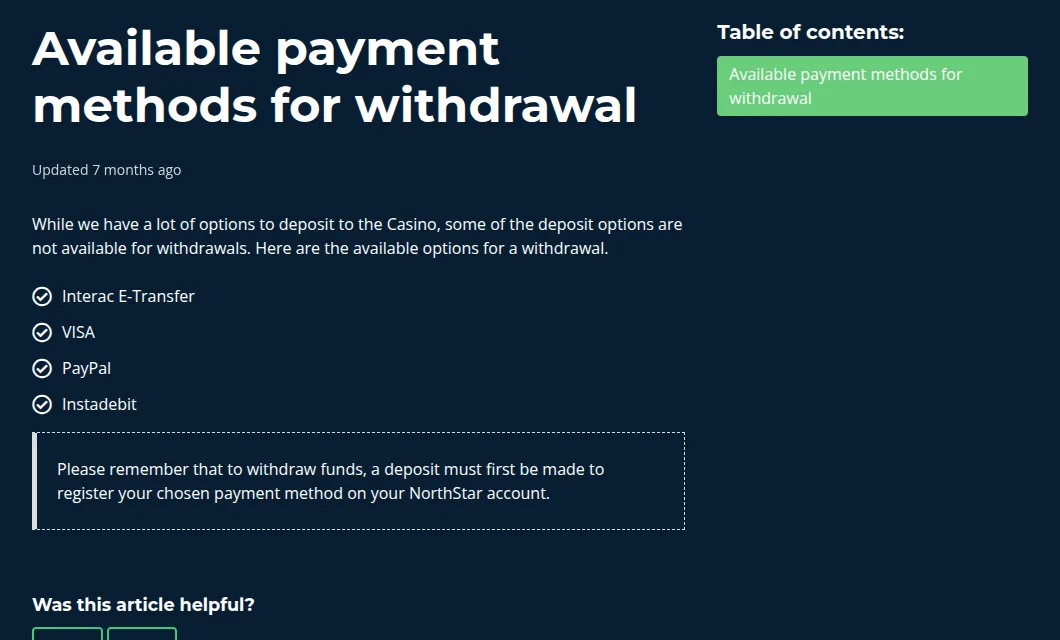
NorthStar’s Ontario help article on the payment methods available for withdrawal.
Cards and Wallets That Only Fund the Account
Four of NorthStar’s deposit options cannot receive money back: Mastercard, Amex and the two phone wallets. Topping up with one of them means registering a second method before you can cash out.
Mastercard Deposits Leave You Without a Payout Route
The help article on blocked withdrawals opens with Mastercard: the network does not support payouts from casinos. A player whose only deposit went in by Mastercard therefore has nothing to withdraw to until another method is added.
American Express
Amex is unusual in Ontario, and NorthStar takes it for deposits. It is not among the methods that can be paid, so winnings from an Amex-funded session have to leave by Interac, Visa or PayPal.
Apple Pay and Google Pay
The site’s footer shows both phone wallets as payment options, yet neither is on the withdrawal list. Treat them as a quick way in only.
Registering a Payout Route With a $20 Deposit
The fix NorthStar gives is to deposit the $20 minimum with a method that pays, such as Interac. Once that deposit succeeds, the new method shows up as an option when you withdraw.
NorthStar Bets Minimum and Maximum Withdrawal
The smallest payout is $20. NorthStar sets no upper limit of its own, although your bank may, and very large amounts take longer.
The $20 Minimum
Twenty dollars is both the lowest deposit and the lowest withdrawal at NorthStar, so a balance below that figure cannot be cashed out through the normal request.
Cashing Out Less Than $20
Section 2.07 of the Ontario terms gives a way round the minimum: if you want to take out less than the stated amount, contact Customer Support. The same section lets NorthStar cap the number of withdrawals an account can make.
No NorthStar Ceiling, but Your Bank May Have One
The help centre says there is no maximum on NorthStar’s side and points to your financial institution instead. Interac transfers and card payments carry their own daily and per-transaction limits, set by each bank.
Payouts Above $10,000
Withdrawals over $10,000 could need further processing time, according to the same article, so a large cash-out is worth requesting well before you need the money.
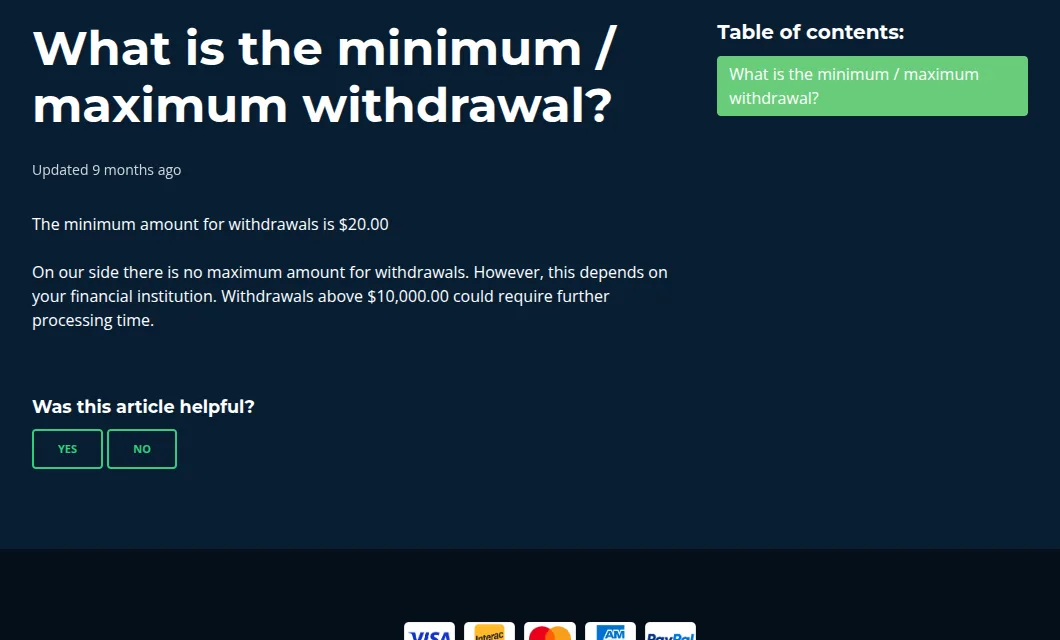
The Ontario help article on NorthStar’s minimum and maximum withdrawal.
How Long a NorthStar Bets Withdrawal Takes
Approval normally lands the same day, within 24 hours at the latest; extra safety checks can stretch that to 72 hours, and the payment method then adds its own time.
Approval Within a Few Hours
Every request first goes through approval. The help centre says this normally takes a few hours and, in some cases, up to 24 hours.
Safety Checks of Up to 72 Hours
A second article warns that some withdrawals pass through additional safety checks, which may last as long as 72 hours. Amounts above $10,000 are the one case the help centre names as slower.
The Approval Email
When the request is approved, NorthStar emails you with the details of the transaction, and the money is sent to the method you picked when you asked for it.
The Method’s Own Time
After approval, arrival depends on the route you chose and on your payment provider, which the help centre says may add some technical time of its own.
A Withdrawal That Has Not Arrived
If the expected time has passed with nothing received, NorthStar wants you to get in touch with Customer Service. Have the approval email to hand, since it holds the transaction details.
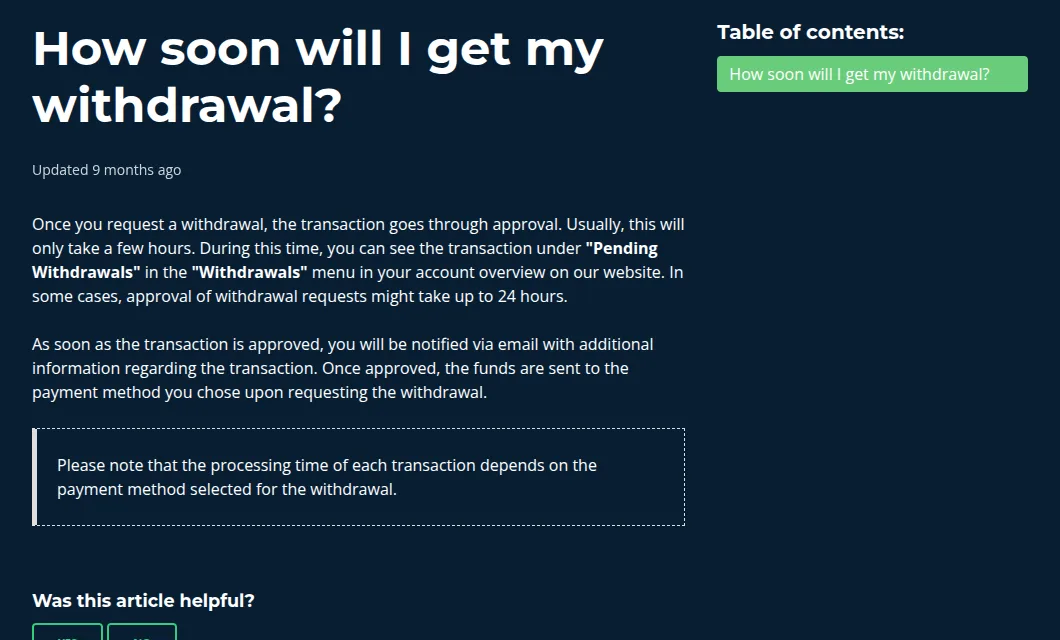
NorthStar’s Ontario help article on how soon a withdrawal arrives.
Requesting, Tracking and Cancelling a Payout
A request is made from your account while you are in Ontario, shows as pending until approved, and can be cancelled until NorthStar processes it.
Where a Request Shows Up
While it waits for approval, the transaction is listed under Pending Withdrawals in the Withdrawals menu of your account overview. That is the place to check before contacting support.
Cancelling Before Processing
Section 2.08 lets you cancel a withdrawal request through your account. As long as NorthStar has not yet processed it, the funds are put back into your NorthStar balance.
When NorthStar Refuses a Request
The same section allows NorthStar to refuse a withdrawal it suspects breaks the agreement, minor breaches included. It undertakes to make reasonable efforts to tell you promptly through the contact details on your account.
Requesting From Inside Ontario
NorthStar checks your location with GeoComply, and a VPN, proxy or remote desktop program makes that check fail. Switch them off before you sign in to ask for a payout.
The Last-Deposit-Method Rule
Under the Ontario terms, payouts normally go back to the method you used for your most recent deposit, and only ever to an account held in your name.
Payouts Follow Your Latest Deposit
Section 2.06 says that, subject to certain exceptions, funds are returned to the last method of payment used to deposit. If you topped up by Interac and then by Visa, expect the Visa card to be the route.
Asking for a Different Account
You can ask for the money to go to another account, but NorthStar may want extra documents first. Whatever the route, the destination must be in your name; payments to anyone else are excluded.
A Removed Method Cannot Come Back
Removing a payment method is done through Customer Service, and the help centre warns that, for security reasons, a method taken off the account cannot be added again. Think twice before deleting the card or wallet you are paid to.
Replacement Cards
If a new card keeps the same 16-digit number, support can update the expiry date for you from the last four digits. A card with a new number has to be added through a fresh deposit before it can be used.
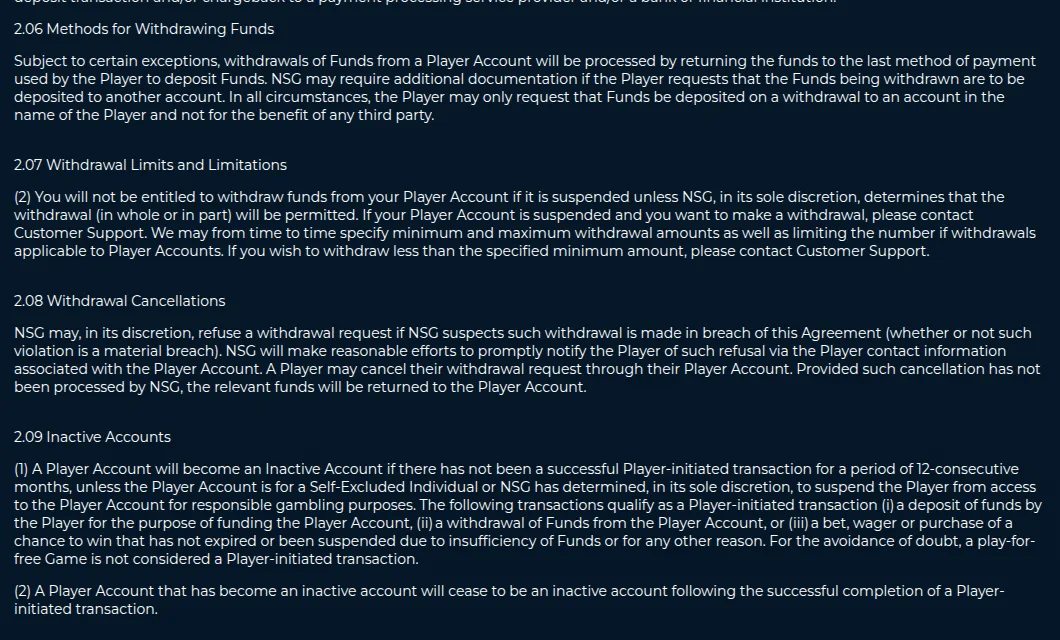
Sections 2.06 to 2.09 of NorthStar’s Ontario terms and conditions.
Documents NorthStar May Ask For
Identity is normally confirmed during sign-up, so most players never send anything else. If NorthStar does ask later, documents go by email.
Verification at Sign-Up
Uploading ID is part of registration and is done through the website or the app. The help centre describes requests after that as very rare, but says they can happen at any time.
Accepted ID
One government-issued document: a driver’s licence, a passport or an ID card. It must be valid, clear, unedited and photographed with all four corners in the frame.
Sending Documents by Email
Later requests are made through the contact details on your account, and the papers go to documents@northstarbets.ca. One help article spells that address with an extra “t” (northstartbets), so type it carefully.
Fees, Chargebacks and Your Balance
NorthStar takes no fee on payouts. Two things can still hold money up: a chargeback on an earlier deposit and an account suspension.
No NorthStar Fees
The help centre promises that NorthStar will never add a hidden charge to a deposit or a payout. Your bank, card issuer or PayPal may still apply its own charges.
Chargebacks Can Freeze the Account
If you ask your bank to reverse a deposit, section 2.05 lets NorthStar suspend the account while the dispute runs, take the disputed amount out of your balance and, at worst, deactivate the account. A negative balance after that becomes a debt you owe.
Your Balance Is Held in Trust
Section 2.03 says NorthStar keeps players’ funds in a bank account as trustee for the player, not as a banker. The balance earns no interest and is not covered by deposit insurance, because a casino account is not a bank account.
The Parent Company’s Filings
In May 2026 NorthStar’s listed parent received a failure-to-file cease trade order from the Ontario Securities Commission. Our NorthStar Bets review sets out what that does and does not affect; for payouts, the trust arrangement in the terms is the part that matters.
Suspension, Closure and Inactive Accounts
Your account’s status decides whether you can withdraw at all. A suspended account cannot pay out, while closure and dormancy send the balance back to your last deposit method.
A Suspended Account
Under section 2.13, a suspension blocks log-ins and withdrawals unless NorthStar decides otherwise, and you may have to cooperate with an investigation, documents included, before it is lifted. Section 2.07 adds that a suspended player who wants a payout should contact Customer Support.
Closing Your Account
You can close the account at any time through Customer Service, by chat, email or phone. Subject to the minimum and any documents, NorthStar returns the balance to the method of payment you last used (section 2.12).
Inactive After 12 Months
Section 2.09 counts transactions, not log-ins. An account turns inactive once 12 months in a row pass without a deposit, a withdrawal or a real-money bet; free-play games do not count. One successful transaction makes it active again.
Dormant After 36 Months
Another 24 months without a transaction makes the account dormant (2.10). It is suspended and then deactivated, and NorthStar sends the balance to your last payment method; if that fails and you cannot be reached within 24 months, the money may be forfeited. Support can reactivate a dormant account with its old details (2.11).
NorthStar Bets .ca and .com Pay Differently
Searches for NorthStar withdrawals also bring up northstarbets.com, a separate site with its own help centre and its own limits. Only northstarbets.ca serves Ontario.
| What we compared | northstarbets.ca (Ontario) | northstarbets.com |
|---|---|---|
| Licence | AGCO registration OPIG1226485 (NorthStar Gaming (Ontario) Inc.) | Kahnawake Gaming Commission, licence 00930 |
| Payout methods | Interac e-Transfer, Visa, PayPal | Interac e-Transfer (and Instadebit, now closed) |
| Minimum withdrawal | $20 | $10 |
| Largest single payout | No NorthStar maximum | $9,999 |
| 30-day cap | None stated | $50,000 |
| Approval | Within hours, 24 at most; checks up to 72 hours | Up to 24 hours on NorthStar’s side |
Both help centres as they read on the same day, opened from Toronto.
Why Google Mixes the Two
The .com site uses the NORTHSTARBETS trademark under licence, and its help centre also has a Canadian English address (en-ca), so its Withdrawals section sits in the same results as Ontario’s. Its answers are written for a different operator.
The $9,999 and $50,000 Caps Belong to .com
A per-transaction cap of $9,999 and a $50,000 total over 30 days come from the .com help pages. An Ontario player sees neither cap; only the bank’s limit and slower handling above $10,000 apply.
Checking Which Site You Are On
An Ontario help page has support.northstarbets.ca in the address, and the Ontario terms name the AGCO and NorthStar Gaming (Ontario) Inc. Our guide to logging in at NorthStar Bets shows how to tell the two sites apart before you sign in.
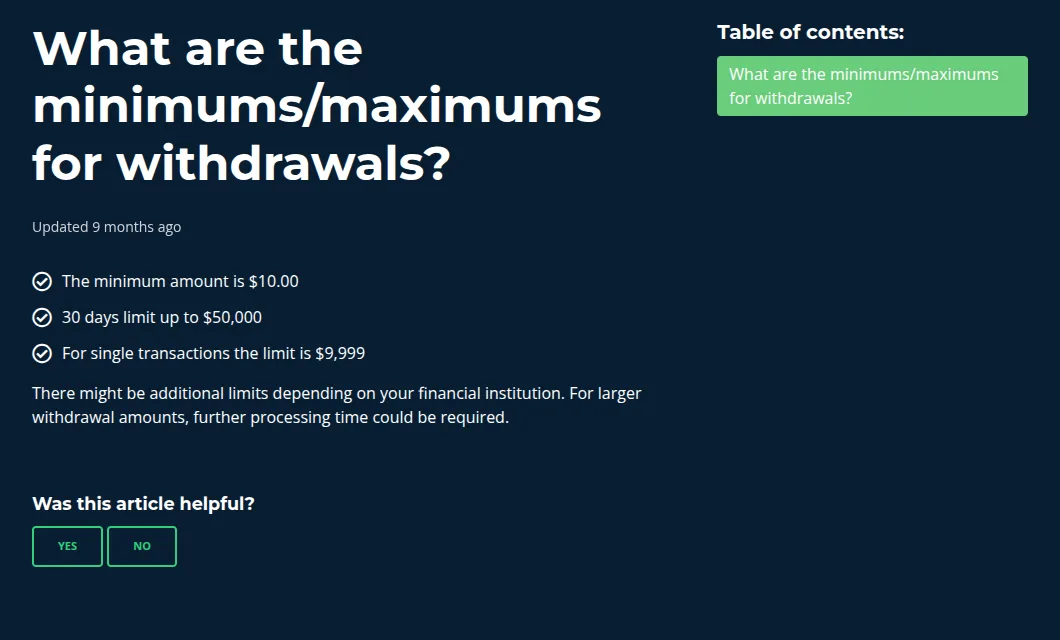
The northstarbets.com help article on withdrawal limits, which does not apply in Ontario.
NorthStar Bets Next to Other Ontario Payouts
Approval within a day and PayPal as a payout route are NorthStar’s strengths; the $20 minimum and four deposit-only methods are the weak points. Our instant withdrawal casinos page ranks the whole province by speed, and our Interac casinos guide lines up every Ontario site that pays by e-Transfer.
FAQ’s – Frequently Asked Questions
- How long does a NorthStar Bets withdrawal take?
Approval normally takes a few hours and no more than 24. Some requests go through extra safety checks of up to 72 hours, and amounts over $10,000 can take longer; after approval, the payment method adds its own time.
- What is the minimum withdrawal at NorthStar Bets?
Twenty dollars. To take out a smaller balance, ask Customer Support, as the Ontario terms allow. NorthStar sets no maximum of its own, but your bank’s limits still apply.
- Why can’t I withdraw to my Mastercard at NorthStar Bets?
Mastercard does not support withdrawals from casinos. Deposit at least $20 with Interac, Visa or PayPal; that method then shows up when you withdraw.
- Can I cancel a NorthStar Bets withdrawal?
Yes, through your account, as long as NorthStar has not processed it yet. The amount then returns to your balance.
- Does NorthStar Bets charge withdrawal fees, and are winnings taxed?
NorthStar charges no fees on deposits or withdrawals, though your payment provider may. Recreational players in Canada do not usually pay tax on casino winnings; our winnings tax page sets out when they do.
Is NorthStar Bets Good for Withdrawals?
For Interac, Visa and PayPal users, yes. Approval within a day, no fees, no NorthStar ceiling and the option to cancel before processing work in its favour; a $20 minimum, four deposit-only methods and checks of up to 72 hours count against it.
Make your first deposit by Interac, Visa or PayPal, keep that method on the account and verify early. The full NorthStar Bets review covers the games and the parent company, and the NorthStar Bets app guide shows which app serves Ontario.
Best NorthStar Bets Casino Alternatives


19+ and in Ontario. Real-money play on Ontario’s regulated sites is limited to adults aged 19 or over who are physically in the province. If gambling stops being fun, ConnexOntario offers free, confidential support 24/7 on 1-866-531-2600.
Related Articles