


 You must be based in Ontario to enjoy all this online casino features
- NorthStar Bets Login:
Ontario Players
NorthStar Bets Ontario Login: Temporary Passwords, GeoComply
NorthStar Bets Ontario Login: Temporary Passwords, GeoComply
🕑 Updated: 11 November 2026
 Content Writer
 Content Manager
Visit
Support
- Software Providers






To log in to NorthStar Bets in Ontario, go to northstarbets.ca or the NorthStar Bets Ontario app, choose Log In, enter your email address and password and tick Fit to play. GeoComply then confirms you are in Ontario, which NorthStar requires even for logging in.
Pros
 Three choices for two-factor checks
Lockout lifts after 30 minutes
Phone help for a forgotten email
Support open around the clock
Cons
 No log-in outside Ontario
Phone browsers need GeoGuard app
Lookalike .com site and app
How to Log In to NorthStar Bets in Ontario
NorthStar Bets signs you in with your email address, which is the unique log-in detail on the account. One account covers the casino, the live dealer tables and the sportsbook.
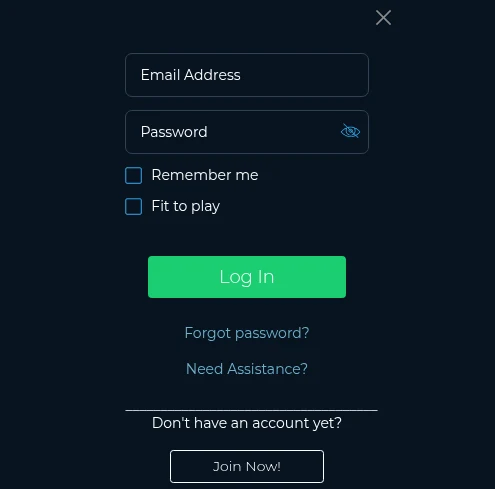
- Go to northstarbets.ca from a device in Ontario, or open the NorthStar Bets Ontario app.
- Find Log In at the upper right and select it.
- Enter your email address and password.
- Tick Fit to play; tick Remember me only on a device nobody else uses.
- Choose Log In, then complete the location check: GeoComply on a computer, location services on a phone.
.ca, Not .com
Two NorthStar sites carry the same logo and the same tagline. northstarbets.ca is the one on the iGaming Ontario register, run by NorthStar Gaming (Ontario) Inc. under AGCO registration OPIG1226485. northstarbets.com is a different operation outside the provincial framework, and your Ontario account does not exist there. Check the address ends in .ca before you type your password.
No Log-In From Outside Ontario
NorthStar’s help centre is blunt: it does not accept registrations or log-ins from outside the province. Unlike operators that let you check a balance from elsewhere in Canada, NorthStar needs you in Ontario even to sign in. NorthStar recommends Google Chrome, with pop-ups allowed, for registering and playing.
Forgotten Password, Email or Lockout
NorthStar has a different fix for each of these three problems: a temporary password by email, a 30-minute wait after a lockout, and a phone call for a forgotten email address.
A Temporary Password by Email
Choose Log In, then Forgot password?, and enter your email address and your date of birth. NorthStar emails a temporary password that works for one log-in; use it, then set a new password straight away. The new one needs at least 8 characters, with letters, numbers and at least one special character such as @, # or !, and no spaces. If the email does not arrive, check the spam and junk folders and any inbox filters, then contact customer service.
NorthStar Lockouts After Wrong Passwords
Too many wrong passwords lock the account temporarily, and a pop-up tells you so. Wait 30 minutes and try again. Getting the email address or date of birth wrong too many times during a password reset is treated more strictly: the account is blocked for security, and only customer service can lift it.
Forgotten the Email You Registered With
Because the email is your log-in, NorthStar handles this one by phone. Call +1 (855) 218-7827 from the phone number registered on the account, and the team will help you recover it. The same line handles changes to details that cannot be edited on screen, such as a new name, which needs a document like a marriage certificate.
Two-Factor Authentication
NorthStar lets you choose when it asks for a second check. Go to My Account > Account Details > Two-Factor Authentication Preferences and pick any of three triggers:
- On Login: an extra code at every log-in.
- On Change Password: a code whenever the password is changed.
- On Change Phone: a code when you log in from a new device.
You choose whether codes and alerts come by SMS or email, so you hear about any log-in you did not make. The help centre is honest that 2FA is not foolproof: phishing can still capture both factors, so never type your details into a page you reached from an unexpected email or text.
GeoComply and GeoGuard: The Location Check
NorthStar uses GeoComply to confirm you are in Ontario, in two different ways depending on the device.
On a Computer
After you log in, choose the green Download button, install the GeoComply plug-in (Player Location Check) with a stable Wi-Fi connection, then choose Refresh and Allow. On Windows, the Wi-Fi adapter must be on, with several networks visible in range. To confirm the plug-in is installed, look for Player Location Check in Control Panel > Programs on a PC, or in System Preferences on a Mac.
In a Phone or Tablet Browser
In a mobile browser, NorthStar sends you to the App Store or Google Play for GeoGuard Location Validator, a GeoComply app. Open it, accept, and set its location access to Always, with Precise Location on an iPhone or High accuracy on Android, then allow notifications when you return to the site. A proxy, VPN or remote desktop program on the device will fail the check, so turn it off or uninstall it.
The NorthStar Apps
NorthStar Bets Ontario, published by NorthStar Gaming (Ontario) Inc., is the AGCO-registered app, and it needs iOS 16.0 or later. NorthStar Bets Canada, from Slapshot Media Inc., which served the .com site, is no longer listed in the Canadian App Store, and a copy still installed from before will not open your Ontario account. On Google Play only the Ontario app is listed, marked 19+ Ontario Only. Installing it, store by store, is covered in our NorthStar Bets app guide; see how it ranks in our Ontario casino apps compared guide.
Keeping Your NorthStar Account Secure
- Switch on 2FA On Login, so a stolen password is not enough.
- Keep the registered phone number current under My Account: it is the number support uses to confirm it is you.
- Never share your log-in details, and hold only one account; a second registration is blocked.
- Untick Remember me on shared computers.
Support runs 24 hours a day, every day: live chat once you are logged in, email at support@northstarbets.ca and the toll-free line above. The help centre is at support.northstarbets.ca.
New to NorthStar Bets? Registering
- Choose Register at the top right of northstarbets.ca, or Join Now! in the log-in window.
- Enter your personal details exactly as they appear on your ID, then your billing address from the post code search.
- Add your phone number and email, the email becoming your log-in, and choose a password.
- Set deposit, loss and time limits when offered.
Identity checks are part of registration, and further documents go by email to documents@northstarbets.ca only if NorthStar asks for them later. You must be 19 or older and in Ontario, and the minimum deposit is $20. The NorthStar Bets Ontario review covers the games, payments and support in full.
FAQ’s – Frequently Asked Questions
- How do I log in to NorthStar Bets in Ontario?
Go to northstarbets.ca or the NorthStar Bets Ontario app, choose Log In, enter your email and password and tick Fit to play. On a computer, the GeoComply plug-in then confirms you are in Ontario.
- I forgot my NorthStar Bets password. What happens?
Choose Forgot password? and enter your email and date of birth. NorthStar emails a temporary password for a single log-in; use it to sign in, then set a new password with at least 8 characters, numbers and a special character.
- How long is a NorthStar Bets account locked after wrong passwords?
Thirty minutes, after which you can try again. If you enter the wrong email or date of birth too many times while resetting the password, the account is blocked until customer service lifts it.
- What is GeoGuard Location Validator?
A GeoComply app NorthStar asks you to install when you play in a phone or tablet browser. Set its location access to Always so it can confirm you are in Ontario.
- Is NorthStar Bets Canada the same app as NorthStar Bets Ontario?
No. NorthStar Bets Ontario, published by NorthStar Gaming (Ontario) Inc., is the AGCO-registered app. NorthStar Bets Canada, from Slapshot Media, served northstarbets.com, did not open an Ontario account and is no longer in the Canadian App Store.
NorthStar Bets Ontario Login: Key Points
Log in at northstarbets.ca, not .com, or in the NorthStar Bets Ontario app, with your email and password and Fit to play ticked. You have to be in Ontario even to sign in, and GeoComply or GeoGuard does the check.
A forgotten password brings a one-use temporary password by email, a lockout lasts 30 minutes, and a forgotten email is recovered by phone. Two-factor authentication can be set for every log-in, a password change or a new device.




