


 You must be based in Ontario to enjoy all this online casino features
- PlayOJO Withdrawal:
Ontario Players
PlayOJO Withdrawal Time in Ontario: 11 Hours, No Minimum
PlayOJO Withdrawal Time in Ontario: 11 Hours, No Minimum
🕑 Updated: 11 November 2026
 Content Writer
 Content Manager
Visit
Support
- Software Providers


PlayOJO has no pending period and aims to process Ontario withdrawals within 11 hours. After that, MuchBetter can arrive in minutes and Visa takes 2 to 7 business days. There is no minimum, though the terms allow a payout under $5 to be sent by cheque.
Pros
 No pending period
11-hour processing aim
No minimum withdrawal
Cancel any time before processing
Cons
 Limit per withdrawal set by PlayOJO
Under $5 may come by cheque
Paysafecard cannot be paid back
Inactive accounts pay $5 a month
How Fast PlayOJO Pays in Ontario
PlayOJO has no pending period: a withdrawal goes to its payments team as soon as you ask, and the method’s own transfer time starts once it is processed. How quickly that processing happens is worded four different ways across its Ontario pages.
| Where PlayOJO says it | What it promises |
|---|---|
| Terms and conditions, clause 8 | All withdrawals processed “within a few hours” |
| Help centre, “When will my withdrawal be approved?” | Within 11 hours, or more if a request goes to review |
| Help centre, “How long will it take…?” | “As soon as possible” |
| Visa payment page | Processed “right after you place the request” |
All four point the same way, and the 11 hours is the only one you can hold PlayOJO to. An email tells you when the request has been processed.
After Processing, by Method
| Method | Time to reach you | Note |
|---|---|---|
| MuchBetter | Between 10 minutes and a few days | Withdraw from the PlayOJO cashier, with your MuchBetter phone number in the format 1xxxxxxxxxx |
| Visa | 2 to 7 business days | Prepaid Visa cards cannot receive a withdrawal |
| Interac | Depends on your bank | PlayOJO warns that the bank’s own verification stages can slow the transfer |
| Paysafecard | Cannot receive withdrawals | Deposit only |
The Ontario cashier also lists Mastercard and Apple Pay; as with every method here, a withdrawal goes back to whichever of them funded the account.
No Minimum, With Two Footnotes
Every one of the six payment cards on PlayOJO’s Ontario banking page shows a minimum withdrawal of $0, and the help centre says you can withdraw “as little or as much” as you want.
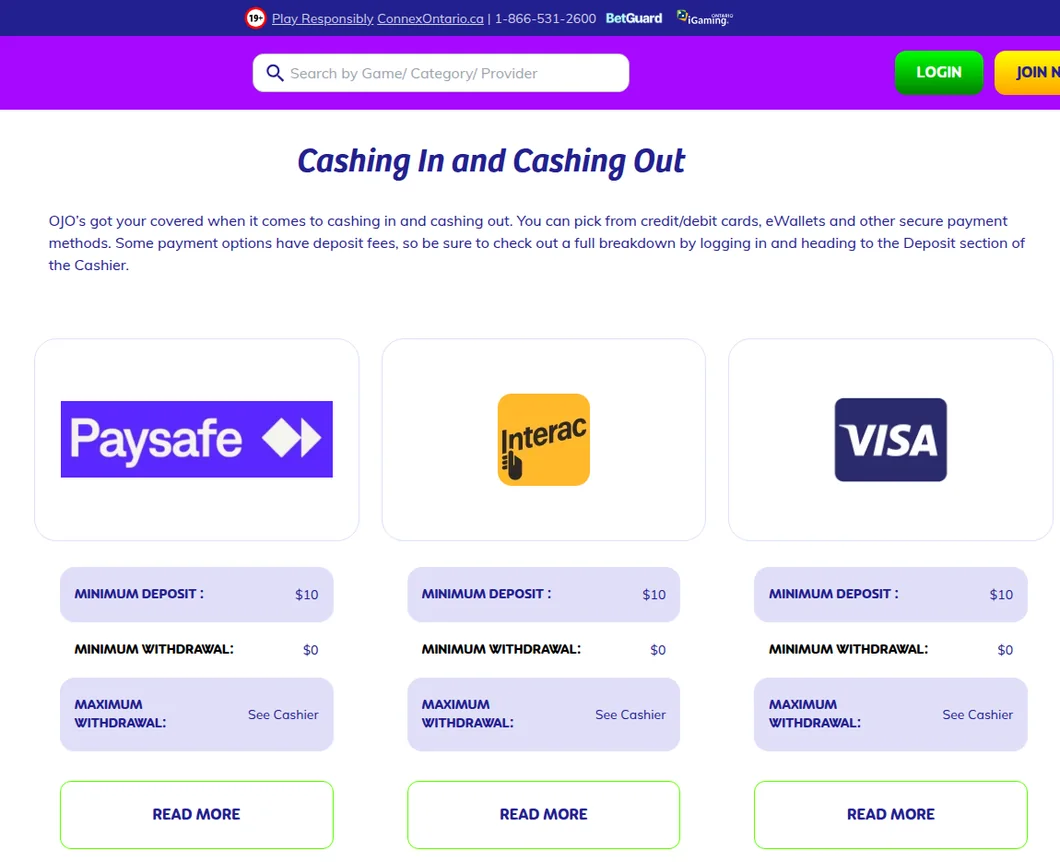
PlayOJO’s Ontario banking page, read from Toronto. The Paysafecard card shows the same $0 minimum withdrawal as Interac and Visa, although PlayOJO’s Paysafecard page says the voucher cannot be withdrawn to.
A Cheque Below $5
Clause 8 of the terms adds that PlayOJO reserves the right to send a withdrawal of less than 5 CAD by cheque. A small balance can still come out, but not necessarily to your card or wallet.
A Real Money Account First
A withdrawal is only possible once the account has made at least one successful deposit, and PlayOJO accepts requests only through the withdrawal page in its software, not by email or telephone.
How Much You Can Withdraw at Once
PlayOJO does not publish one maximum for everyone. When the account is registered, its system sets an individual limit per withdrawal, which you can see under “more info” on the withdrawal page.
- Once a withdrawal is processed you can request another straight away; there is no cap on the number per day, week or month.
- To take more than your limit in a single payment, email customer support. The ceiling is $50,000 per transaction.
- A win of $5,000 or more, or a jackpot, can take longer while PlayOJO verifies it, with a third party where relevant.
How to Withdraw from PlayOJO
Browser and app share one cashier.
- Log in and open the cashier, then choose Withdraw.
- Pick a method you have already deposited with; the cashier lists only those.
- Enter the amount and check the “more info” panel for your per-transaction limit and any fee or method minimum.
- Confirm. Until it is processed, you can cancel the request and the money returns to your Real Money Balance.
When Only “Wire Transfer” Appears
PlayOJO returns money to the method that funded the account. When that is not possible, usually with prepaid cards, it sends the money another way or contacts you, and the help centre notes that some players see only a Wire Transfer option on the withdrawal page. The terms let PlayOJO choose the route in that case, after confirming that the alternative account is yours.
Documents
PlayOJO may ask for ID, proof of address and evidence that the payment method is yours after your first withdrawal request. Upload them under My Account, Personal Settings, Upload Documents, in colour, in date and with no edges cut off. It aims to check them within 12 hours and asks you to get in touch if 48 hours pass without news. Our PlayOJO login guide covers the sign-in side.
Fees and Account Charges
PlayOJO states that it takes no fee on payments, and its terms promise that any fee or method minimum will be shown during the withdrawal. Its own MuchBetter page is less tidy: one answer says PlayOJO charges nothing, the next mentions “very minor fees” for the method’s operational costs.
- Withdrawing without playing: repeated deposits and withdrawals without matching bets can lead PlayOJO to pass on bank charges of 15% of the amount and close the account.
- Inactivity: after six months without logging in, an account can be charged $5 a month from its balance, with an email 30 days before the first charge.
- Dormancy: after 48 months with no login the account is frozen, and the balance can still be withdrawn on request.
Recreational gambling winnings are not taxed in Canada.
Searching for PlayOJO Withdrawal Times
Most of what Google shows in Canada for “playojo withdrawal time” describes other PlayOJO markets: blog posts and Visa pages on playojo.com, forum threads and a test of the UK site. The Ontario product lives at playojo.ca, and its banking page, help centre and terms are the ones that apply from inside the province.
PlayOJO Against Other Ontario Casinos
On published commitments, PlayOJO sits among the faster Ontario operators, and it is the only one in this table without a minimum.
| Casino | Minimum withdrawal | Hold or processing | Quickest published route |
|---|---|---|---|
| PlayOJO | None | Within 11 hours | MuchBetter, minutes to days once processed |
| Casino Time | $10 | Included in the 30 seconds | Interac e-Transfer, most within 30 seconds of asking |
| bet365 | $10 ($20 by PayPal) | 1–4 hours (Interac, cards, PayPal) | The same |
| Jackpot City | $50 | 24 hours, reversible, under its terms | Interac or Visa, near-instant for the first morning request |
| Yukon Gold | $50 | 48 hours plus a business day | Skrill, one to three working days |
The bet365 withdrawal guide and the Yukon Gold withdrawal guide go through two of these in detail, and our fastest withdrawals ranking covers the province.
FAQ’s – Frequently Asked Questions
- How long does a PlayOJO withdrawal take in Ontario?
PlayOJO aims to process a withdrawal within 11 hours, or more when a request is reviewed. After that, MuchBetter takes between ten minutes and a few days, and Visa 2 to 7 business days.
- Is there a minimum withdrawal at PlayOJO?
No. The Ontario banking page shows $0 on every method. The terms do allow PlayOJO to pay a withdrawal of less than $5 by cheque.
- What is the maximum PlayOJO withdrawal?
Each account gets its own per-transaction limit at registration, shown under “more info” on the withdrawal page. Support can raise a single payment to as much as $50,000, and there is no cap on the number of withdrawals.
- Can I cancel a PlayOJO withdrawal?
Yes, until it has been processed; the money goes back to your Real Money Balance. With an 11-hour processing aim, that window is usually short.
- Does PlayOJO charge for withdrawals, and are winnings taxed?
PlayOJO says it charges nothing, though some methods may carry a provider fee, shown before you confirm. An inactive account can pay $5 a month. Canada does not tax recreational gambling wins.
Is PlayOJO Quick to Pay Out?
Yes. With no pending period, an 11-hour processing aim and no minimum, PlayOJO is one of the easier Ontario casinos to cash out from, and MuchBetter is its fastest route. Check your per-transaction limit before a big withdrawal, and deposit with a method that can also receive money.
For the games, the RTP figures and the rest of the site, see our PlayOJO Ontario review and the PlayOJO app guide.
Best Play Ojo Alternatives


Related Articles


