


 You must be based in Ontario to enjoy all this online casino features
- Spin Genie Login:
Ontario Players
Spin Genie Ontario Login: Resets, Xpoint and Login Limits
Spin Genie Ontario Login: Resets, Xpoint and Login Limits
🕑 Updated: 11 November 2026
 Content Writer
 Content Manager
Visit
Support
- Software Providers





To log in to Spin Genie in Ontario, go to on.spingenie.ca or the Spin Genie app, choose LOG IN and type your username or email with your password. Computer users should start Xpoint Verify first, so Spin Genie can confirm they are in Ontario.
Pros
 Reset by username, email or phone
Phone line for locked-out players
Login time limits you control
Limits settable before verification
Cons
 Live chat only after logging in
Xpoint app needed on a computer
C$5 monthly fee after idle months
Limits do not cover sister casinos
Signing In at on.spingenie.ca
Spin Genie takes your username or your email address, with your password, in a single log-in window. Before that window, the device decides the route: a computer needs the Xpoint location app running, and a phone needs the Spin Genie app.
- On a computer, start Xpoint Verify first. On a phone, open the Spin Genie app instead of the browser.
- Go to on.spingenie.ca; typing spingenie.ca forwards you there.
- Choose LOG IN at the top right and fill in Username Or Email and Password; the eye icon reveals what you typed.
- Choose LOGIN. The location check runs before any real-money play.
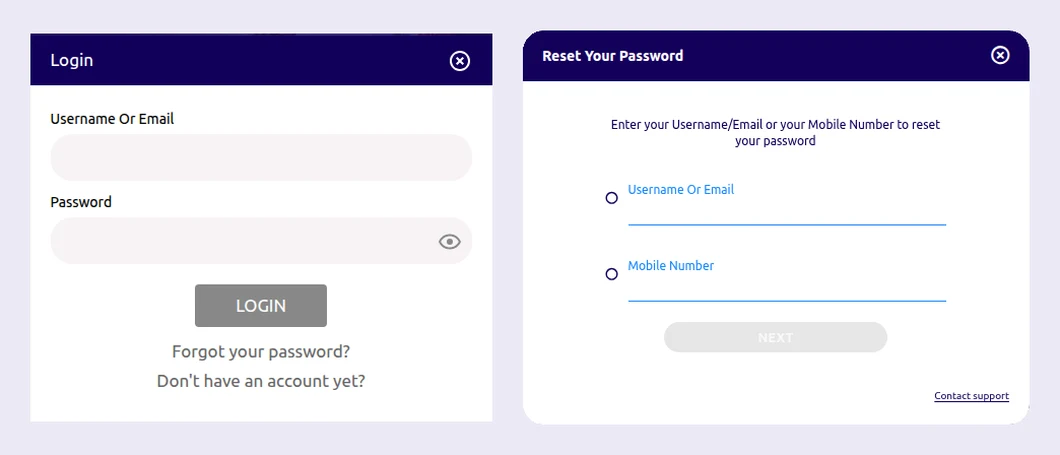
Spin Genie’s log-in window, left, and the Reset Your Password window behind “Forgot your password?”, right, both opened from Toronto.
Four Skill On Net Casinos, Four Separate Log-Ins
Skill On Net runs four registered Ontario casinos: Spin Genie, PlayOJO, SlotsMagic and Knightslots. Each keeps its own account, so a Spin Genie username and password open Spin Genie only. What does travel between them is your play history: the SafeMate risk tool combines play across every Skill On Net account you hold, while your limits and self-exclusion stay on the account where you set them.
Watch the address as well. ab.spingenie.ca is the Alberta build and spingenie.com the international site under another licence; neither is the casino on the iGaming Ontario register.
Resetting a Forgotten Password
The reset starts from the log-in window, and it lets you identify the account either by its details or by your phone number.
- Select Forgot your password? beneath the LOGIN button.
- In Reset Your Password, select either Username Or Email or Mobile Number, and enter it.
- Choose Next and follow the steps Spin Genie gives you to set the new password.
The same window carries a Contact support link, which matters at Spin Genie more than elsewhere, for the reason below.
Locked Out, With No Chat
Spin Genie’s live chat runs around the clock, but it is open to signed-in players only. If you cannot get in, your routes are email, at contact.ontario@spingenie.ca, and the phone line on the responsible gaming page, +1 343-303-5151. The other number on that page, 1-866-531-2600, is ConnexOntario’s help line, not Spin Genie’s support desk.
Xpoint on a Computer, the App on a Phone
Proving you are inside the province is an iGaming Ontario rule, and Spin Genie handles it differently on each kind of device.
- Computer: install Xpoint Verify from install.xpoint.tech (Windows or Mac) and open it every time before you log in. According to Spin Genie, Xpoint reads your location only while you play and stops once you log out.
- Phone or tablet: Spin Genie’s help centre directs mobile players to the app. On iPhone, allow location under Settings > Privacy > Location Services; on Android, under Settings > Apps > Spin Genie > Permissions, set location to Always.
- Out-of-date app: an older build passes the check only if it carries the current location technology, so update before you blame the account.
- VPNs and proxies: HideMeVPN, Witopia, OpenVPN and the like must be uninstalled; running them is enough to stop you playing.
Xpoint shows a numbered error when the check fails. Spin Genie uses the same Xpoint codes as its sister casino, and our PlayOJO login guide sets out what each one means and how to clear it.
When Spin Genie Ends or Blocks a Session
A log-in that works but will not let you play, or a session that stops early, usually traces back to a limit or a stuck game rather than to your password.
- Login time limit: set under Responsible Gaming in the Personal Area, it logs you out when the day’s allowance runs out and keeps you out until it resets.
- Take a Break: 24 hours, 7, 30, 60 or 90 days, during which you can still withdraw.
- “Close all ongoing sessions”: if a withdrawal asks you to close a game you cannot see, clear cookies and cache, close the game from another browser or device, then reload.
- No real-money play at all: check the limitations listed under Responsible Gaming in the Personal Area; if there are none, contact support.
Remember that the account starts in a pre-activated state. Until verification clears you can log in, set limits or self-exclude, but you cannot play for real money.
Changing Your Details
Most details are yours to edit, with two exceptions that need support or documents.
- Email address: while it is still unvalidated, change it under Account Settings > Preference in the side menu. Once it is validated, ask Customer Support and give the reason for the change.
- Name, surname and date of birth: greyed out in the Personal Area. To correct one, upload proof of ID.
- Documents: Personal Area > Upload Documents; choose the document type, then the file. An email confirms receipt, and another the result. Uploads must be clear, in colour, in date and uncropped.
Staying Active, Closing and Reopening
An account you leave alone starts to cost money. Six consecutive months without accessing it makes it inactive, after which Spin Genie can deduct C$5 monthly from what is left in the account until you next sign in; after 48 months without a log-in it becomes dormant and has to be reactivated. Logging in once every few months avoids both.
To close the account yourself, use the Player Limitation options under Responsible Gaming in the Personal Area. Reopening goes through Customer Support.
The Spin Genie App
Spin Genie’s app is listed on both stores as Slot Games Canada | SpinGenie, from Skill On Net Ltd, and one app now serves both Ontario and Alberta. It holds 3.2 from 223 ratings on the App Store and 3.9 from 476 on Google Play, and both stores label it 18+, though Ontario’s age of 19 applies. Installing it store by store is covered in our Spin Genie app guide; see it against the rest in our Ontario casino apps compared guide.
You must be 19 or older and in Ontario to play, and verification runs before your first deposit. The Spin Genie Ontario review covers the games, the payments and the sister casinos in full.
FAQ’s – Frequently Asked Questions
- Does my Spin Genie log-in work at PlayOJO or SlotsMagic?
No. Each Skill On Net casino has its own account and log-in. The SafeMate risk tool combines play across all of them, but limits and self-exclusion apply only to the account where you set them.
- Can I reset my Spin Genie password with my phone number?
Yes. After Forgot your password?, the Reset Your Password window lets you identify the account by username or email, or by mobile number, before you choose Next and set a new password.
- Do I need the app to play Spin Genie on a phone?
Spin Genie’s help centre says mobile players need its app, Slot Games Canada | SpinGenie. On a computer you play in the browser, with Xpoint Verify open before you log in.
- Why does Spin Genie log me out before I have finished?
Usually a login time limit. Once the daily allowance you set runs out, Spin Genie logs you out and keeps you out until it resets. Check Responsible Gaming in the Personal Area.
- How do I contact Spin Genie if I cannot log in?
Chat is open to signed-in players only, so write to contact.ontario@spingenie.ca or phone +1 343-303-5151. The password reset window also has a Contact support link.
Spin Genie Ontario Login: Key Points
Sign in at on.spingenie.ca with your username or email, with Xpoint Verify open on a computer or through the app on a phone. A forgotten password can be reset by username, email or mobile number, and when you are shut out, write or phone, because chat waits behind the log-in.
Your Spin Genie log-in is separate from PlayOJO, SlotsMagic and Knightslots, and so are your limits. Log in at least every few months, since six idle months can bring a C$5 monthly charge.





