


 You must be based in Ontario to enjoy all this online casino features
- Ruby Fortune Login:
Ontario Players
Ruby Fortune Ontario Login: Three Sites, One Right Sign-In
Ruby Fortune Ontario Login: Three Sites, One Right Sign-In
🕑 Updated: 11 November 2026
 Content Writer
 Content Manager
Visit
Support
- Software Providers


To log in to Ruby Fortune in Ontario, type rubyfortune.ca/ontario, tap Login and enter your details on the auth.rubyfortune.ca page whose badge says Ontario. Google lists rubyfortune.com first, a different casino, and the bare rubyfortune.ca can open the Alberta site.
Pros
 Province badge beside Log In
Password change from account menu
Text codes also emailed
Toll-free line for help
Cons
 Bare address can open Alberta
Google ranks the .com first
Lookalike app on Google Play
Username fixed after sign-up
Three Ruby Fortune Sites, One Ontario Sign-In
Only one of the three sites called Ruby Fortune holds an Ontario account: rubyfortune.ca/ontario, whose Login button leads to auth.rubyfortune.ca. The same brand also runs an Alberta site on the same domain, and a separate company runs rubyfortune.com.
| Site | Run by | Sign-in page | Licence |
|---|---|---|---|
| rubyfortune.ca/ontario | Cadtree Limited | auth.rubyfortune.ca, Ontario badge | AGCO, registered with iGaming Ontario (OPIG1237898) |
| rubyfortune.ca/alberta | Cadtree Limited | auth.rubyfortune.ca, Alberta badge | Alberta Gaming, Liquor and Cannabis (#120427) |
| rubyfortune.com/ca | Baytree Interactive Ltd | auth.rubyfortune.com | Kahnawake Gaming Commission (01059) |
Where Google and the Bare Address Send You
In Google Canada, “ruby fortune login” puts rubyfortune.com/ca first and the plain rubyfortune.ca second; the Ontario home page only appears fifth. The .com site shows a “Select your province” bar, and its Ontario link goes to rubyfortune.ca/ontario. Typed on its own, rubyfortune.ca picks a province for you, and from a Toronto connection it opened the Alberta site. The safe habit is to type or bookmark the full rubyfortune.ca/ontario address.
Logging In to Ruby Fortune Step by Step
Signing in takes five steps, and the third is the one that matters most at Ruby Fortune.
- Type rubyfortune.ca/ontario in the browser, or open the Ruby Fortune Casino Real Money app on an iPhone.
- Tap Login, which takes you to auth.rubyfortune.ca.
- Look beside the “Log In” heading: the badge must say Ontario, with the red Ontario flag. If it says Alberta, go back to rubyfortune.ca/ontario.
- Fill in Username and Password. “Keep me logged in” is already ticked, so untick it on a shared computer.
- Type the one-time code if you use 2-Step Verification, then choose Enable on the location banner; the location icon at the top right turns blue once Ruby Fortune can see you.
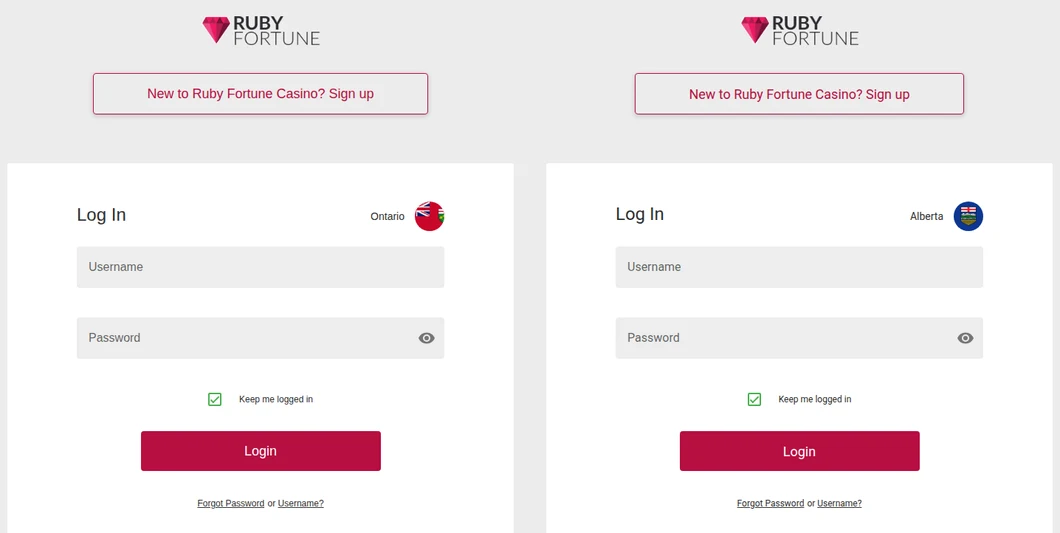
Ruby Fortune’s two sign-in pages at auth.rubyfortune.ca, both opened from Toronto: the Ontario one (left) and the Alberta one (right). Only the badge tells them apart.
One username and password covers the browser, a phone and the iPhone app. Ruby Fortune’s own FAQ reminds players to sign out after each visit, which matters more here because the sign-in page keeps you logged in unless you change the box.
Username and Password Rules at Ruby Fortune
Your username is permanent, while the password can be changed from inside the account or reset from the sign-in page.
- The username stays: the help centre says it cannot be changed after sign-up, and the terms let Ruby Fortune close accounts with obscene or offensive usernames.
- Changing the password: once signed in, open the drop-down menu by your username and choose Change Password.
- Lost password: choose Forgot Password, give the username and press Send Reset Link; the email goes to the address on the account.
- Lost username: choose Username?, give your sign-up email and choose Send.
- New email or phone number: update it under My Account, choose Send Pin and enter the four-digit PIN that arrives at the new address or number.
Clause 1.1.14 of the Ontario terms makes you responsible for anything done on the account with your correct username and password, including after a weak password or an insecure device lets someone in. If you think someone else has your details, tell Ruby Fortune straight away so it can investigate.
Ruby Fortune’s One-Time Login Codes
Ruby Fortune calls it Multi-Factor Authentication in its terms and 2-Step Verification in the account: a one-time code, or OTP, entered at every log-in.
- Turning it on: My Account > My Details > Manage Setup, select Text Message or Email and press Confirm, check that the number or address shown is right, then choose Send Verification Code and type the code.
- Texts have a backup: a code sent by text also lands in your email inbox.
- Turning it off: the same Manage Setup button, then Off and Confirm.
When Ruby Fortune Cannot Place You in Ontario
A correct password is not enough if the location check fails. The Ontario terms say Ruby Fortune checks where you are at reasonable intervals and looks for software that can hide a location.
- iPhone, Safari: in Settings > Privacy > Location Services, set Safari Websites to “While using the App” and switch on Precise Location; in Settings > Safari > Location, choose Ask or Allow.
- Android, Chrome: tap the lock icon in the address bar, open Permissions and allow Location; in the phone’s location settings, switch on Google Location Accuracy.
- VPN or screen-sharing tools: quit the VPN and any screen-sharing app (the help centre names RDP, AnyDesk, UltraViewer and TeamViewer), then wait about a minute and reload.
- Still refused inside Ontario: ask your internet provider where your IP address is registered.
Other Reasons a Ruby Fortune Login Fails
Some log-in problems are about the account itself, and live chat is the way through them.
- Account under review or closed: documents being checked, or a closed or excluded account, stop the log-in until support has looked at it.
- BetGuard: if Ontario’s self-exclusion register is briefly down, you may get in, but once a later check finds you on it, Ruby Fortune ends the session and logs you out.
- Temporary self-exclusion: the account reopens by itself; contact live support if it is still locked afterwards.
- Permanent self-exclusion: after the period ends, answer the removal questions by email or chat; if the Responsible Gambling team agrees, the account reopens after a 24-hour cooling-off period.
- Closing for good: only Player Services can do it, under clause 10.16.1.
Logging in also keeps the account active. The C$10 monthly inactivity fee only applies once every account you hold at Ruby Fortune, Spin Casino, Jackpot City and Royal Vegas has gone six months without a log-in or log-out. Signing in counts even if you do not deposit or play.
The Ruby Fortune App and a Google Play Lookalike
The Ontario app exists only for the iPhone. Ruby Fortune Casino Real Money, published by Cadtree Limited, has 4.44 stars from 450 ratings on the Canadian App Store; version 23.2 requires iOS 15.1 or later and is a 44.2 MB download. It uses your website username and password.
Google Play’s top result in Canada for “ruby fortune” is an app simply named Ruby Fortune, from a developer called ATAL PDP. It is a payment notebook in the Business category with 100+ downloads, and it is unrelated to the casino or your account. Ruby Fortune has no casino app on Google Play; its Ontario site says Android players use the browser. The iPhone app is set out in our Ruby Fortune app guide, and our Ontario casino apps compared page covers the alternatives.
Getting Help with a Ruby Fortune Log-In
The fastest route is live chat, from the chat icon in the help centre at help.rubyfortune.ca. Ruby Fortune’s FAQ lists only chat and email, but the contact page of that help centre also gives a toll-free number, 1 888 378 1328. The help centre and the number are shared with Cadtree’s other Ontario casinos, each with its own account: see the Jackpot City, Spin Casino and Royal Vegas log-in guides. Our Ruby Fortune Ontario review covers games, payments and withdrawals.
FAQ’s – Frequently Asked Questions
- Why does Ruby Fortune show Alberta when I log in?
The plain rubyfortune.ca can open the Alberta site, and its sign-in page carries an Alberta badge. Type rubyfortune.ca/ontario instead and make sure the badge beside Log In says Ontario before entering your username and password.
- Is rubyfortune.com the Ontario Ruby Fortune?
No. rubyfortune.com/ca is run by Baytree Interactive Ltd under a Kahnawake licence and has its own sign-in at auth.rubyfortune.com. The Ontario casino is rubyfortune.ca/ontario, run by Cadtree Limited and registered with iGaming Ontario.
- How do I change my Ruby Fortune password?
Signed in, open the menu by your username and choose Change Password. If you are locked out, use the Forgot Password link under the Login button, type your username and request the reset link, then check your email, including the junk folder.
- Is the Ruby Fortune app on Google Play real?
The Google Play app called Ruby Fortune is a payment notebook from ATAL PDP, not the casino. Ruby Fortune’s Ontario app is on the App Store only, from Cadtree Limited; on Android, sign in through the browser at rubyfortune.ca/ontario.
- Does Ruby Fortune charge an inactive account fee?
Only once every account you hold at the four Cadtree casinos has had no log-in for six months, and 30 days after a notice about a cash balance. A C$10 monthly charge can apply until nothing is left or you sign in. Recreational winnings are tax-free in Canada.
Before You Sign In at Ruby Fortune
Go straight to rubyfortune.ca/ontario and check the Ontario badge on the auth.rubyfortune.ca page; the .com site and the Alberta site look almost the same. The username is fixed for good, the password can be changed or reset in a minute, and 2-Step codes come by text or email.
On Android, use the browser and ignore the Ruby Fortune notebook app on Google Play. A log-in every few months also keeps the inactivity fee away.





