


 You must be based in Ontario to enjoy all this online casino features
- BetRivers Login:
Ontario Players
BetRivers Ontario Login: Screen Names, Codes and Lockouts
BetRivers Ontario Login: Screen Names, Codes and Lockouts
🕑 Updated: 11 November 2026
 Content Writer
 Content Manager
Visit
Support
- Software Providers


To log in to BetRivers in Ontario, go to on.betrivers.ca or the BetRivers Casino & Sportsbook app, choose Log In, check the jurisdiction box says Ontario, and enter your email or screen name and password. A wrong jurisdiction is a common reason a correct password fails.
Pros
 Reset code by SMS or email
Strong Authentication at every log-in
Leaked passwords blocked
Email alert on every log-in
Cons
 Easy to pick the wrong jurisdiction
No geolocation plug-in for Linux
Help articles written for the US
Logging In at on.betrivers.ca
BetRivers asks for three things: your jurisdiction, your email or screen name, and your password. Getting the first one wrong is the most common reason a correct password fails.
- Go to on.betrivers.ca, not betrivers.ca, or open the BetRivers Casino & Sportsbook app.
- Tap Log In, top right.
- Check the drop-down at the top of the window reads Ontario | BetRivers; the other choice is Alberta.
- Enter your e-mail or screen name and your password.
- Tick I am eligible and fit to play, and acting on my own behalf, which confirms you are not under the influence of alcohol or anything else that impairs your judgement, and choose Log In.
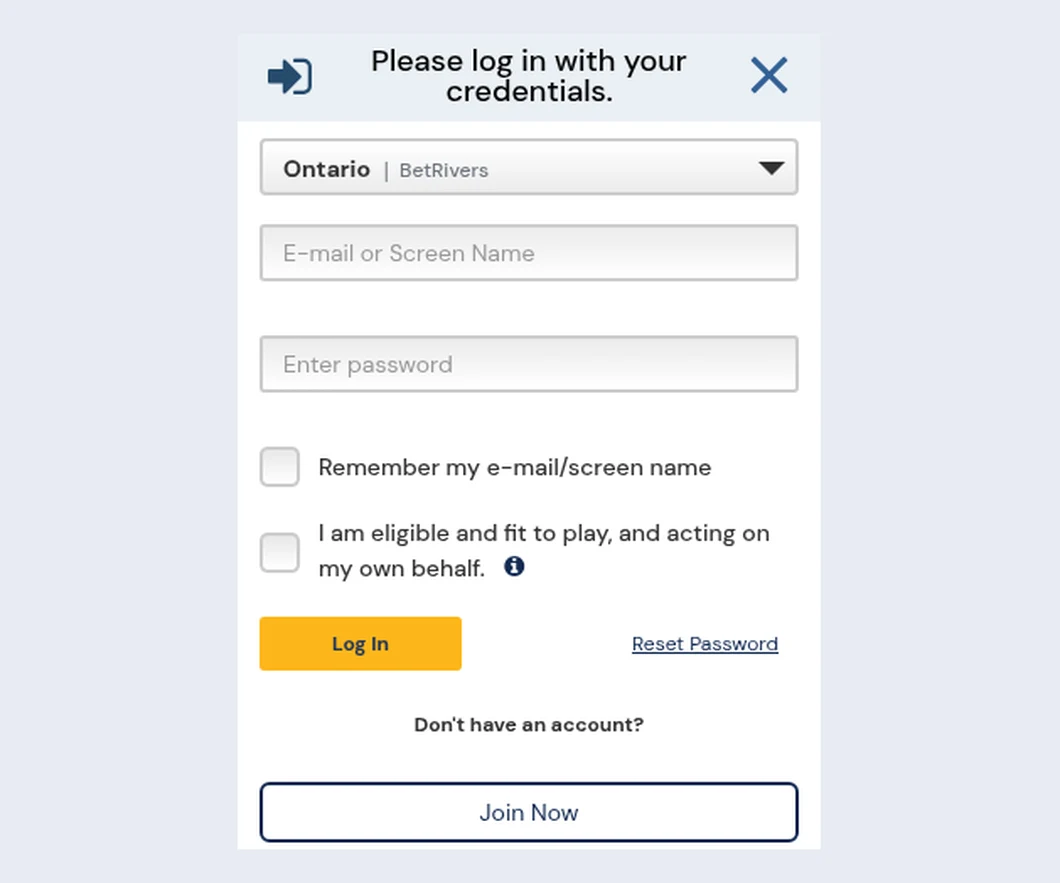
The BetRivers log-in window at on.betrivers.ca, opened from Toronto, with Ontario selected in the jurisdiction box.
Why the Jurisdiction Box Matters
When a log-in fails, BetRivers’ message reads “Incorrect screen name, password or wrong jurisdiction selected”. An Ontario account does not exist under Alberta, so a stray click on the drop-down looks exactly like a forgotten password. Check it before you reset anything. Likewise, betrivers.ca on its own is a page of jurisdiction links, mostly American, rather than the casino; your account lives at on.betrivers.ca.
Forgotten Password and Locked Accounts
BetRivers sends a code rather than a link, and the same reset is what unlocks an account after too many wrong passwords.
Resetting a BetRivers Password
- Choose Reset Password in the log-in window.
- Enter your email address and your date of birth (day, month, year).
- Choose Receive Code by SMS or Receive Code by Email, and enter the six-digit code.
- Set a new password of 8 to 64 characters with at least one letter and one number.
BetRivers checks every new password against lists of passwords leaked in data breaches elsewhere, and refuses one it finds there, so a password reused from another site may be rejected. Too many attempts at the reset can lock it for 15 minutes.
When the Account Locks
Enter the wrong password too many times and the account locks; BetRivers’ message tells you to reset the password to unlock it, and the button in the error does exactly that. After repeated failures you may instead be asked for secondary authentication: a code sent to your email, valid for five minutes, which you can ask to resend once it expires. An account locked for any other reason, or one marked as blocked, needs Player Support.
Strong Authentication and Login Alerts
Two optional settings make a stolen password far less useful, and both can be switched on at sign-up or later in your account preferences.
- Strong Authentication: once enabled, BetRivers asks for a verification code at every log-in, and lets you choose how to receive it, including by text message. Fail the code too many times and you are logged out.
- Login notification: an email every time your account is logged in to, so you notice a log-in that was not yours.
- Remember my e-mail/screen name: fills in the first field next time. Leave it unticked on a shared computer.
- Biometric log-in: the Android app can switch on biometric log-in after you sign in with your password, and you can keep using the password instead.
GeoComply: The Location Check
BetRivers uses GeoComply, and what you need depends on the device.
- Computer: a geolocation plug-in must be downloaded and running. If you have installed it and are still asked for it, contact Player Support. There is no Linux version, so use Windows or a Mac.
- Phone browser: install GeoGuard Location Validator, set location to Always allowed with Precise Location on, and allow notifications. It is not needed in the BetRivers app.
- VPNs and proxies: any service that can misrepresent your location stops the check, even if you use it without meaning to.
- Near a land-based casino: online casino and poker games are blocked in or near casino premises, though sports bets still work there. Move a safe distance away and try again.
If a log-in is refused with a message about unusually high traffic from your area, wait ten minutes and try again. Wagering requires you to be physically in Ontario throughout, and the check repeats while you play.
Limits, Cooldowns and Closed Accounts
Some refusals are the account doing what you asked it to.
- Daily time limit: once you reach the time limit you set, BetRivers refuses the log-in until the next day.
- Cooldown: a self-suspension from wagering that you set in days and cannot shorten. The terms of service set a minimum of 72 hours, the patron protection page 24 hours. You can still log in to request a withdrawal or view statements.
- Self-exclusion: six months, one year or five years, alongside BetGuard, the province-wide scheme.
- Closed account: logging in to an account you closed brings up a Reopen Account button; if reopening is not allowed for that account, Player Support handles it.
- New terms: when BetRivers updates its terms, you must accept them at log-in before you can play.
The BetRivers App
In Ontario the app is BetRivers Casino & Sportsbook, with no colon in the name: App Store ID 1594144135, needing iOS 16.4 or later, and package com.rush.on.ri on Google Play. It carries the casino and the sportsbook on one log-in and also serves Alberta. A help article tells players to switch to “BetRivers: Casino & Sportsbook”, with a colon; that is the American app, not listed in Canada, and it will not open your Ontario account. The BetRivers app guide covers both listings. Compare it in our Ontario casino apps compared guide.
Player Support and New Accounts
Live chat is reached from Support chat in the top menu. By email, write to ONsupport@betrivers.ca; by phone, the Ontario Player Protection terms list 1-855-744-0152, and the Ontario panel of the help centre 1 (800) 604-9756. A number found without the Ontario setting can be Pennsylvania’s, so use these.
To open an account, register at on.betrivers.ca with the details on your government ID, from anywhere in Canada, though you can only wager in Ontario and must be 19 or older. Identity checks run through Veriff, which does not take HEIC photos, so send a JPEG from an iPhone. The BetRivers Ontario review covers the games, payments and support in full.
FAQ’s – Frequently Asked Questions
- Why does BetRivers say wrong jurisdiction when I log in?
The log-in window has a drop-down for Ontario or Alberta, and an Ontario account only works with Ontario selected. The same message covers a wrong screen name or password, so check the drop-down first.
- How do I unlock a BetRivers account after too many wrong passwords?
Reset the password. BetRivers locks the account after repeated wrong passwords and unlocks it once you set a new one with the code it sends by SMS or email. Other locks need Player Support.
- How long is a BetRivers email code valid?
Five minutes. When BetRivers asks for secondary authentication after several failed log-ins, it emails a code that expires after five minutes; once it has expired you can ask for it to be sent again.
- What are the BetRivers password rules?
Between 8 and 64 characters, with at least one letter and one number. BetRivers also rejects any password that appears on lists leaked in other sites’ data breaches.
- Can I log in to BetRivers at a casino in Ontario?
You can log in, but online casino and poker games are blocked in or near a land-based casino. Sports bets still work there; move a safe distance away to play casino games.
BetRivers Ontario Login: Key Points
Log in at on.betrivers.ca or in the BetRivers Casino & Sportsbook app with Ontario selected, your email or screen name and your password. A reset needs your email and date of birth and sends a six-digit code by SMS or email; it also unlocks an account after too many wrong passwords.
Switch on Strong Authentication and login emails for extra protection, keep GeoComply or GeoGuard ready for the location check, and remember the check fails in or near a land-based casino.





