


 You must be based in Ontario to enjoy all this online casino features
- Betano Withdrawal:
Ontario Players
Betano Withdrawal Times in Ontario: Methods and Limits
Betano Withdrawal Times in Ontario: Methods and Limits
🕑 Updated: 14 November 2026
 Content Writer
 Content Manager
Visit
Support
- Software Providers


Betano processes Ontario withdrawals within 24 hours. Its cashier then estimates about a minute for cards, Apple Pay and Google Pay and about 30 minutes for Interac e-Transfer, eCashout and PayPal. Every method starts at $10, and your deposit decides which ones you can use.
Pros
 Requests processed within 24 hours
$10 minimum on every method
Real-time eCashout at 48 banks
Option to block cancellations
Cons
 Deposit choice limits payout routes
Wallet payouts capped at $5,000
Terms allow fees on idle accounts
How Long Betano Takes to Pay
Betano handles each Ontario withdrawal request within 24 hours and then passes it to the bank or payment provider. The cashier’s Transactions page publishes an estimate for every payout method, and the help centre says those estimates are recalculated each month from recent transactions.
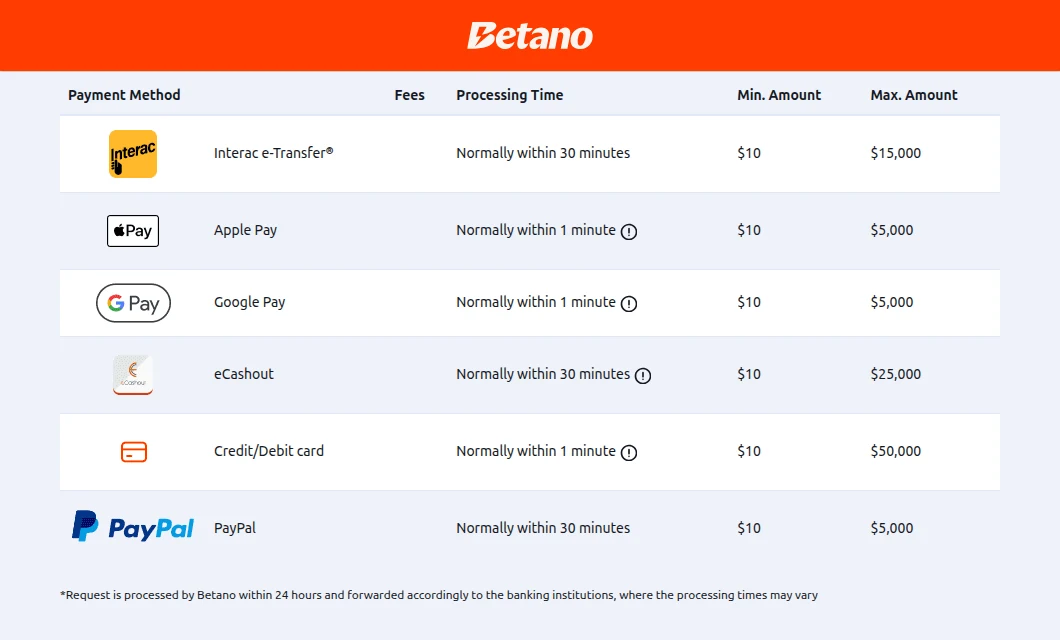
The Withdrawals tab of Betano’s Transactions page, opened from Toronto.
| Payout method | Betano’s estimate | Per withdrawal | What the cashier adds |
|---|---|---|---|
| Credit or debit card | Normally within 1 minute | $10 to $50,000 | Rarely up to 2 business days; Visa Direct and Mastercard Send cards usually take minutes |
| Apple Pay | Normally within 1 minute | $10 to $5,000 | Same note as cards |
| Google Pay | Normally within 1 minute | $10 to $5,000 | Same note as cards |
| Interac e-Transfer | Normally within 30 minutes | $10 to $15,000 | Only after an e-Transfer (Request Money) deposit |
| eCashout | Normally within 30 minutes | $10 to $25,000 | Five institutions take 1–4 business days |
| PayPal | Normally within 30 minutes | $10 to $5,000 | Only after a deposit from the same PayPal account |
Those times start once Betano has released the money, not when you press the button. The help centre also warns that payouts slow down after major events, because requests are handled in the order they arrive, and that a request made at a weekend or on a public holiday may wait for the next working day at your bank.
When the Status Says Complete
A card, Apple Pay or Google Pay withdrawal marked “Complete” has left Betano; what remains is your bank’s own processing. Betano asks you to allow up to one business day for the money to appear, then to contact the bank before its support team. A business day, in its definition, excludes Saturdays, Sundays and days when banks are closed by law.
Your Deposit Decides How Betano Pays You
Betano matches every withdrawal to the deposit that produced the money, a rule it calls a closed transaction loop. The help centre publishes the full map, and eCashout, a transfer to a Canadian bank account in your name, is the one option open after every type of deposit.
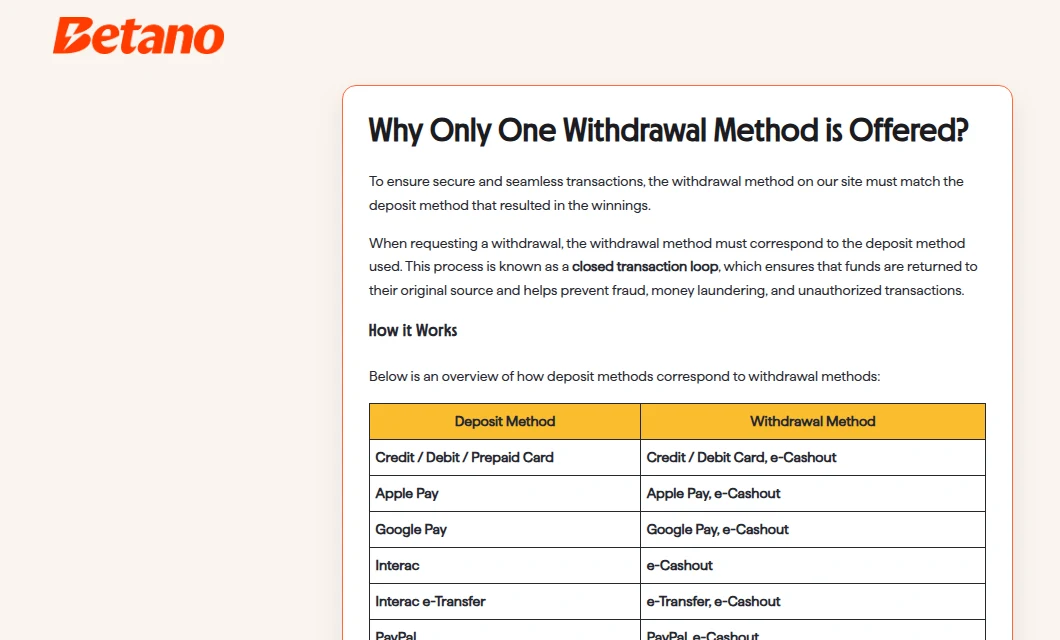
The deposit-to-withdrawal table in Betano’s Ontario help centre.
| If you deposited with | You can be paid by |
|---|---|
| Credit, debit or prepaid card | Card or eCashout |
| Apple Pay | Apple Pay or eCashout |
| Google Pay | Google Pay or eCashout |
| Interac (the cashier’s plain Interac option) | eCashout only |
| Interac e-Transfer (Request Money) | e-Transfer or eCashout |
| PayPal or PayPal 1-Click | PayPal or eCashout |
Where you have used several deposit methods, the help centre says withdrawals may be prioritized or restricted by the most recent or eligible one, and some methods need a full or partial withdrawal before another becomes available. Clause 4.11 of the general terms allows partial payments back to earlier deposit types, and clause 4.5 lets Betano pay by a different method from the one you asked for.
Wallet Payouts Follow the Wallet Deposit
Apple Pay and Google Pay pay you only after a recent deposit with them, PayPal only after a deposit from the same account, and in each case the winnings must come from that deposit; the cashier then lists the cards or PayPal emails you used before. Prepaid card deposits are paid out by eCashout, according to the help centre, and Betano may ask for a recent bank statement and a photo of the card.
eCashout and the Banks That Pay in Minutes
eCashout is open only to players who have made an Interac deposit, and it is the fastest bank route Betano has. At the 48 institutions on the help centre’s real-time list the money can arrive within minutes; everywhere else, Betano gives 1–4 business days.
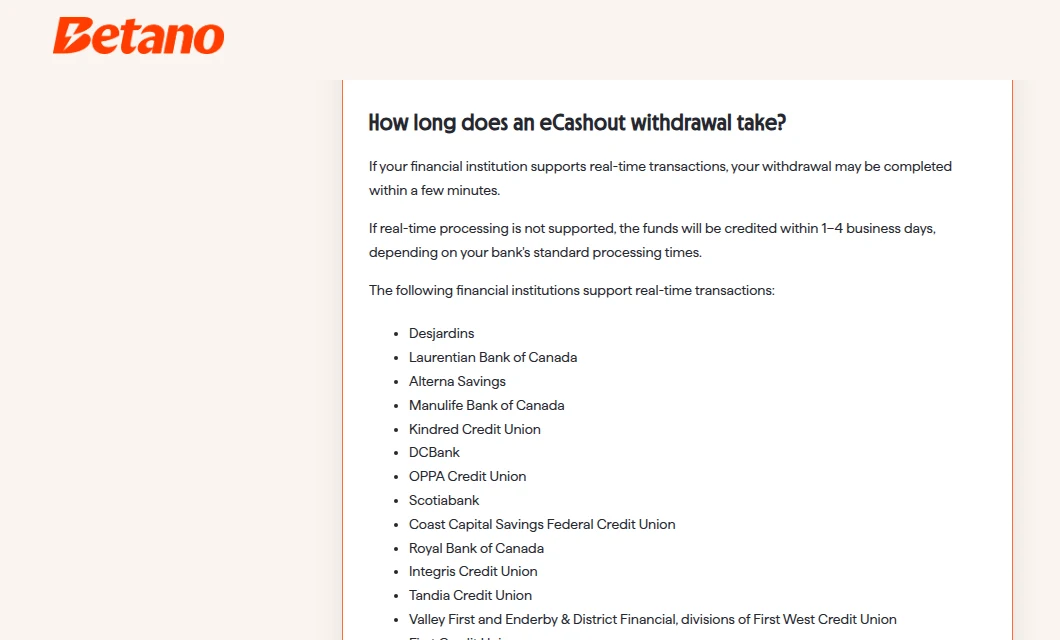
Betano’s help article on processing times, with the start of its real-time list.
The list includes RBC, TD, BMO, Scotiabank, CIBC, National Bank, Desjardins, EQ Bank, Meridian and Libro, along with dozens of credit unions. The cashier names five institutions where eCashout takes 1–4 business days: Peoples Trust Company, The Equitable Trust Company, ING Bank of Canada, President’s Choice Financial and Central 1 Credit Union Ontario.
The first eCashout asks you to register the account, either by signing in to your online banking from the cashier or by entering the details and uploading a statement page that shows the bank’s name, your full name and the transit and account numbers.
Documents Before Your First Betano Withdrawal
Withdrawals stay unavailable until your Betano account is verified. Betano can confirm your identity from your Canadian credit file at registration; only if that check fails do you upload government photo ID and complete a liveness check, moving your face in a circle.
Accepted IDs include a passport, driver’s licence, permanent resident card, Ontario Photo Card, NEXUS card and Secure Certificate of Indian Status. Every document must be current and photographed with all four corners visible. For the payout method itself, Betano may ask for:
- Card: a picture of the card, a card statement or a bank statement. Clause 4.6 asks for front and back, with only the opening six digits and closing four left visible and the CVV covered.
- Interac e-Transfer, PayPal or eCashout: a bank statement.
- Address: clause 4.7 allows Betano to request utility bills, bank statements or similar, and to cancel pending withdrawals if the copies do not arrive in reasonable time.
Apple Pay’s own withdrawal article says no document verification is required for that method, although the general verification article still lists a bank statement as a possible request.
The $10,000 Confirmation
From $10,000 upward, a checkbox appears during checkout reading “I confirm that the receiving account is mine and this withdrawal is not for any third party.” The request cannot go ahead until you tick it. Betano describes the step as mandatory for Ontario players under the province’s rules on third-party transactions.
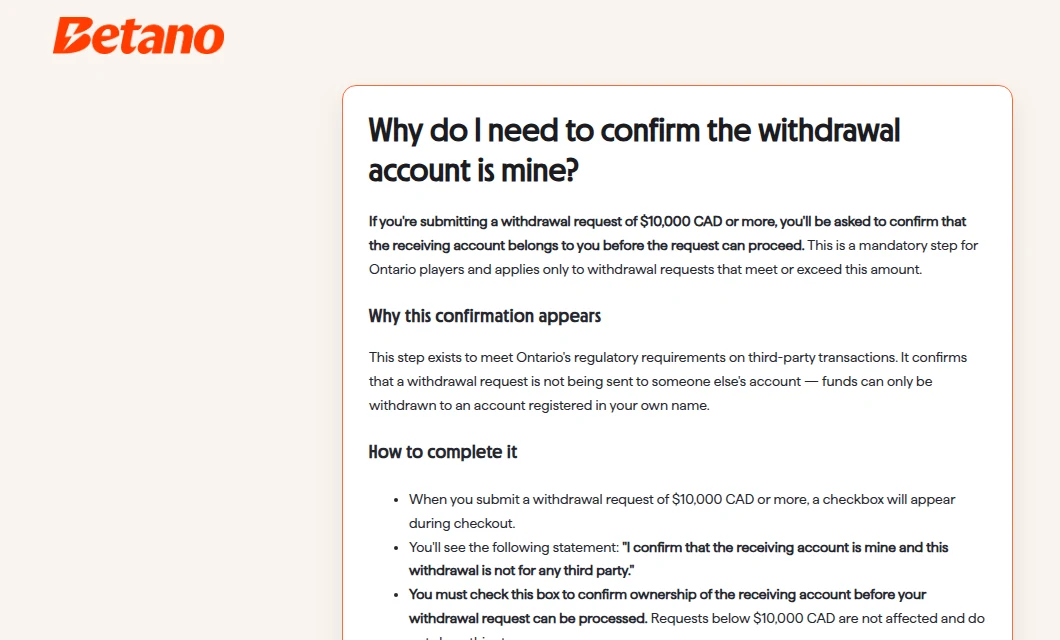
The help article on confirming that the receiving account belongs to you.
How to Withdraw from Betano
Withdrawals can only be requested through betano.ca or the Betano app. Clause 4.3 of the terms rules out requests by telephone or email, and Betano staff are not allowed to bypass that.
- Go to My Account, then Transactions, then Withdrawal.
- Pick one of the methods your deposits allow. For e-Transfer, the email comes from your deposit and cannot be edited.
- Enter the amount; requests of $10,000 or more also need the ownership checkbox.
- Submit, then follow the request under My Account, History, Transactions.
Reading the Withdrawal Status
“Reviewing your withdrawal” means the request is in Betano’s queue. “Finalizing your withdrawal” and “Funds on the way!” mean it has gone to the provider. “It is taking longer; stay tuned for updates” signals an extra check, and “Action Required” tells you which document to upload. A push notification, or a Feed Message in the Notification Center, confirms the payment.
Cancelling a Request, or Blocking Cancellations
Until a request is approved, open Transactions and choose Withdrawal Cancellation; the amount goes straight back to your Betano balance. Players who prefer not to have that escape route can remove it in Player Protection.
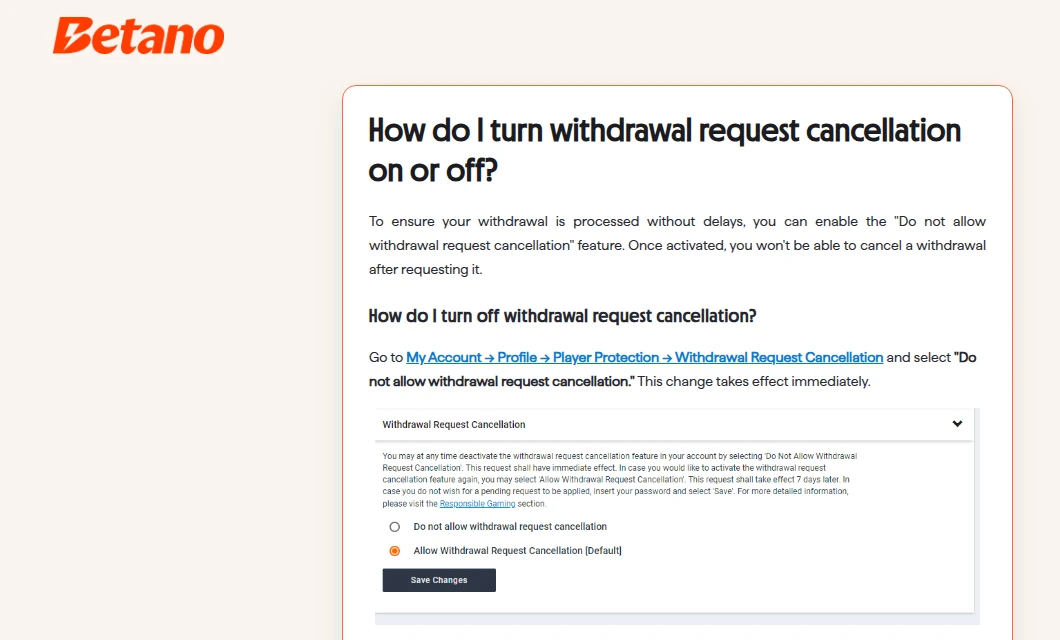
The Withdrawal Request Cancellation setting, explained in the Ontario help centre.
Choosing “Do not allow withdrawal request cancellation” applies straight away, while restoring cancellations only takes effect seven days later. Betano presents it as a responsible gambling feature: once a withdrawal is requested, the money cannot be pulled back into play.
Fees, Unplayed Deposits and Tax
Betano charges no withdrawal fees, and its help centre adds that Ontario does not tax gambling winnings. Clause 4.4 of the terms adds that your own bank may charge administration fees.
A deposit withdrawn before it has been played through in full is treated differently. Clause 4.8 allows Betano to charge reasonable costs for both the deposit and the withdrawal and to reduce the payout accordingly, and clause 4.10 lets it withhold funds that were never used to play.
Idle Betano Accounts: Help Centre and Terms Disagree
The help centre says Betano does not charge inactive accounts: one nobody has accessed for 12 months is placed in “hibernation”, and support reopens it free of charge. The general terms are harsher.
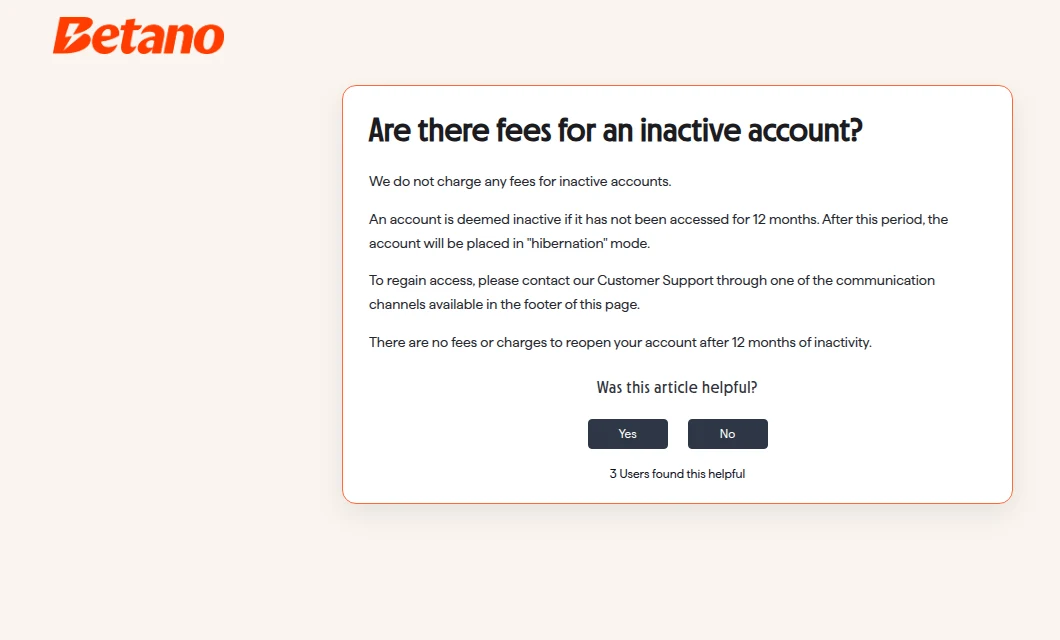
The help article that rules out inactivity fees.
- An account with a real-money balance and no log-in or play for 36 months becomes “Inactive”, and log-ins stop.
- Betano must warn you at least 30 days before that happens.
- That warning states that Betano “reserves the right to impose fees up to the full amount of the account”.
- Reactivation may mean going through identity verification again.
A second help article reproduces this definition but leaves out the line on fees. Follow the terms, which are the binding text: withdraw what you do not plan to use, or sign in now and then.
How Betano Compares on Withdrawals
Betano processes requests within a day, quicker than Sports Interaction or 888 Casino, keeps a $10 floor on every method and publishes exactly which deposit unlocks which payout.
| Casino | Before the money moves | Pulling a request back | Minimum payout |
|---|---|---|---|
| Betano | Processed within 24 hours | Until approved, unless you have blocked cancellations | $10 on every method |
| Sports Interaction | Internal review lasting up to two business days | All or part, before dispatch | $10 (online banking, wire) |
| 888 Casino | A one-business-day queue | Within that day, if you have not disabled it | $5 |
| Casino Days | Target of 12 hours | In the cashier while pending | $20 |
Details for each rival are in our Sports Interaction withdrawal guide, 888 Casino withdrawal guide and Casino Days withdrawal guide. Our instant withdrawal ranking sets Betano against the rest of the province.
FAQ’s – Frequently Asked Questions
- How long does a Betano withdrawal take in Ontario?
Betano processes requests within 24 hours. Its cashier then estimates about a minute for cards, Apple Pay and Google Pay, and about 30 minutes for Interac e-Transfer, eCashout and PayPal. eCashout can take 1–4 business days at banks without real-time payments.
- What is the minimum withdrawal at Betano?
The minimum is $10 on every method. Maximums per withdrawal are $50,000 by card, $25,000 by eCashout, $15,000 by Interac e-Transfer and $5,000 by Apple Pay, Google Pay or PayPal.
- Why does Betano only show one withdrawal method?
Betano pays back through the method you deposited with, or by eCashout to a bank account in your name. A deposit with the cashier’s plain Interac option can only be paid by eCashout.
- Can I cancel a Betano withdrawal?
Yes, until it is approved: choose Withdrawal Cancellation under Transactions and Betano puts the amount back in your account. If you have turned on the setting that blocks cancellations, re-enabling it takes seven days.
- Does Betano charge withdrawal fees or tax?
Betano adds no withdrawal fee of its own; your bank may still charge. Betano’s help centre states that Ontario does not tax gambling winnings.
Is Betano Good for Withdrawals?
Yes. Requests are processed within a day, every method starts at $10, card and wallet payouts usually land within minutes, and eCashout pays in real time at most major Canadian banks. The trade-off is rigidity: your deposit fixes your payout route.
Fund the account through the route you would like your winnings to take, and verify early. Read the terms on idle accounts rather than the help article. For games, the app and customer support, see our Betano Ontario review.