


 You must be based in Ontario to enjoy all this online casino features
- DraftKings Login:
Ontario Players
DraftKings Ontario Login: 2FA Codes, Resets and Lockouts
DraftKings Ontario Login: 2FA Codes, Resets and Lockouts
🕑 Updated: 11 November 2026
 Content Writer
 Content Manager
Visit
Support
- Software Providers


To log in to DraftKings in Ontario, open the DraftKings Casino or Sportsbook & Casino app, or casino.draftkings.com, and enter your email and password, then the security code DraftKings sends. That code is mandatory for the sportsbook and casino, and location is checked before you play.
Pros
 Two-factor codes on every account
Email recovery by text message
Callback for Ontario customers
Highly rated casino apps
Cons
 No live phone line
Locked accounts need support
Funds tied to a provincial wallet
Logging In to DraftKings in Ontario
DraftKings signs you in with the email address on your account and your password, followed by a security code. In Ontario you log in through the DraftKings Casino app, the DraftKings Sportsbook & Casino app, or casino.draftkings.com on a computer; one account covers both products.
- Open the DraftKings Casino or DraftKings Sportsbook & Casino app, or go to casino.draftkings.com on a computer.
- Choose Log In and enter your email address and password.
- Enter the code DraftKings sends you, by text message or, where offered, by email.
- Allow location access when the app or browser asks, so DraftKings can confirm you are in Ontario.
The Ontario account is run by Crown DK CAN Ltd., and you must be 19 or older and physically in Ontario to play.
The Code You Cannot Switch Off
Two-factor authentication is not optional for the DraftKings sportsbook and casino. You can choose to receive a code at every log-in, under Log In & Security > Login Security Preferences in the app or Account Information > Login & Security on a computer, but you cannot turn it off for these products. Even without that setting, DraftKings asks for a code on an unrecognised device and, depending on where you are, as often as every 14 days.
Codes arrive by SMS, so they fail without a cellular signal, with Do Not Disturb on, or when the number is blocked; on an iPhone, check that Filter Unknown Senders is not hiding them. DraftKings’ support team will never ask you for a code: if anyone does, change your password straight away.
Forgotten Password or Email
Both can be recovered without contacting anyone, and each uses the other detail to prove it is you.
Resetting a DraftKings Password
- Choose Forgot Password on the log-in page, or go to myaccount.draftkings.com/resetpassword.
- Enter the email address on your account; the reset email should arrive within 15 minutes.
- Select the Reset Password button in the email.
- Create a password of at least 10 characters with at least one letter, one number and one special character, and choose Save and Continue.
The help centre shows yellow triangles under the new password until it meets every rule, and green ticks once it does. If the email has not arrived after 15 minutes, check the spam folder, add @draftkings.com and @account.draftkings.com to your allowed senders, then contact support.
If You Forgot the Email on Your DraftKings Account
Choose Forgot Email on the log-in page and enter the phone number on your account. DraftKings texts a 6-digit verification code; once you enter it, you recover the email address and can log in normally. To change the email later, go to Login & Security, choose Change email and confirm the code DraftKings sends to the new address.
Locked or Restricted Accounts
A locked or restricted DraftKings account is reopened by Customer Support, not by a reset, and the help centre’s Canadian article says what to have ready so the review goes faster.
- Photo ID: support may ask for a selfie holding your ID next to your face.
- A recent statement: a PDF bank or financial statement showing your latest DraftKings deposit or withdrawal.
- Clean devices: location switched on, no VPN or location-masking software, and no jailbroken phone.
- One account: use only the account you first opened. A second registration triggers a duplicate account message, and DraftKings deactivates all but one.
You may also be asked to scan the front and back of your ID and take a selfie through an identity check before you can use the account again; DraftKings lets you skip it and verify later, but not play until it is done.
Location: What the Account Can Do Where
DraftKings decides what you can do by where you are standing, not where you live. Its Canadian help article sets it out province by province.
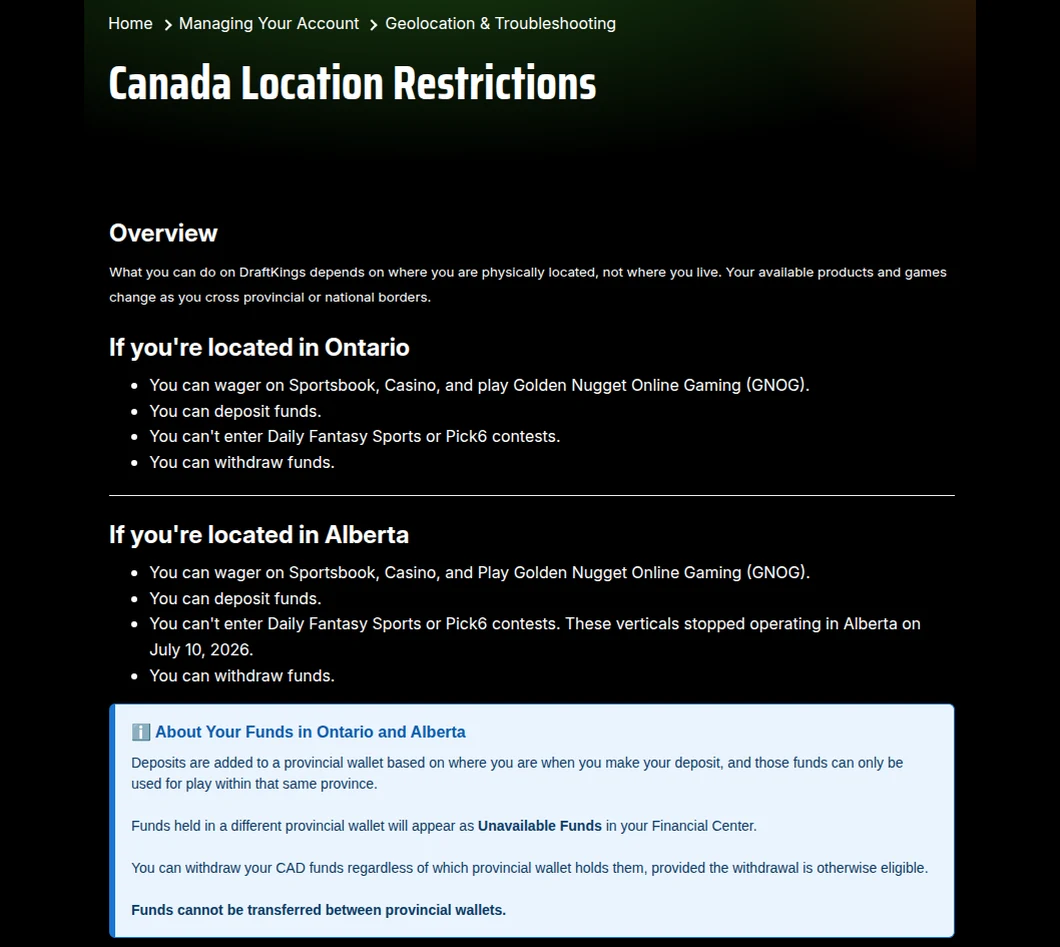
The DraftKings help centre’s Canadian location article, read from Toronto: what the account can do in Ontario and Alberta, and how provincial wallets work.
- In Ontario: sportsbook, casino and Golden Nugget Online Gaming, plus deposits and withdrawals. Daily Fantasy Sports and Pick6 are not available.
- Elsewhere in Canada outside Alberta: no sportsbook or casino play, though you can still deposit and withdraw.
- Provincial wallets: money deposited in Ontario can only be played in Ontario. Funds from another province’s wallet show as Unavailable Funds and cannot be transferred, though you can withdraw them.
If DraftKings cannot detect your location, turn on Wi-Fi and location services, allow location for the DraftKings app (Always or While Using), turn off any VPN, and clear the app’s cache or the browser’s before trying again. DraftKings checks location by GPS, Bluetooth and Wi-Fi.
Cool-Offs, Self-Exclusion and BetGuard
Three tools stop the log-in on purpose, and none of them can be shortened.
- Cool-off: 1 day, 1 week, or 1, 2 or 3 months. You cannot log in, deposit or play; open bets stay live, and a withdrawal needs Customer Support.
- Self-exclusion: 6 months, 1 year or 5 years, with no log-in, no deposits and no marketing. DraftKings is not permitted to shorten it, and a self-exclusion set in one location applies everywhere.
- BetGuard: Ontario’s province-wide self-exclusion, for 6 months up to 5 years, restricts your DraftKings account along with every other regulated site. Its support line is 1-833-776-7171, or 1-416-479-0008 locally.
Limits work the other way round: deposit, loss and wager limits can be tightened at any time from the shield icon at the top right, but a looser limit waits out its period plus 24 hours, and then has to be confirmed.
The DraftKings Apps
Two DraftKings apps open an Ontario casino account: DraftKings Casino – Real Money, rated 4.67 from 7,783 ratings on the Canadian App Store, and DraftKings Sportsbook & Casino, rated 4.69 from 21,406. Both need iOS 17.0 or later, and on Google Play they hold 4.7 from about 43,300 and 320,000 reviews. DraftKings Fantasy Sports and Pick6 sit beside them in the store but cannot be played in Ontario. Installing the right one is covered in our DraftKings app guide, and our Ontario casino apps compared guide lines them up with other operators.
Contacting DraftKings
Support starts with the chatbot in the help centre and the apps, available 24 hours a day; a logged-out customer has to verify an email address before a case opens. Ontario Sportsbook & Casino customers can ask the chatbot for a callback. There is no live phone line: messages left on the voicemail number, +1 833-367-7840, are transcribed and answered, so include your name, phone number, username and email. On X, @DK_Assist helps with password resets from 8 a.m. to midnight ET, but not with locked accounts or email changes. The DraftKings Ontario review covers the games, jackpots and payments in full.
FAQ’s – Frequently Asked Questions
- Can I turn off DraftKings two-factor authentication?
Not for the sportsbook or casino. You can choose a code at every log-in, but you cannot disable 2FA there, and DraftKings may ask for a code on a new device or as often as every 14 days.
- How do I reset my DraftKings password?
Choose Forgot Password, or go to myaccount.draftkings.com/resetpassword, and enter your email. The reset email arrives within 15 minutes; the new password needs 10 characters, including a letter, a number and a special character.
- I forgot the email on my DraftKings account. What now?
Choose Forgot Email on the log-in page and enter your phone number. DraftKings texts a 6-digit code, and entering it recovers the email address so you can log in.
- Why is my DraftKings account locked?
Locks and restrictions are reviewed by Customer Support. Have photo ID ready for a possible selfie check, and a PDF statement showing your latest DraftKings transaction; turn off any VPN and use only your original account.
- Can I use my DraftKings balance outside Ontario?
Not for play. Money deposited in Ontario sits in an Ontario wallet and can only be played there. Elsewhere in Canada, outside Alberta, you can still deposit and withdraw but not bet.
DraftKings Ontario Login: Key Points
Log in through the DraftKings Casino or Sportsbook & Casino app, or casino.draftkings.com on a computer, with your email, password and a security code that cannot be switched off for these products. A forgotten password is reset by email; a forgotten email is recovered with a code texted to your phone.
Locked accounts go through Customer Support, with ID and a recent statement ready. Play only where you deposited: Ontario money stays in an Ontario wallet, and outside Ontario and Alberta there is no betting at all.





