


 You must be based in Ontario to enjoy all this online casino features
- Betty Login:
Ontario Players
Betty Ontario Login: Email Sign-In, Access Codes, Location
Betty Ontario Login: Email Sign-In, Access Codes, Location
🕑 Updated: 11 November 2026
 Content Writer
 Content Manager
Visit
Support
- Software Providers




To log in to Betty in Ontario, go to betty.ca or the Betty app, choose Log In, check the province is set to Ontario and enter your email and password. On a new device, Betty also emails you an access code, and the site confirms you are in Ontario.
Pros
 No geolocation app needed
Automatic code on new devices
Live chat lifts lockouts early
Log in and withdraw outside Ontario
Cons
 Codes go to email only
Reset link expires in 15 minutes
Wi-Fi must be on to play
How to Log In to Betty in Ontario
Betty signs you in with the email address you registered with, not a username. The whole log-in happens in one window.
- Go to betty.ca, or open the Betty app, and choose Log In.
- Check that the province button at the top of the window says Ontario.
- Enter your email and password.
- Tick the box confirming you are eligible and fit to play, then choose Log In.
- If you are on a new device or in a new location, type in the access code Betty emails you.
- Allow location access when your browser or phone asks for it.
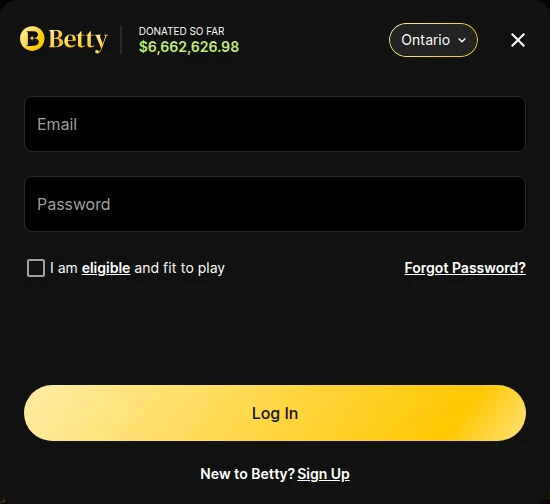
Ontario or Alberta: Check the Province
Betty now also runs a site for Alberta, and the same window lets you switch province. The two are regulated separately, by iGaming Ontario and the AGCO here and by Alberta’s regulators there, and Betty keeps your balance and game history separately for each province. An Ontario account belongs to the Ontario setting, so leave it on Ontario.
The Access Code on a New Device
Betty has a built-in security check: whenever you log in from a new device or a new location, it asks for a verification code sent to your registered email. Codes go to email only, never to a phone number. If the code does not arrive, look in your spam folder and add support@betty.ca to your contacts or safe senders list, so future codes and reset emails land in your inbox.
You can also switch on two-factor authentication for every log-in under Account > Two-Factor Authentication. Switching it off does not remove the new-device check, which always stays on.
Forgotten Password, Lockouts and Lost Email Access
Most log-in failures at Betty are a mistyped password or an expired reset link, and both are quick to fix.
Resetting Your Betty Password
Choose Forgot Password? in the log-in window, enter the email you used to sign up, and choose Send reset link. Use the link within 15 minutes and click it only once: an expired or double-clicked link ends in the message “Something went wrong and Betty couldn’t update your password”. The new password has to be between 8 and 20 characters long. Once you are in, you can change it at any time under Account > My Profile > Edit Password.
Locked Out After Wrong Attempts
Too many wrong passwords lock the account for 15 minutes. After that, it stays locked until you enter the right password or reset it. The live chat team can lift a lockout before the 15 minutes are up, but you still need the correct password or a reset, followed by the email code. Watch the capitals, spelling and special characters before you try again.
No Longer Have Your Email?
Because codes and reset links only go to your registered email, losing that inbox means asking Betty to change the address. Email support@betty.ca with your first and last name, the old email address if you know it, the new one you want to use, a short explanation, both sides of a valid government-issued ID, and a selfie of you holding that ID. Once Betty updates the address, you can reset the password.
Location Checks: When Betty Says You Are Not in Ontario
Betty needs no separate geolocation app: you need to be physically in Ontario, with location permission on for the browser or the Betty app, because an IP address alone can place you in the wrong province.
Wi-Fi, Signal and New Routers
Wi-Fi must be switched on, on a computer as well as a phone, even if you use a cable or mobile data; it does not have to be connected to a network. Near the border or in rural areas, try switching between mobile data and Wi-Fi, and prefer Wi-Fi, since mobile IP addresses change often. On iPhone, turn on Precise Location; on Android, High Accuracy. A new router or device can take a few days to be recognised.
VPNs, Remote Desktops and Extensions
Close any VPN, proxy or privacy app completely, because pausing it may not be enough. Remote-access software such as TeamViewer, LogMeIn, TigerVNC, Splashtop, GoToMeeting and Apple’s VNC and Remote Management also blocks the check. In a browser, turn off extensions that change your location, reset any location override made in developer tools, and on Android switch off Developer Options.
One Browser at a Time
Betty works in the app or a mobile browser on a phone, and in Chrome, Firefox, Safari or Edge on a computer. Use one browser at a time: two sessions with different location settings can fail the check, and an account open in several places can trigger a temporary lockout. If you see “exceeded the allowed number of verification attempts”, wait five minutes, then close the tab or force-close the app.
Outside Ontario
From elsewhere in Canada you can still open the site, log in, deposit and withdraw, but real-money games stay blocked until you are back in Ontario. Cashing out is covered in our Betty withdrawal guide.
The Betty App and the Sites to Avoid
The app is Betty Casino: Real Money Slots, published in the Canadian App Store by Betty Gaming, Inc and on Google Play by Betty Canada. On iPhone it needs iOS 16.4 or later. It serves both Ontario and Alberta, so check the province when you sign in. Step-by-step installation, and the copycat listings to skip on Google Play, are in our Betty app guide. Our Ontario casino apps compared guide weighs it against rival apps.
The Canadian App Store also lists Betty.com: Rest of Canada, published by Empire Games LTD. Its listing describes Betty.com as a casino for eight other provinces, excluding Ontario and Alberta, under a Kahnawake Gaming Commission licence. It is not the Ontario site, and neither are the lookalike domains that use the Betty name. In Ontario, the address is betty.ca.
Keeping Your Betty Account Secure
Your email inbox is the key to a Betty account, since every code and reset link goes there.
- Protect the email account itself with a strong password and its own two-step verification.
- Switch on Betty’s two-factor authentication for every log-in, not just new devices.
- Use a password of 8 to 20 characters that mixes letters, numbers and symbols, and that you use nowhere else.
- Never share your password, and log out of one browser before you sign in on another.
- Keep to one account: Betty restricts accounts it detects as duplicates.
Help is available around the clock by live chat, with Ontario-based agents, and by email at support@betty.ca; the help centre is at help.betty.ca. Betty does not publish a phone number; our Betty customer service guide covers the chat form and the complaint route.
New to Betty? Creating an Account
Choose Sign Up in the log-in window, or Join Betty on the home page.
- Enter the email and password you will use to log in.
- Add your full legal name exactly as it appears on your photo ID, your date of birth and your other details.
- Let the automatic check verify you. If it cannot, choose Verify Identity and upload a photo ID and a selfie; health cards are not accepted.
- Set your deposit, loss and playtime limits under Account > Responsible Gaming.
You cannot deposit or play until the account is verified; manual checks aim to be done within 24 hours. You must be 19 or older and in Ontario, and the minimum deposit is $1. The Betty Ontario review covers the games, payments and support in full.
FAQ’s – Frequently Asked Questions
- How do I log in to Betty in Ontario?
Go to betty.ca or the Betty app, choose Log In, check the province says Ontario, and enter your email and password. Tick the eligible and fit to play box, and allow location access when asked.
- Why is Betty asking me for an access code?
Betty sends a verification code to your registered email whenever you log in from a new device or a new location. This check cannot be switched off. If the code is missing, look in spam and add support@betty.ca to your contacts.
- My Betty password reset link does not work. Why?
Reset links expire after 15 minutes and work only once, so an old or double-clicked link fails. Request a new one with Forgot Password? in the log-in window, and choose a password of 8 to 20 characters.
- How long is a Betty account locked after wrong passwords?
Fifteen minutes, and then until you enter the right password or reset it. Live chat can lift the lockout sooner, but you still need the correct password and the emailed code.
- Is Betty.com the same as Betty.ca?
No. Betty.ca is the Ontario casino, on the iGaming Ontario register. Betty.com, with its own app from Empire Games LTD, serves other provinces under a Kahnawake licence and excludes Ontario.
Betty Ontario Login: Key Points
Log in at betty.ca or in the Betty app with your email and password, with the province set to Ontario. Expect an emailed access code on any new device or location, and keep location services and Wi-Fi switched on.
For a forgotten password, the reset link is valid for 15 minutes and works once. Because every code and link goes to your inbox, securing that email account is the best protection a Betty account has.





